
TekMatix Blog & Help Articles
Use the search bar below to look for help articles you need.
How to Retry Failed Social Media Posts in Tekmatix Social Planner
Managing your social media content just got even easier.
With the new Retry Failed Posts feature in Tekmatix Social Planner, you can now quickly recover failed publishing attempts without having to recreate content, duplicate posts, or start from scratch.
Whether you're managing your own social media or handling multiple client accounts, this update helps keep your content schedule running smoothly with less manual work.
What's New?
Retry Failed Posts Instantly
If a post fails to publish, you can now simply select Retry Post Now to attempt publishing again using the original content, publishing settings, and connected social media accounts.
If the retry is successful, the post will automatically move into the Published status.
No editing. No cloning. No rebuilding.
Just one click and you're back on track.
Reschedule Failed Posts
Need to publish the post later instead?
Simply select Reschedule Post, choose a new date and time, and Tekmatix will move the post back into the Scheduled status ready for future publishing.
This gives you complete flexibility when dealing with temporary connection issues or platform-related publishing delays.
Quick Recovery Actions
Recovery options are now built directly into the Social Planner experience.
You can access Retry and Reschedule actions from:
List View
Grid View
Post Preview
This means faster recovery and fewer interruptions to your content marketing workflow.
How to Use Retry Failed Posts
Navigate to Marketing → Social Planner
Open the Failed Posts section
Click the three-dot menu on the failed post
Select one of the following options:
Retry Post Now
Reschedule Post
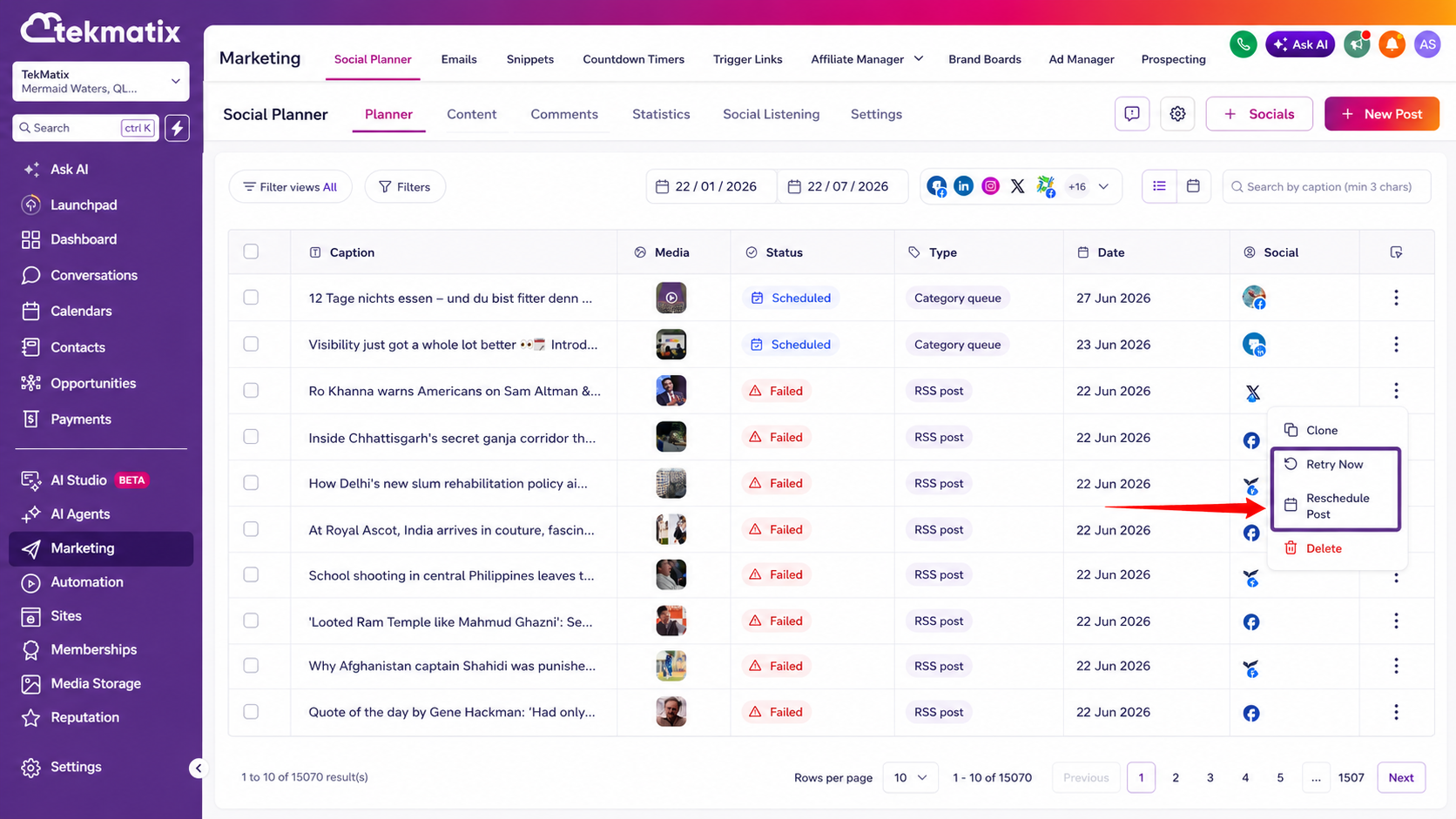
Confirm your action
That's it.
Your content can be republished or rescheduled in just a few clicks.
Why This Matters
Publishing failures happen from time to time due to connection interruptions, social platform restrictions, temporary outages, or account authentication issues.
Previously, recovering from these situations often meant recreating content or duplicating posts manually.
Now you can:
Recover from publishing failures faster
Eliminate the need to recreate or clone content
Keep campaigns running with minimal disruption
Improve efficiency across multiple social accounts
Reduce unnecessary troubleshooting and support requests
Maintain momentum in your content marketing strategy
For agencies and businesses managing high volumes of social content, these small time savings can quickly add up.
Important Notes
Available only for posts currently in the Failed status
Bulk retry actions are not included in this release
Automatic retry functionality is not currently supported
Keep Your Content Moving
The goal of Tekmatix is simple: remove unnecessary admin work and make it easier to manage your marketing from one platform.
With Retry Failed Posts, recovering from publishing issues is now faster, easier, and more efficient than ever.
Spend less time fixing failed posts and more time creating content that grows your business.

Copyright © 2026 TekMatix. All rights reserved | [email protected]