
TekMatix Blog & Help Articles
Use the search bar below to look for help articles you need.
How to Manage Threads Comments from Social Planner in Tekmatix
Managing conversations across multiple social media platforms is much easier when everything is in one place.
Tekmatix has expanded its Social Planner Comment Management feature to support Threads, allowing you to view, manage, and reply to Threads comments directly from your unified inbox.
Instead of jumping between different social media apps, you can now keep up with your Threads engagement alongside comments from your other connected social channels, helping your team respond faster and stay organized.
What's New?
Social Planner now includes full Threads Comment Management, making it simple to monitor and respond to your audience without leaving Tekmatix.
With this update, you can:
View Threads comments from a centralized inbox
Reply directly to comments without opening Threads
Keep conversations synchronized in near real time
Manage Threads alongside your other social media accounts
Whether you're managing one brand or multiple clients, this feature helps streamline your social media workflow.
Reply to Threads Comments Without Leaving Tekmatix
You can now respond to Threads comments directly inside Social Planner using supported reply types, including:
Text responses
Images
Emojis
Location attachments
This allows you to continue engaging with your audience while keeping your entire social media workflow inside a single platform.
Near Real-Time Comment Synchronization
Threads comments are automatically synchronized using webhook-based updates, ensuring your inbox stays up to date as new conversations happen.
This means you can:
See new comments shortly after they're posted
Respond more quickly to your audience
Reduce the risk of missing important conversations
Manage Multiple Social Channels from One Inbox
Threads joins the growing list of platforms supported by Tekmatix Social Planner Comment Management, including:
Facebook
Instagram
LinkedIn
TikTok
Communities
Bluesky
With all supported channels available from one unified inbox, your team can spend less time switching between platforms and more time engaging with customers.
How to Manage Threads Comments in Tekmatix
Getting started is simple.
Open Marketing from the left navigation.
Select Social Planner.
Click Comment Management.
Choose your connected Threads account.
Open the Comments tab.
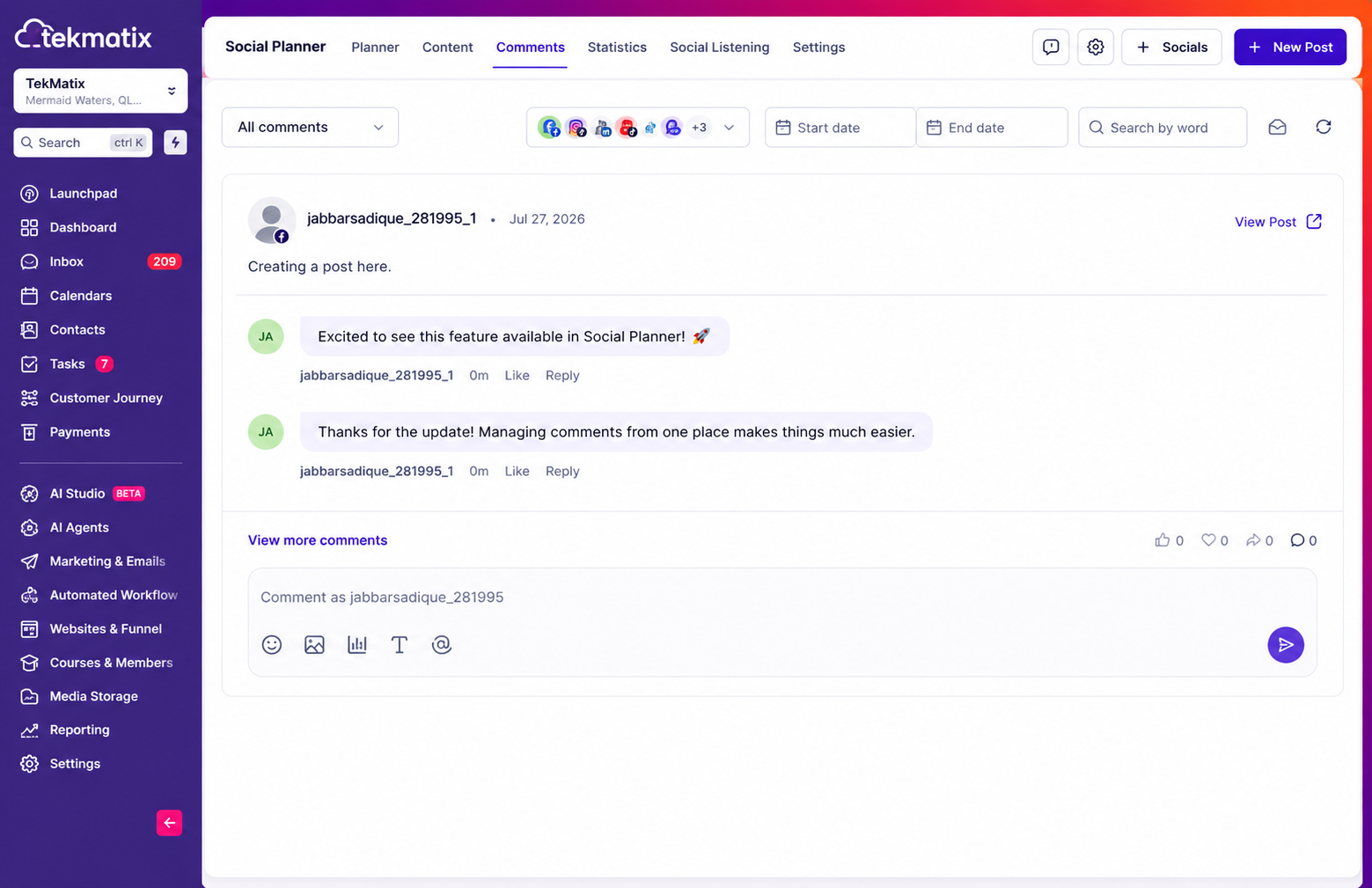
View and reply to Threads comments directly from the unified inbox.
Once connected, all supported conversations can be managed from the same workspace.
Why This Feature Matters
Keeping up with customer engagement across multiple platforms can quickly become time-consuming.
By bringing Threads Comment Management into Social Planner, Tekmatix helps you:
Manage Threads conversations without switching platforms
Respond faster to customer comments
Maintain consistent engagement across every social channel
Improve team efficiency with a centralized comment management system
Keep all social conversations organized in one place
Important Notes
Before using Threads Comment Management, existing Threads connections must be reconnected once to grant the additional permissions required for comment management.
Also note:
Comments are synchronized in near real time.
Rich replies support text, images, emojis, and location attachments where supported by Threads.
Start Managing Threads Conversations More Efficiently
With Threads now integrated into Social Planner Comment Management, Tekmatix makes it easier than ever to stay connected with your audience from one centralized inbox.
Whether you're responding to customer questions, engaging with followers, or managing multiple brands, you can now handle Threads conversations alongside your other social channels—saving time while delivering a faster, more consistent customer experience.

Copyright © 2026 TekMatix. All rights reserved | [email protected]