
TekMatix Blog & Help Articles
Use the search bar below to look for help articles you need.

How do I add an Instagram feed to my website or funnel on Tekmatix?
Websites, funnels and social
You post on Instagram for a reason. It shows people who you are, what you do and that your business is active.
So why should it only live on Instagram? With the Instagram Feed widget, your latest posts can show up right on your Tekmatix website, funnel or online store. It updates itself, it matches your brand, and you don't need any outside embed tool or custom code to do it.
The short answer
Open any website, funnel or store page in the Tekmatix page builder, go to the elements panel, choose Social Widgets, then drag Instagram Feed onto your page. Pick a starting template, select the Instagram Business or Creator account you have already connected in Social Planner, then save, preview and publish.
What is the Instagram Feed widget?
It is a built-in element in the Tekmatix page builder that pulls posts from a connected Instagram account and displays them on your page.
It works on funnels, websites and store pages. You choose a template, choose the account, then customise the layout, colours and post details so it fits the rest of your page.
Why it matters for your business
Your site always looks current. New posts flow onto your page automatically, so visitors can see you are active without you updating anything.
Social proof where it counts. Real photos, results and behind-the-scenes content sitting next to your offer builds trust before someone books or buys.
One less subscription. No separate Instagram embed app to pay for, connect and keep working.
Grow your following from your website. Show a follow button and your follower count so website visitors become Instagram followers too.
It looks good on every device. You can set columns, rows and spacing separately for desktop, tablet and mobile.
Before you start
Get these sorted first and the set-up takes minutes.
An Instagram Business or Creator account. Personal Instagram accounts are not supported.
That account connected in Social Planner. The widget pulls your posts through your Social Planner connection, so connect it there first.
A page to put it on. Any funnel step, website page or store page in your account.
A couple of limits worth knowing. How far back your feed goes depends on what Instagram makes available through its connection. Posts load progressively, up to 50 at a time, and visitors can load more using the Load More option or the slider arrows.
Which Tekmatix plan do you need?
The Starter, Pro and Max plans all include websites and funnels, so you can add the Instagram Feed to any of them. If you are on the Launch Plan, you have websites but not funnels, so you can add the feed to your website pages.
Want funnels too? You can change your plan here in a couple of clicks, or compare every plan first.
How to add the Instagram Feed, step by step
1. Open the page builder
From your Tekmatix account, open the page you want to add the feed to:
Funnel: go to Sites, then Funnels. Open the funnel, then open the step.
Website: go to Sites, then Websites. Open the website, then open the page.
Store: go to Sites, then Stores. Open the store, then open the page.
2. Add the Instagram Feed
Open the elements panel.
Select Social Widgets.
Select Instagram Feed and drag it onto your page.
Choose a starting template.
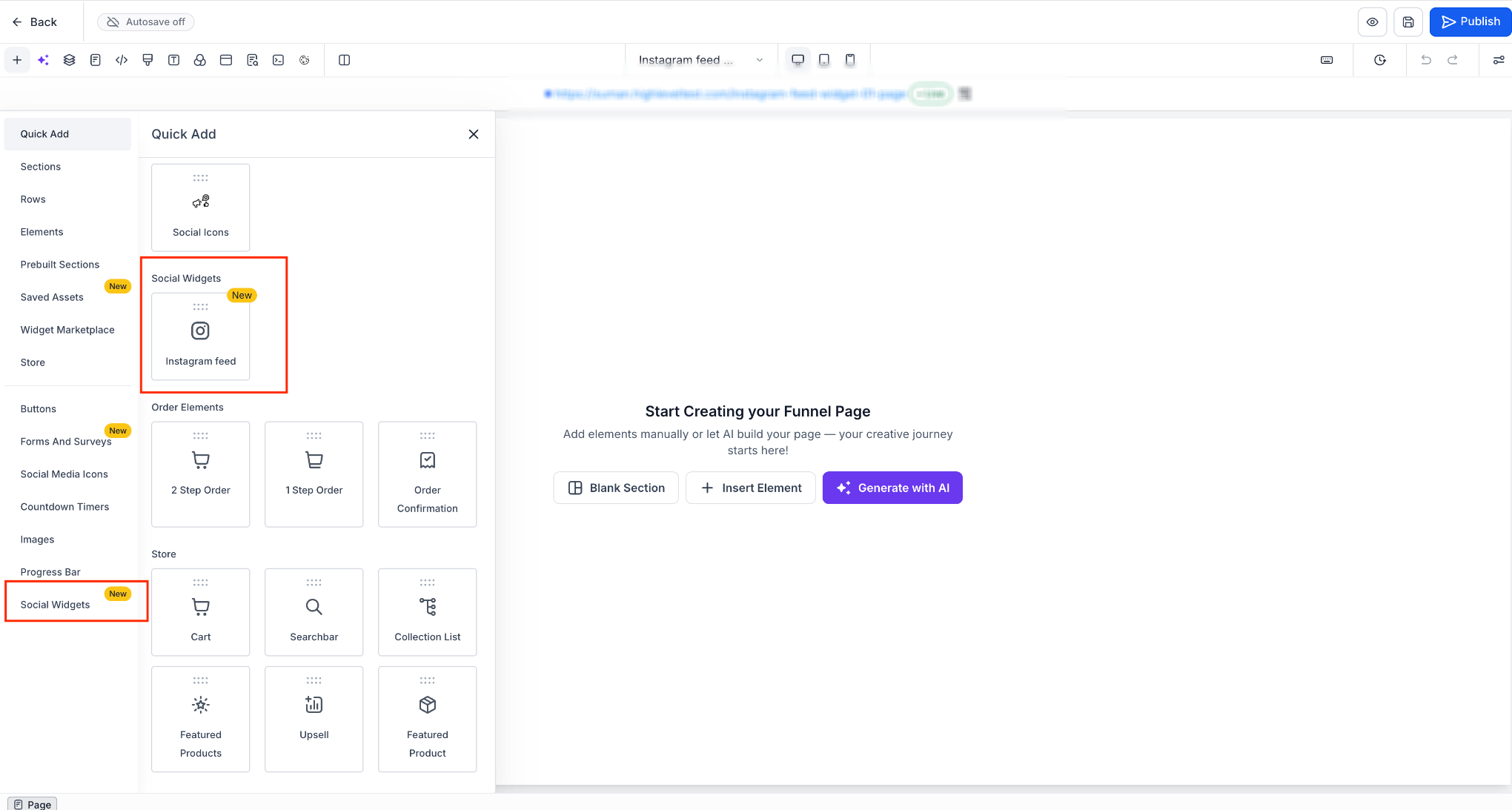
Social Widgets, then Instagram Feed, in the page builder elements panel.
There are five templates to start from:
Profile widget: your profile header with a grid of posts.
Grid: just the posts, in a grid.
Small widget: a compact two by two layout.
Post slider: a horizontal carousel.
Dark profile widget: the profile layout in a dark colour scheme.
Don't overthink the choice. You can change everything afterwards.
3. Select your Instagram account
Click the Instagram Feed widget on your page.
Choose the Instagram account you connected in Social Planner.
Check that your posts appear.
Use the General, Styles and Post tabs to customise it.
Save and preview the page, then publish when you are happy.
Editing and managing your feed
Layout
Choose between a Grid or a Slider and switch any time. You can use automatic columns or set anywhere from 1 to 10, set 1 to 5 rows, and set the gap between posts from 0 to 50 px. You can also add a feed title of up to 200 characters.
Columns, rows and spacing can be set separately per device, with up to 3 columns on mobile. Tablet follows your mobile settings until you change a tablet setting, then the two can be set independently.
Profile header
Show or hide the whole header, or just the parts you want: profile picture, display name, @handle, post count, follower count, following count and the follow button.
Posts
Show all posts, photos only or videos only. Pick a tile style: Classic (the image with a hover overlay) or Card (the image with a caption block underneath). Crop to Square (1:1) or Portrait (4:5).
Depending on the tile style, you can also show the author, date, Instagram link, likes, comments and caption.
Slider controls
If you chose the slider, you can turn navigation arrows and drag or swipe on or off, set the animation speed from 0.1 to 2 seconds, and set autoplay to off or every 3 to 30 seconds.
What happens when someone clicks a post
You decide. Clicking a post can open it in a built-in lightbox on your page, open it on Instagram, or do nothing at all.
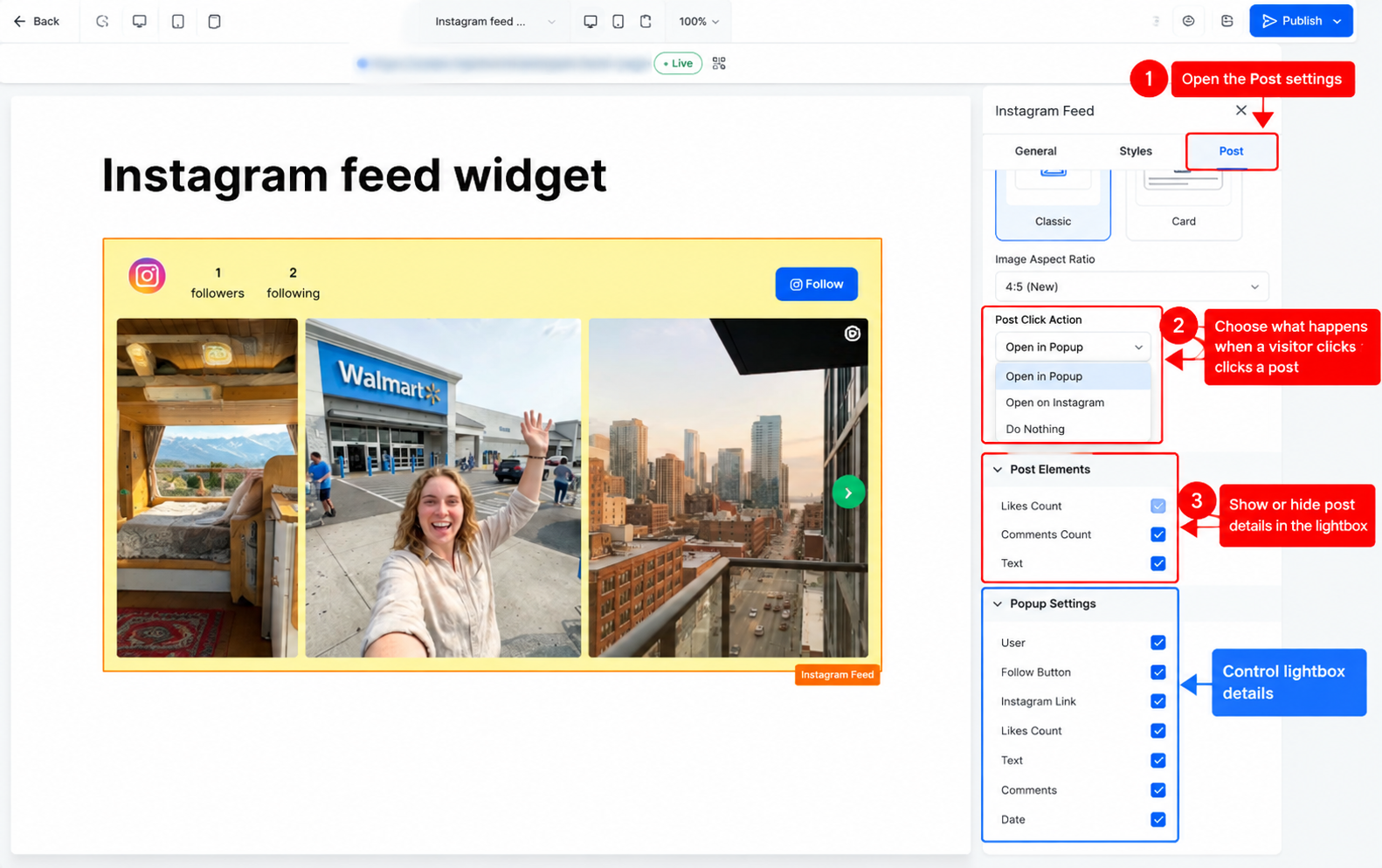
The Post tab, where you set the click action and choose what shows in the lightbox.
The lightbox handles carousel posts and videos, and you can choose which details it shows: author, follow button, Instagram link, likes, caption, comments and date.
Colours and visibility
Start with a Light or Dark colour scheme, then adjust the colours for the header, posts, slider arrows, popup and Load More button so it matches your brand.
You can also add a custom CSS class, and choose which devices the widget shows on.
What your visitors see
Your visitors see a live, on-brand gallery of your latest Instagram content, sitting right inside your page. Depending on your settings, they can scroll through posts, open them in a lightbox without leaving your site, watch videos, swipe through carousel posts and follow you in one click.
In the lightbox, they can use the arrow keys to move between posts and press Escape to close it.
If your Instagram connection drops
If your Instagram connection expires, the widget shows a Disconnected badge and a Reconnect account button in the builder so you can sort it out quickly.
If Instagram or Social Planner is briefly unavailable, your published page can keep showing cached posts. If there is nothing cached, the widget simply hides itself rather than showing an error to your visitors.
Test it before you launch
Preview the page on desktop, tablet and mobile and check the columns look right on each.
Click a post and check it does what you expect: lightbox, Instagram or nothing.
If you are using the slider, check the arrows, swipe and autoplay speed feel right.
Check your colours against the rest of the page, especially if you used the dark scheme.
Open the published page in a private browser window to see exactly what a new visitor sees.
Five ways to actually use this
Your home page. Add a slim post slider below your hero section so first-time visitors see a real, active business straight away.
Your sales page or funnel. If your Instagram is full of client wins, results and testimonials, place the feed just above your checkout button as social proof.
Your store. Show product photos and customers using your products on your store pages to help people picture owning them.
Your thank-you page. Someone just opted in or bought. Use the profile widget with the follow button so they keep hearing from you on Instagram too.
Your about or events page. Behind-the-scenes posts, workshops and event photos show the person behind the business and help people feel they know you before they book.
Rather we built it for you?
An Instagram feed is the finishing touch. It works best on a website or funnel that is already doing its job. If you'd rather skip the learning curve, our Teksperts can build the whole thing for you, inside your own Tekmatix account, so you can edit it yourself forever.
5 Page Website
We build you a professional, SEO discoverable 5-page website on your own domain, from a template you choose. It means you stop losing people who go looking for you and can't find a proper site, and you get a home for your Instagram feed, your offers and your bookings, without spending weeks building it yourself.
Sales Funnel System
We set up a 3-step funnel (sales page, checkout and thank-you page) plus an order confirmation workflow and an abandoned cart automation. That means visitors turn into buyers automatically, and the people who nearly bought get followed up so the sale isn't lost. Add your Instagram feed to the sales page for instant social proof.
Frequently asked questions
Which Instagram accounts can I use?
An Instagram Business or Creator account that is connected in Social Planner. Personal Instagram accounts are not supported.
Do I need a separate Instagram feed app or embed code?
No. The Instagram Feed widget is built into the Tekmatix page builder, so there is no outside service to pay for and no code to paste in.
Can I use it on my online store?
Yes. It works on funnel, website and store pages.
Can my feed look different on mobile?
Yes. Columns, rows and spacing can be set separately for each device. Mobile allows up to three columns.
What happens if my Instagram connection expires?
The widget shows a Disconnected badge and a Reconnect account button so you can reconnect it.
What happens if Instagram is down?
Any cached posts stay visible. If there is nothing cached, the widget hides itself instead of showing an error on your page.
How many posts can the widget show?
Posts load progressively, up to 50 at a time, and visitors can load more. How far back your feed goes depends on what Instagram makes available for your account.
Which Tekmatix plan do I need for the Instagram Feed?
The Starter, Pro and Max plans include websites and funnels, so you can use the feed on both. The Launch Plan includes websites but not funnels. You can compare plans here.
Does the Instagram Feed widget cost extra?
No separate subscription is needed. It is part of the Tekmatix page builder, so you don't need to pay for a third-party Instagram embed service.
Need a hand?
You've got this, and we've got your back.
Free daily group trainingBring your questions to a live session with a Tekspert, every day, at no cost.
Book free training
Hire a Tekspert for 60 minutesShare your screen and we'll build it with you, live, explaining every step as we go.
Book a Tekspert
15 minute advanced tech supportStuck on one thing? A quick, focused session to get it working.
Book 15 minutes
24/7 live chatOur team is on live chat around the clock for questions, how-tos and troubleshooting.
Chat with us
Your Instagram is already working hard for you. Now your website can show it off. Add the feed, test it on mobile, and let your best content do some selling for you.
Happy Tekkin'!

Copyright © 2026 TekMatix. All rights reserved | [email protected]