
TekMatix Blog & Help Articles
Use the search bar below to look for help articles you need.
How to Get Your AI to Build, Publish and Manage Tekmatix AI Agents for You
Building one AI agent by hand is fine. Building the same agent for 15 client accounts, then updating all of them when your offer changes? That's a week of clicking you'll never get back.
Tekmatix Managed Agents can now be created, updated, published and paused through the API. That means your own AI, your app or your automations can build agents for you from plain-language instructions, without anyone opening Agent Studio. Describe the agent you need. Make a cuppa. Done.
This one is most useful for agencies, SaaSpreneurs and tech-savvy owners running several sub-accounts.
What is new
- Create agents from a description: describe what you need and AI builds the agent, including subagents when the job needs them.
- Update with plain language: refine an existing agent by telling it what to change.
- Guided setup: if details are missing, the builder asks for them, and your AI or app can answer.
- Publish and unpublish: take an agent live or pause it with a single request.
- Built-in validation: check whether an agent is ready before you publish it.
- Secure access: dedicated permissions for building and publishing agents, through Private Integrations in your sub-account.
- No build fee: creating, publishing and unpublishing agents is free. When the agents run, normal AI usage applies.
What AI should I use?
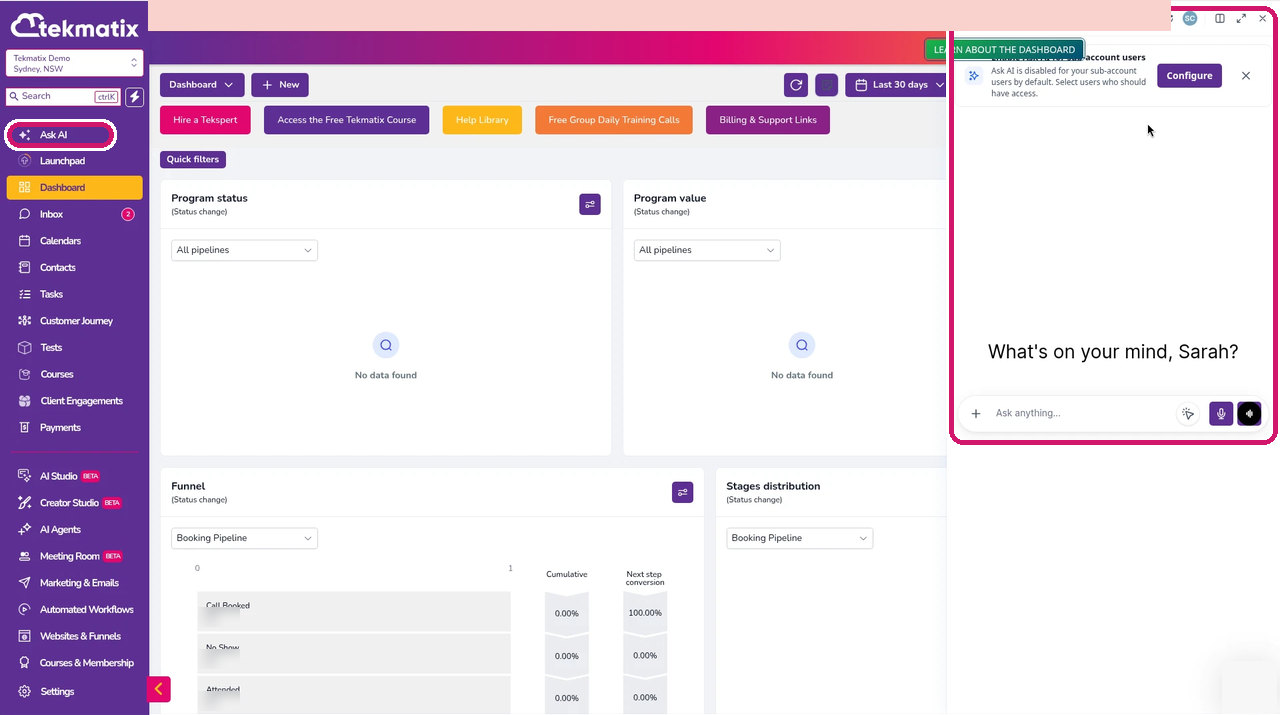
The prompts below should work in Ask AI, Claude, ChatGPT, GrokBot or any other AI you use. Ask AI, built into your Tekmatix dashboard, is the easiest place to start if you don't already pay for an external AI. Click the sparkle icon at the top right of your dashboard (or Ask AI in the sidebar) to open it. Ask AI is great for planning which agents you need, but it can't build them for you. For the API steps, an AI that can run code or use your connected tools (such as Claude, ChatGPT or GrokBot) will do the heavy lifting.
*Tekmatix AI usage applies as a billable consumable. You can find out more about pricing on our public page: tekmatix.com/pricing.
How to get started
-
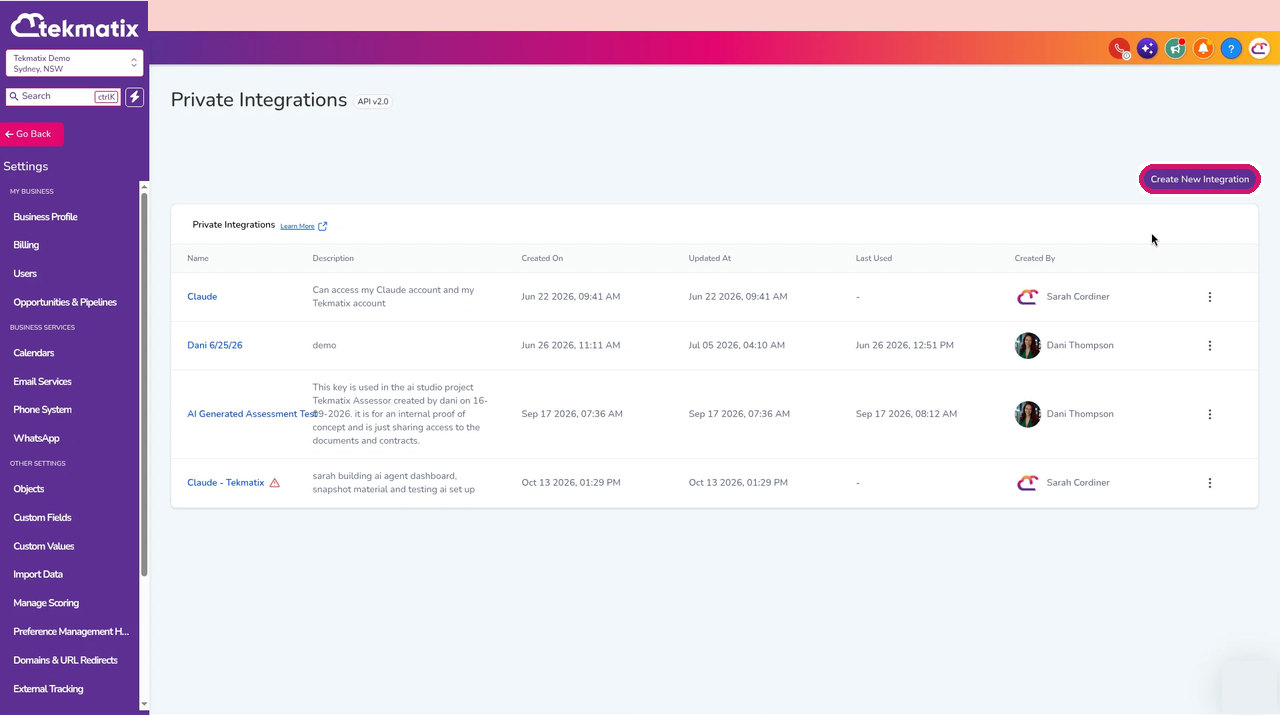
In your sub-account, go to Settings > Private Integrations and click Create New Integration.
How to Create a Private Integration in Tekmatix -
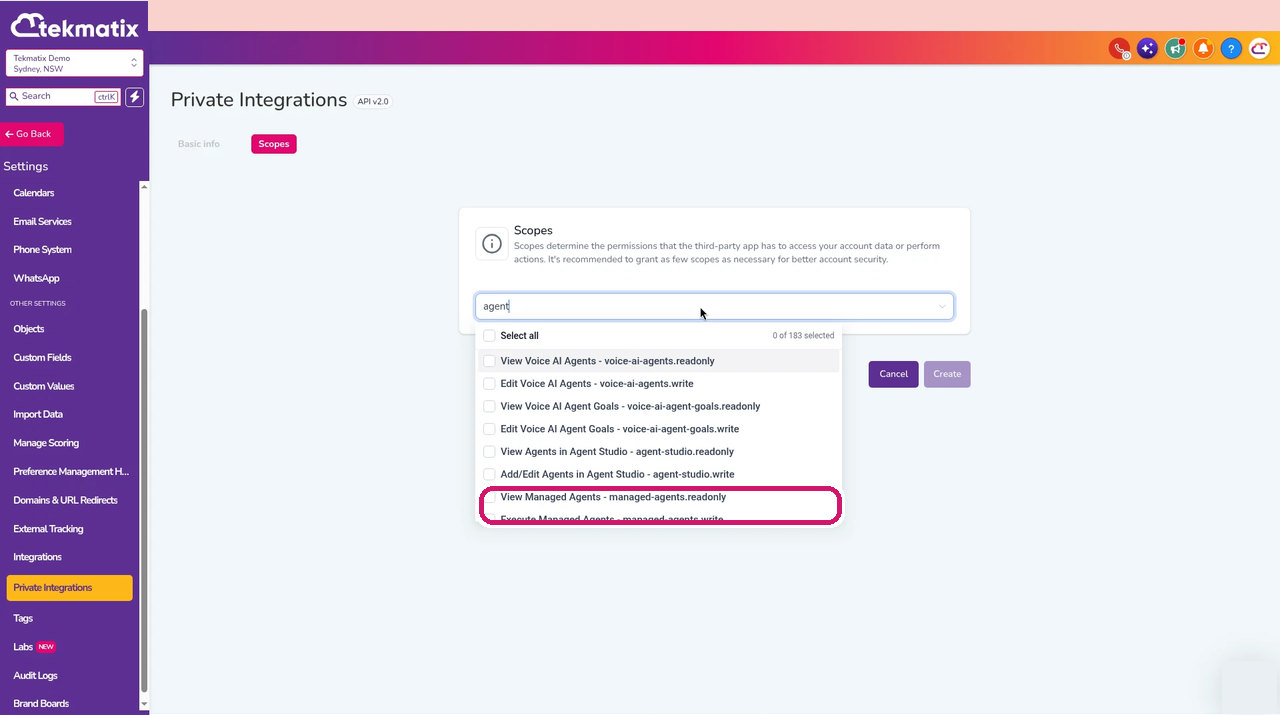
Give it a name, then on the Scopes tab search for agent and tick the Managed Agents permissions your AI needs, including the permission to build and publish agents. Only tick what it needs.
How to Give Your AI Permission to Build Agents in Tekmatix -
Store the integration key somewhere safe, such as your AI's secure vault. Never paste it into a public chat or document.
-
Ask your AI to create, update and publish agents using the prompts below. Every agent it builds shows up under AI Agents > Agent Studio > Managed Agents, where you can open, test and check it.
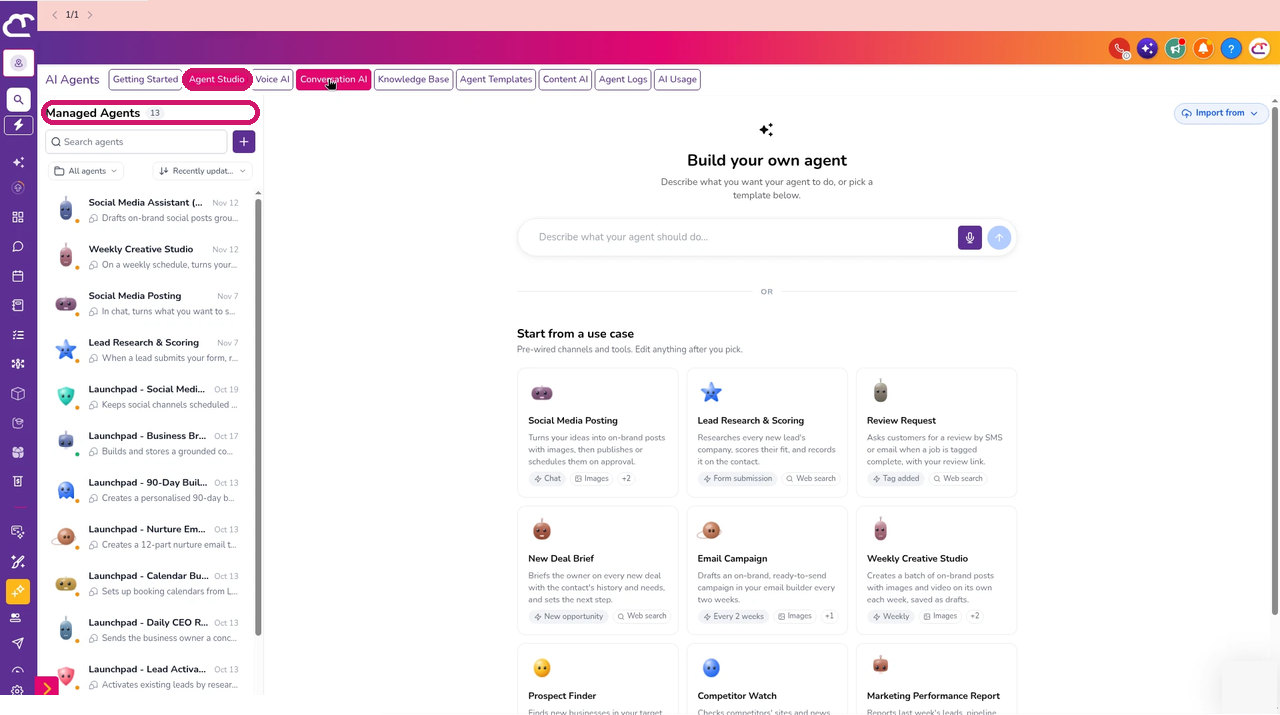
How to See Your Managed Agents in Tekmatix
Prompts you can copy
Which agents should I have?
Prompt to copy into Ask AI, GrokBot, Claude or ChatGPT
Taking everything you know about me and access to all of the data and systems you already have, log into my Tekmatix account and review my enquiries, social comments and DMs, support conversations and call transcripts from the last 90 days. Tell me the 3 AI agents that would save my team the most time, what each one should do and what it should never do.
Build it for me
Prompt to copy into GrokBot, Claude or ChatGPT
Taking everything you know about me and access to all of the data and systems you already have, use my Tekmatix Private Integration to create a Managed Agent called "[agent name]" that [what the agent should do]. Answer any setup questions from what you know about my business, and ask me anything you can't work out. Run the validation check, show me the result and the agent's instructions, and wait for my yes before you publish it.
For agencies: roll it out to clients
Prompt to copy into GrokBot, Claude or ChatGPT
Taking everything you know about me and access to all of the data and systems you already have, use the Tekmatix Private Integration for each of these client sub-accounts: [list]. Create my "[agent name]" Managed Agent in each one, personalised with that client's business name, services and brand voice from their account. Validate each agent and give me a table of which ones are ready. Don't publish any until I approve the list.
Switch a seasonal agent on and off
Prompt to copy into GrokBot, Claude or ChatGPT
Taking everything you know about me and access to all of the data and systems you already have, use my Tekmatix Private Integration to publish my "[campaign agent name]" Managed Agent on [start date] and unpublish it on [end date]. Remind me the day before each change and confirm when it's done.
Good to know
- You stay in control: ask your AI to validate and show you every agent before it publishes.
- Keep your integration key private and give it only the permissions it needs.
- Building and publishing agents is free. Running them is billed on AI usage, like the rest of your Tekmatix AI.
- Results depend on your instructions and your Business Brain and Brand Voice setup, so test each agent before it talks to customers.
Ideas for using it
- Roll out the same lead follow-up agent across every client sub-account in one go.
- Update every agent's instructions when your offer or pricing changes.
- Switch seasonal or campaign agents on and off on a schedule.
- Let your own app create a starter agent for every new customer.
Frequently asked questions
Can my AI build Tekmatix agents for me?
Yes. With a Private Integration that has the Managed Agents permissions, your AI, app or automation can create, update, validate, publish and unpublish Managed Agents from plain-language instructions.
Where do I set up access?
Go to Settings > Private Integrations in your sub-account, click Create New Integration and tick the Managed Agents permissions on the Scopes tab.
Does it cost anything to build agents this way?
No. Creating, publishing and unpublishing agents is free. When the agents run, normal AI usage applies. See our pricing page.
Can Ask AI build the agents?
Ask AI can help you plan which agents to build, but it can't create them. Use an AI that can run code or use your connected tools, such as Claude, ChatGPT or GrokBot.
Will my AI publish agents without asking?
Only if you tell it to. Ask it to run the validation check and wait for your yes before it publishes anything.
Love Your Tech.

Copyright © 2026 TekMatix. All rights reserved | [email protected]