
TekMatix Blog & Help Articles
Use the search bar below to look for help articles you need.

How To Configure Affiliate Payout Methods in Tekmatix
How To Configure Affiliate Payout Methods in Tekmatix
Managing how your affiliates receive payments is essential for a smooth referral program. Tekmatix allows you to control which payout methods PayPal or Bank Transfer are available to your affiliates. Proper setup ensures timely, accurate payments and a seamless experience for both admins and affiliates.
Why Configuring Payout Methods Matters
Streamlined Process: Affiliates see only the payout options you’ve enabled.
Flexibility: Offer multiple payout methods and choose a primary one.
Accuracy: Prevent errors in payments by ensuring correct details are provided.
For Admins: Setting Up Payout Methods for Affiliates
Follow these steps to configure payout methods for each affiliate:
Step 1: Access the Affiliate Profile
Go to Affiliate Manager → Affiliates, then select the affiliate whose payout methods you want to configure.
Step 2: Navigate to the Payout Method Tab
Scroll down and click on the Payout Methods tab.

Step 3: Add a Payout Method
Click Add Payout Method.
Step 4: Choose Method and Enter Details
PayPal: Enter the affiliate’s valid PayPal email ID.
Bank Transfer: Select the country and fill in the required bank details.

Step 5: Save the Payout Method
Click Done to save the entry. You can add multiple methods and select one as the primary payout method.


Important Note: PayPal APIs do not validate account information automatically. Ensure email IDs are accurate to avoid failed payments.
For Affiliates: Adding Their Own Payout Methods
Affiliates can also manage their payout methods directly from their portal:
Step 1: Access Affiliate Portal
Log in to the affiliate portal using the magic link provided.
Step 2: Navigate to Payout Methods
Click on the Commissions Tab → Payout Methods.
Step 3: Add a Payout Method
Click Add Payout Method.
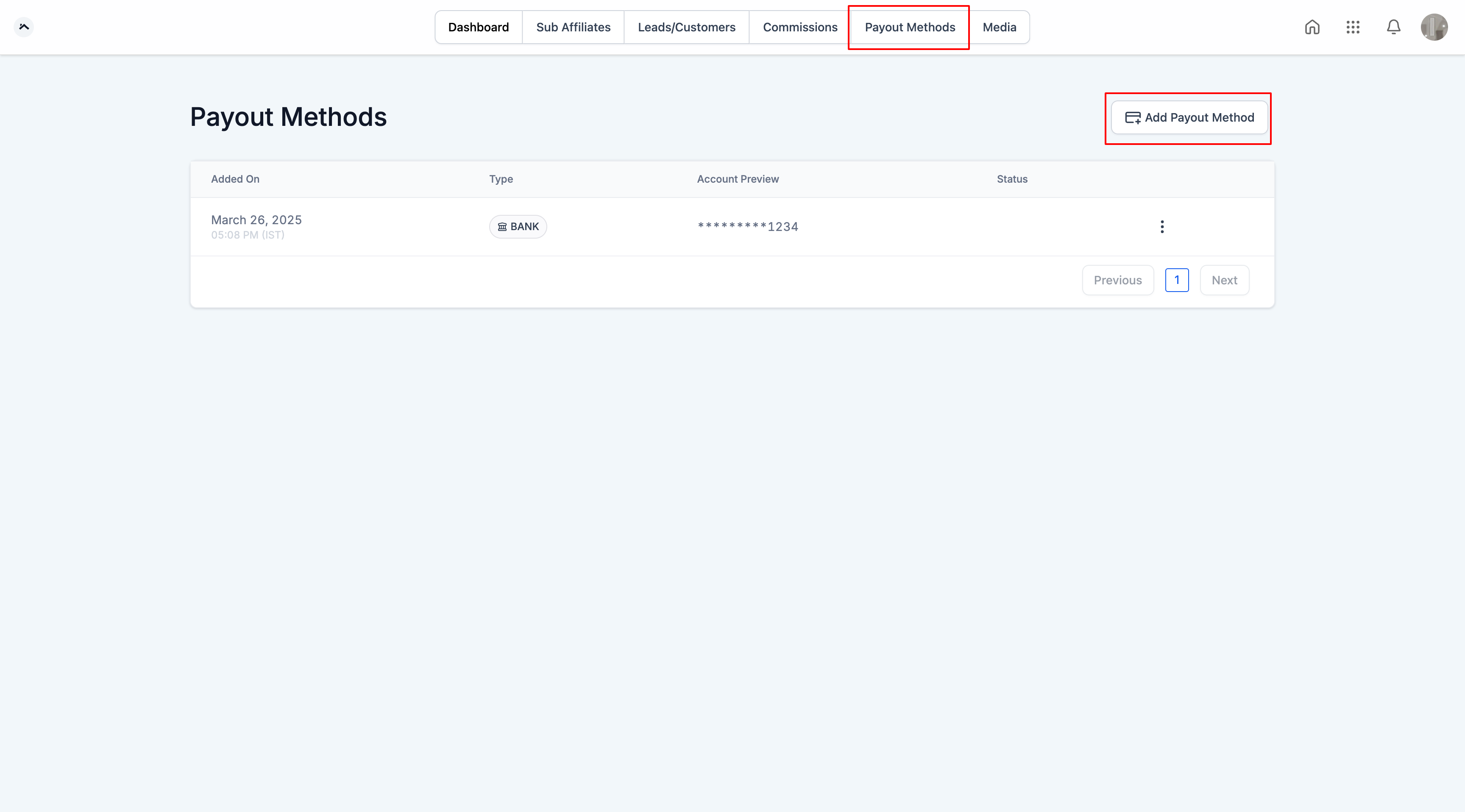
Step 4: Enter Required Details
PayPal: Add a valid PayPal email ID.
Bank Transfer: Select country and enter banking details.
Step 5: Save Method
Click Done. Multiple methods can be added, and one can be set as the primary payout option.

Sample Scenario
David runs a referral program with 20 affiliates. He wants to offer both PayPal and Bank Transfer options but ensures PayPal is the default.
Admin Steps:
David goes to Affiliate Manager → Select Affiliate → Payout Methods.
Adds PayPal and Bank Transfer for each affiliate.
Sets PayPal as the primary payout method.
Affiliate Steps:
Each affiliate logs in to the portal.
Confirms their PayPal email and bank details under Payout Methods.
Clicks Done to save.
Outcome:
David can now pay affiliates using the preferred method, ensuring accuracy and reducing manual errors.

Copyright © 2026 TekMatix. All rights reserved | [email protected]