
TekMatix Blog & Help Articles
Use the search bar below to look for help articles you need.
How To Send Gift Cards to Customers Using Tekmatix
How To Send Gift Cards to Customers Using Tekmatix
Why Sending Gift Cards Matters
Sending gift cards is more than a gesture — it’s a strategic way to:
Reward loyal customers or VIPs
Compensate for support issues professionally
Run promotions, giveaways, or event-based rewards
Test your gift card and redemption flows internally
Unlike selling gift cards, sending a gift card does not require the recipient to purchase it. Tekmatix handles delivery via email, SMS, PDF, or QR code, making it fast, flexible, and convenient.
Pro Tip: The Send flow works only in Live Mode, ensuring that all gift cards sent are fully redeemable and functional.
Key Benefits of Sending Gift Cards
One-to-one issuing: Send a gift card to a single recipient instantly or on a schedule.
No checkout required: Issue prepaid value without charging the recipient.
Flexible delivery: Choose email, SMS, PDF, or QR code depending on your contact data.
Operational visibility: Track each card’s status, code, and balance under Gift Card Orders.
Great for service recovery: Quickly compensate customers or resolve support issues.
Common Use Cases
Loyalty & Rewards: Reward milestones, referrals, or premium plan renewals.
Customer Support Compensation: Replace refunds or manual credits with a gift card.
Promotions & Giveaways: Run seasonal campaigns or influencer gifting.
Internal Testing: QA teams and admins can verify redemption flows.
VIP & Event Distribution: Send prepaid balances to high-value clients or attendees.
Prerequisites Before Sending a Gift Card
A Gift Card Product must exist.
The Gift Card Product must be Active (not Deactivated or Archived).
The recipient must have either:
A valid email address, or
A valid phone number (for SMS delivery).
Step-by-Step: How to Send a Gift Card
Step 1: Navigate to Gift Cards
Go to Payments → Gift Cards.

Create a new Gift Card or select an existing one.
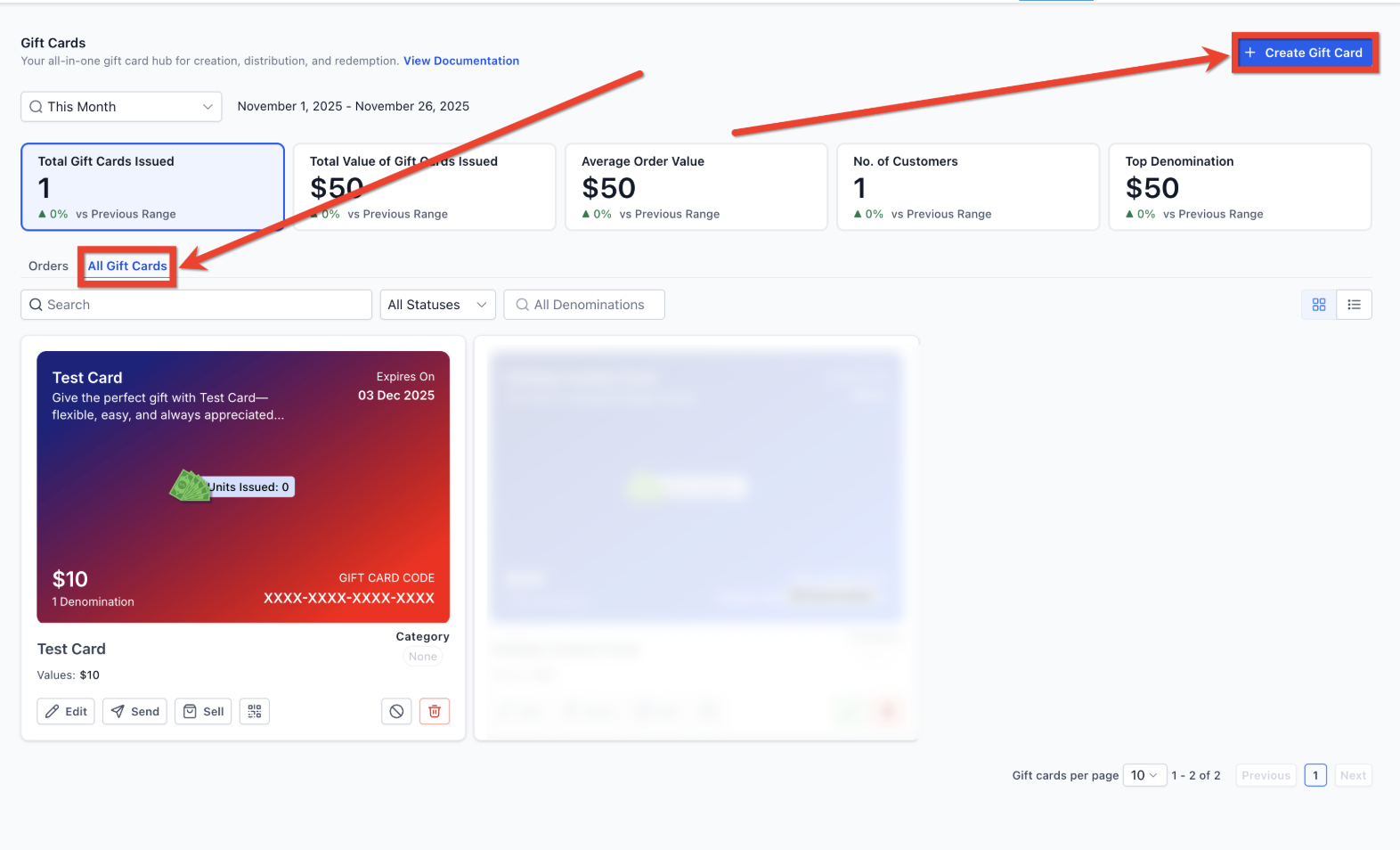
Click Send on the chosen Gift Card to start the Send flow.

Step 2: Choose a Customer/Contact
Select an existing customer/contact from your list.
Or add a new contact before sending.
Click Continue.

Step 3: Add a Personal Message
Type a custom greeting or note of appreciation.
Or choose from pre-populated messages.
Optionally, use Write with AI to generate a message.
Click Continue.

Step 4: Select a Denomination
Pick one of the preset denominations configured for the Gift Card Product.

Step 5: Choose a Delivery Method
Only methods compatible with the recipient’s data will be enabled:

Email: Full visual gift card with artwork. Recommended for most cases.

SMS: Clean message with the gift card link. Artwork not included.

PDF (via Email): Downloadable and printable for in-person gifting.

QR Code (via Email): Scannable code, great for events or offline distribution.

Step 6: Choose Delivery Date
Select Deliver Now or schedule for a future date.
Note: Delivery date must fall within the gift card’s expiry settings, if any.
Click Continue.

Step 7: Review & Send
Review the preview for:
Gift card amount
Custom message
Expiry date
Redemption instructions
Artwork
Click Send Gift Card.
The gift card will now appear in Payments → Gift Cards → Gift Card Orders, where you can track its status and balance.

What Happens After Sending
The gift card is fully redeemable on supported Tekmatix checkouts (Funnels, Forms, Invoices, Stores, Payment Links, and Calendars).
Orders are tracked under Gift Card Orders, not the general Payments → Orders page.

Each order record includes:
Recipient details
Delivery method & timestamp
Denomination
Expiry date
Remaining balance
Gift card status (Scheduled, Active, Inactive)

Sample Scenario: Rewarding VIP Customers
Scenario:
A spa wants to reward its top 10 VIP clients with a $100 gift card for their loyalty.
How They Use Tekmatix:
Navigate to Payments → Gift Cards.
Select the $100 VIP gift card and click Send.
Choose each VIP customer from their contact list.
Add a personalized message: “Thank you for your loyalty! Enjoy a $100 treat on us.”
Deliver via Email immediately.
Confirm the gift cards under Gift Card Orders to track successful delivery.
Outcome:
VIP customers receive a personalized gift instantly.
The spa strengthens loyalty and ensures redemption tracking.
Campaign performance can be reviewed in the Gift Card Dashboard.
Frequently Asked Questions
Q: Can I send gift cards in Test Mode?
A: Not yet. Send flow only works in Live Mode.
Q: Why can’t I send a gift card to some customers?
A: They must have a valid email or phone number.
Q: Can I send multiple gift cards at once?
A: Not currently. Only one gift card per customer per Send flow. Bulk sending is planned.
Q: Are sent gift cards redeemable everywhere?
A: Yes — all supported Tekmatix checkouts accept gift card redemption.
Q: Can scheduled gift cards be used before delivery?
A: Yes. If someone has the code, it can be redeemed immediately.

Copyright © 2026 TekMatix. All rights reserved | [email protected]