
TekMatix Blog & Help Articles
Use the search bar below to look for help articles you need.
How To Use Reviews AI Agents in Tekmatix for Automated, Personalized Review Responses
How To Use Reviews AI Agents in Tekmatix for Automated, Personalized Review Responses
Managing customer reviews effectively can be time-consuming but with Tekmatix Reviews AI Agents, you can automate responses while maintaining a consistent, personalized brand voice. These AI-powered agents can interpret review tone, sentiment, and style preferences, ensuring your business engages professionally and efficiently.
Why Reviews AI Agents Are Important
Responding promptly and appropriately to customer reviews is key to reputation management. Manual replies can be inconsistent, slow, or lack brand alignment. Using Reviews AI Agents allows you to:
Automate responses to save time.
Maintain brand voice across all customer interactions.
Tailor responses based on sentiment (positive, neutral, negative).
Handle multiple locations or brands seamlessly.
Sample Scenario
A multi-location fitness studio receives reviews across three Google Business Pages. Some reviews praise trainers, while others report scheduling issues.
How Reviews AI Agents Help:
Positive reviews automatically get friendly, personalized thank-you messages.
Neutral reviews are acknowledged with empathetic, informative replies.
Negative reviews are handled tactfully, providing solutions or requesting follow-up contact.
Each review is replied to promptly without the team manually crafting messages for each location.
Step-By-Step Guide: Setting Up Reviews AI Agents in Tekmatix
Step 1: Access Reviews AI Settings
Go to the Reviews Management module in your Tekmatix account.
Click Settings.
Navigate to the Reviews AI tab.

Here, you can create and manage AI Agents.
Step 2: Create or Select an AI Agent
Click Create Agent.
Choose between:
Manual setup: Customize tone, style, and traits.
Template: Use pre-built AI Agents for quick deployment.
Key settings to define:
Agent Name: Friendly, memorable name for tracking.
Tone: Friendly, Professional, Empathetic, etc.
Prompt: Concise instructions guiding the AI’s responses.
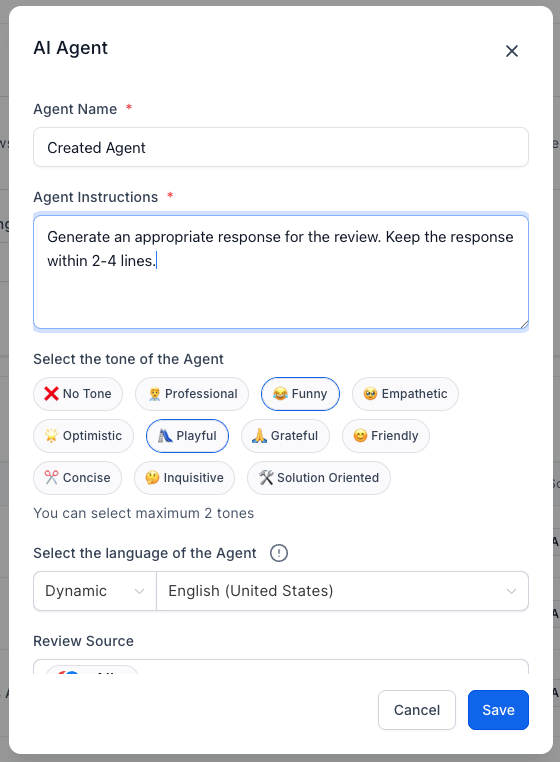
Optionally, enable Create Starter Agents to quickly deploy pre-configured personalities.
Step 3: Set Assignment Rules
Assign AI Agents based on Review Sentiment (Positive, Neutral, Negative).
Enable Round Robin Assignment to rotate agents automatically, adding variety.
Step 4: Configure Language Detection
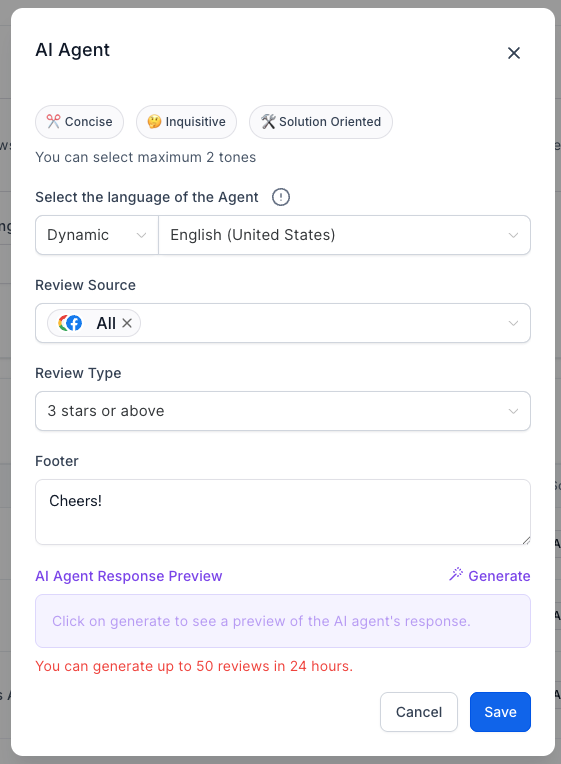
AI automatically detects the language of incoming reviews.
Set a Fallback Language if detection fails, ensuring all reviews are handled appropriately.
Step 5: Assign Google Business Pages (Optional)
Assign agents to specific Google Business Pages if you manage multiple brands or locations.
Ensures responses are tailored to the appropriate business context.
Step 6: Manage and Test AI Agents
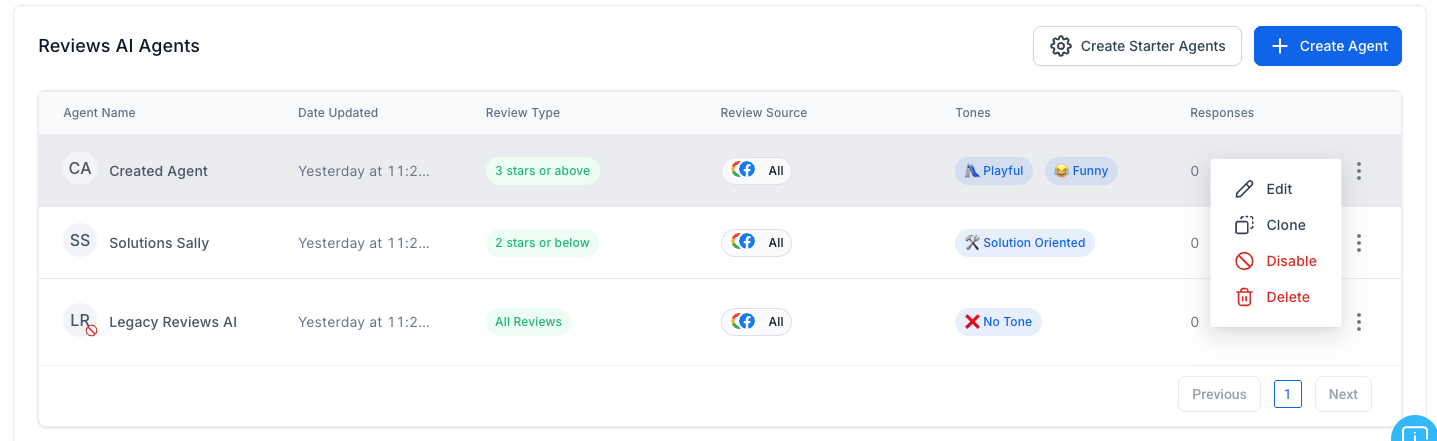
Edit, Clone, or Delete AI Agents as needed.
Preview AI-generated responses before publishing to maintain quality.
Track which agent crafted each reply within the Reputation Management view.
Best Practices for Reviews AI Agents
Set clear tone and style aligned with your brand voice.
Differentiate response styles for positive, neutral, and negative reviews.
Keep instructions simple and specific for consistent output.
Personalize responses using business names or locations.
Preview regularly to ensure tone and content meet expectations.
Next Steps
Begin creating Reviews AI Agents for your Tekmatix account.
Assign them to sentiment categories and business locations.
Monitor agent responses and adjust tone or prompts as needed.
Train your team on managing AI Agents for consistent brand engagement.
Note: Reviews AI Agents are currently available to Agency Users only.

Copyright © 2026 TekMatix. All rights reserved | [email protected]