TekMatix Help Blog
Search Help Categories
Use the search bar below to look for help articles you need.

How to Manage AI Sales Agents with the New Prospect AI Dashboard in Tekmatix
Overview
Prospect AI has been redesigned to give you much clearer visibility into what your AI sales agents are doing, what they have discovered, and what is happening behind the scenes.
Managing multiple AI agents is now easier, faster and far more transparent.
Instead of opening each agent individually to understand its status, you can now see key performance details at a glance, review execution history, diagnose problems, and automatically send newly discovered prospects into your CRM pipeline.
This update turns Prospect AI into a more complete AI-powered sales prospecting system, helping you discover, organise and prepare leads for outreach with less manual work.
What’s New?
Redesigned AI Agent Cards
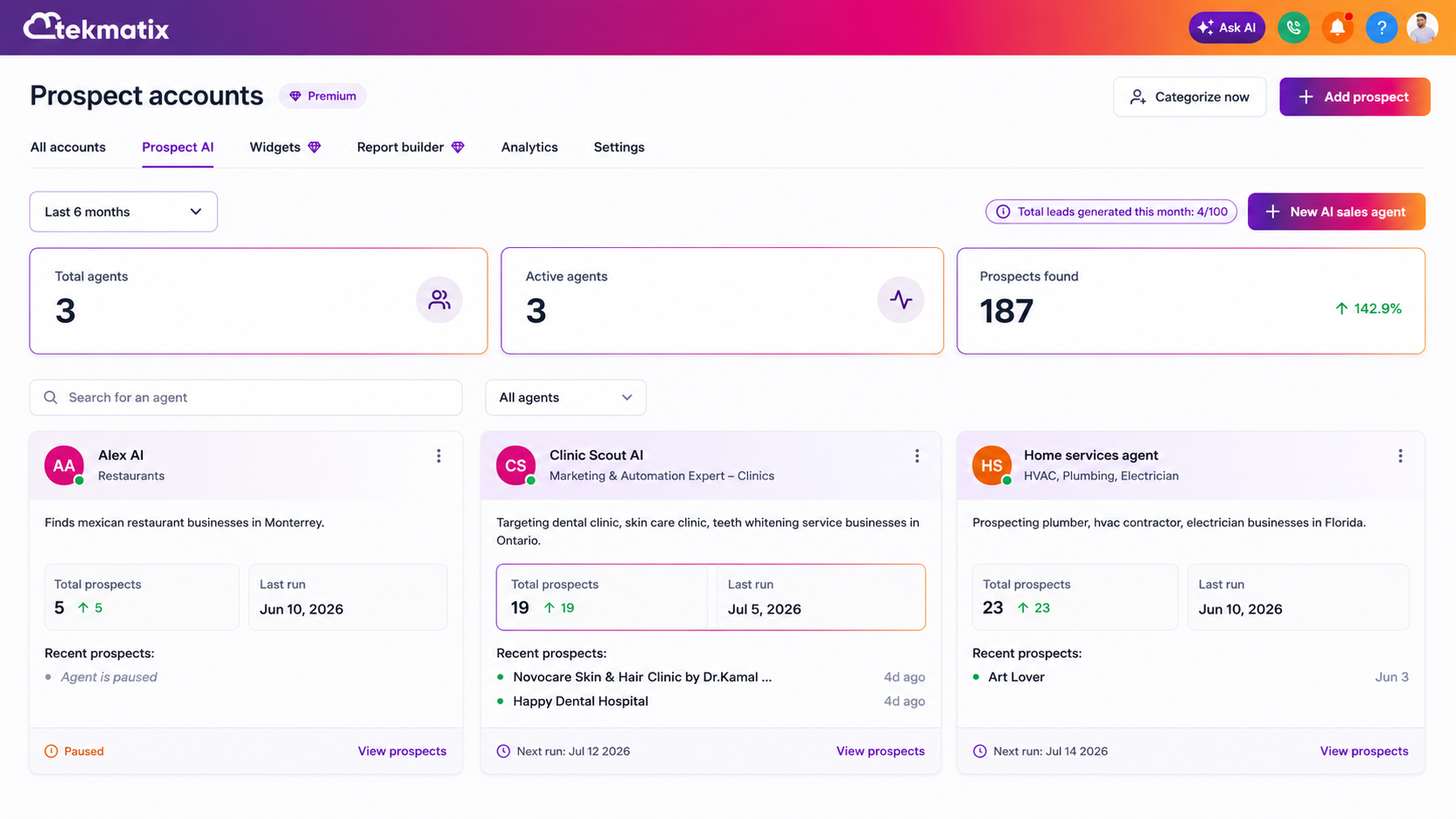
Each Prospect AI agent card now gives you more useful information without requiring you to open the agent.
You can now see:
Total prospects discovered
The agent’s last successful run
The next scheduled run
The agent’s description and specialisation
Quick access to view all prospects found by that agent
This makes it much easier to understand how every agent is performing across your account.
You no longer need to click through multiple screens just to work out whether an agent is active, when it last ran, or how many prospects it has found.
A New Home for Every AI Agent
Clicking an AI agent now opens a dedicated workspace instead of taking you directly into edit mode.
Each agent workspace includes two main views:
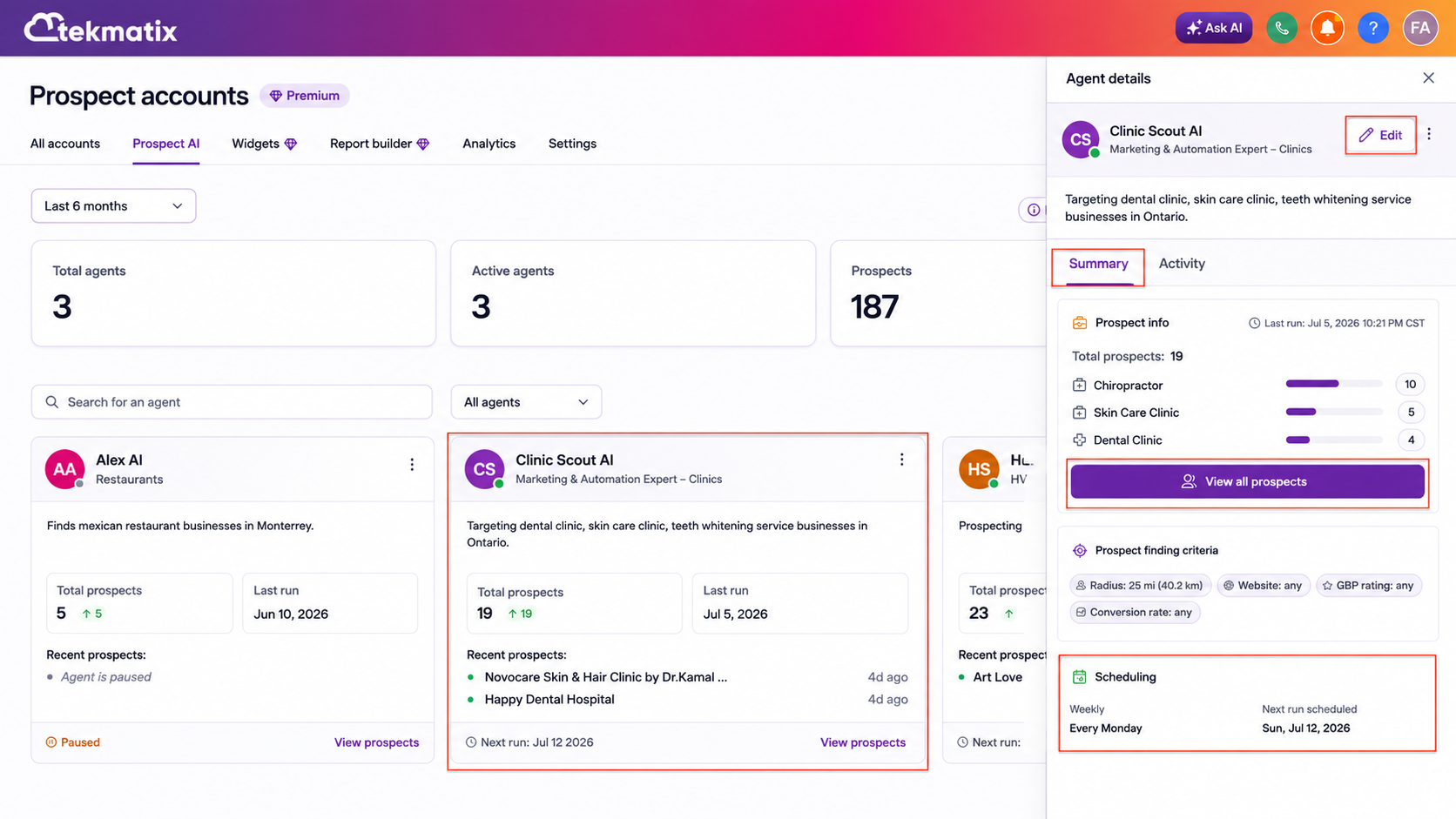
Summary
The Summary view gives you a clear overview of the agent’s setup and performance, including:
Agent configuration
Prospect statistics
Prospect-finding criteria
The next scheduled run
Quick access to all discovered prospects
This allows you to review the agent’s current performance before deciding whether any settings need to be changed.
Activity
The Activity view gives you a complete execution history for that agent.
You can review:
Previous runs
Upcoming scheduled runs
Successful executions
Failed executions
Prospect discovery results
Historical activity logs
This creates much greater visibility into what the agent has been doing over time.
Introducing the Prospect AI Activity Centre
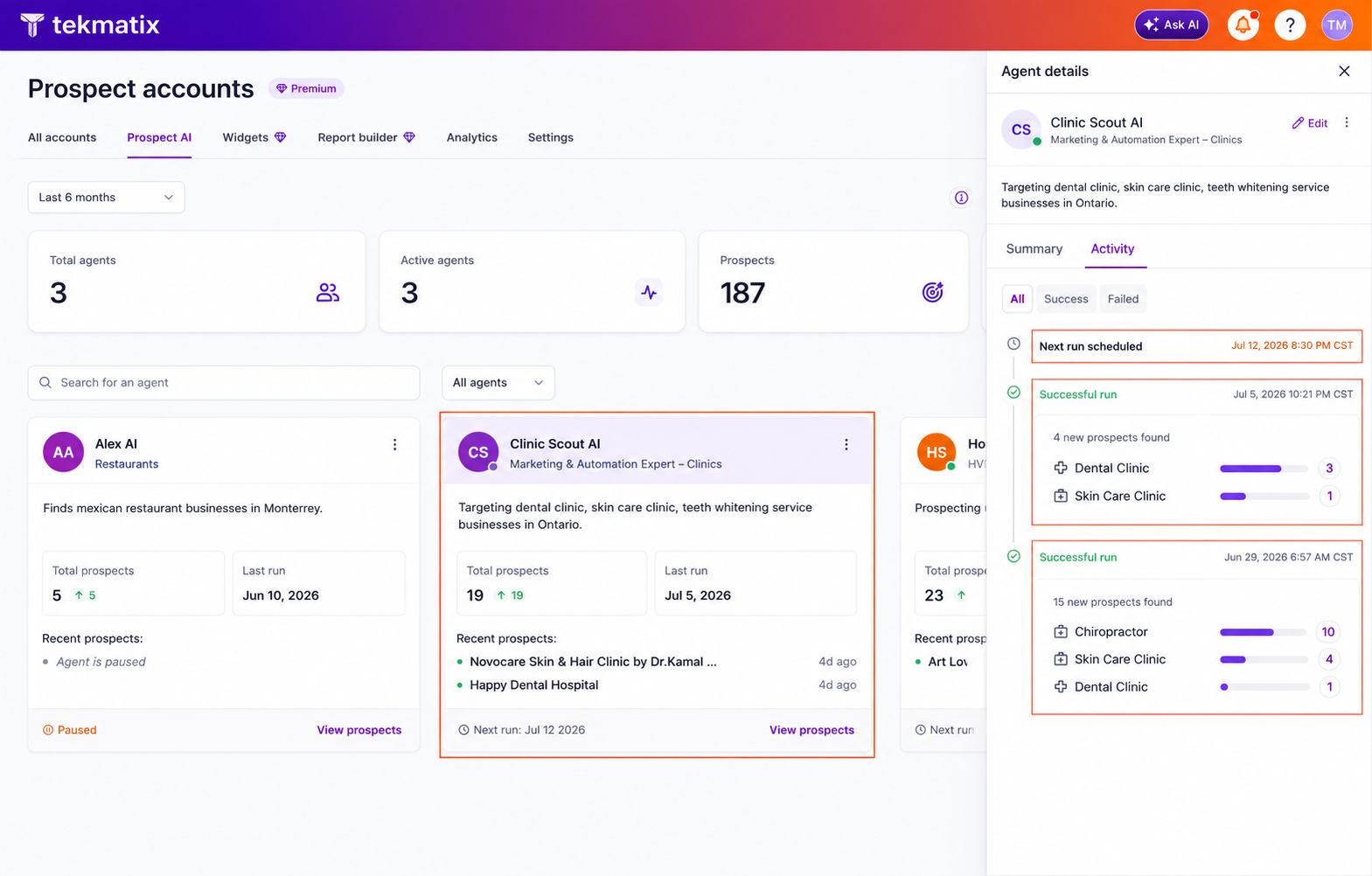
The new Activity Centre helps you understand exactly what is happening behind the scenes.
You can now see:
When the agent last ran
When the agent is scheduled to run again
How many prospects were found
Which business categories were discovered
The outcome of previous searches
Success and failure logs
This is particularly useful when an agent does not return the results you expected.
Rather than leaving you wondering why no prospects were found, Prospect AI now explains what happened and provides recommendations to help improve future results.
Smarter Recommendations When No Prospects Are Found
If an agent completes a search without finding suitable prospects, Prospect AI can now suggest practical adjustments.
Recommendations may include:
Increasing the search radius
Relaxing conversion score filters
Lowering Google Business Profile rating requirements
Increasing your monthly prospecting limit
Reallocating usage limits across different agents
This gives you clear next steps instead of leaving you to troubleshoot the issue manually.
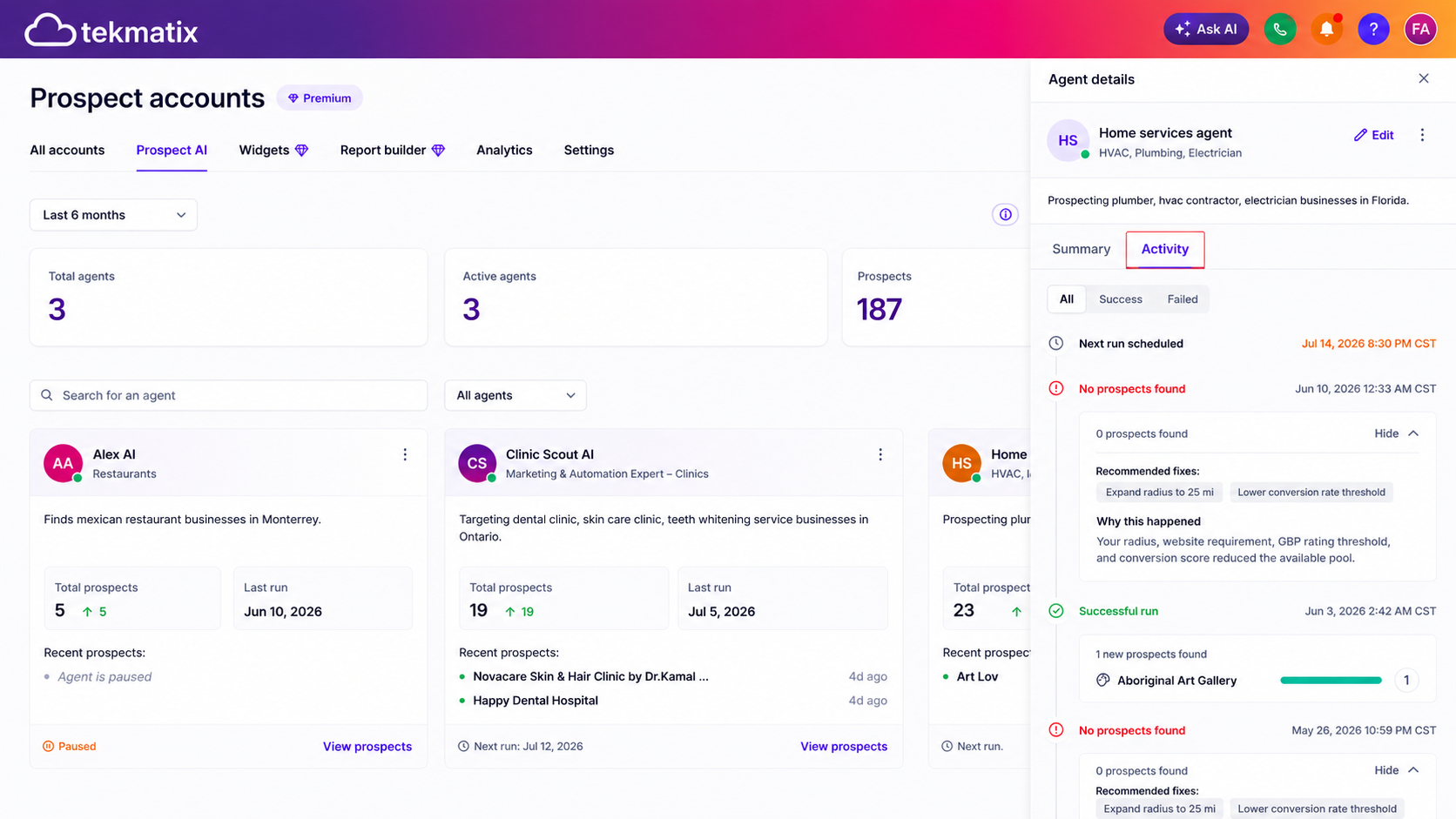
You can review the recommendation, adjust the agent’s settings and run the search again with a better chance of finding suitable prospects.
New Dashboard Metrics
The Prospect AI dashboard now provides quick insights across all of your agents.
At a glance, you can see:
Total AI agents
Active agents
Total prospects discovered
Monthly lead usage
These metrics make it easier to understand the overall performance of your AI prospecting system.
As your AI sales team grows, you can quickly see how many agents are active, how many leads they have discovered, and how much of your monthly prospecting allocation has been used.
Faster Agent Navigation
A new search bar has also been added to the Prospect AI dashboard.
This allows you to quickly locate and manage individual agents without scrolling through your entire list.
It is a simple improvement, but an important one for businesses running multiple agents across different industries, locations, offers or prospecting campaigns.
Native CRM Pipeline Integration
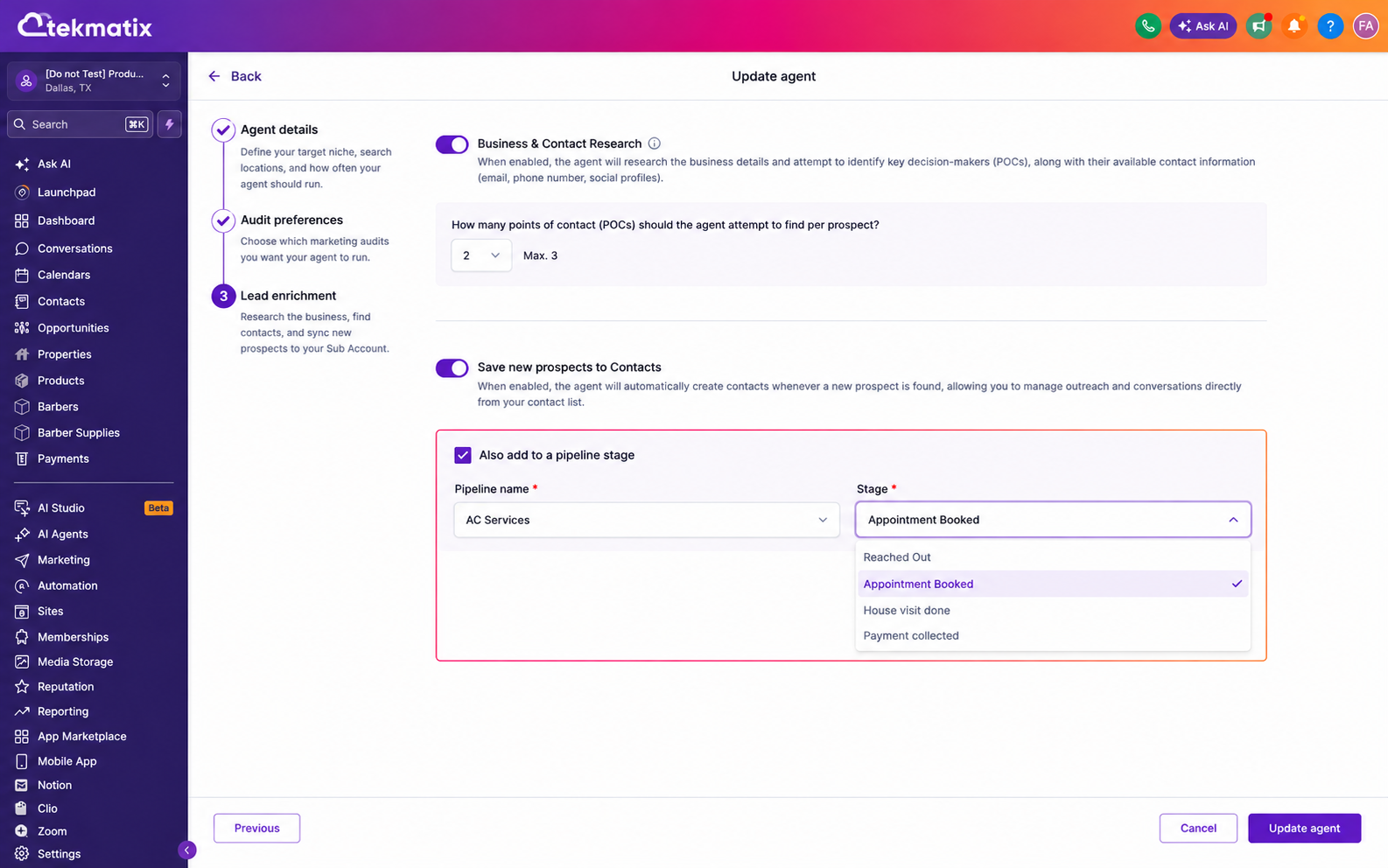
Prospect AI now integrates directly with your Tekmatix CRM pipelines.
When configuring an agent, you can select:
Which pipeline newly discovered prospects should enter
Which pipeline stage they should be placed into
Every new prospect discovered by that agent can then be automatically added to your selected CRM pipeline and stage.
This means prospects are immediately ready for:
Review
Qualification
Workflow automation
Sales follow-up
Email or SMS outreach
Task assignment
Pipeline management
There is no need to manually move leads from Prospect AI into your sales pipeline.
How the CRM Pipeline Integration Works
When setting up or editing a Prospect AI agent:
Open the agent’s configuration.
Select the CRM pipeline you want new prospects added to.
Choose the appropriate pipeline stage.
Save the agent.
Allow the agent to complete its next prospecting run.
Any newly discovered prospects can then be added directly to that pipeline and stage.
For example, you may choose to send all new prospects into:
Pipeline: Outbound Sales
Stage: New Prospect
From there, a workflow could automatically:
Assign the prospect to a sales representative
Add a prospecting tag
Create a follow-up task
Send an internal notification
Begin an email or SMS outreach sequence
Move the prospect into another stage when they respond
This creates a much more connected sales process from discovery through to outreach.
Why This Update Matters
Prospect AI is becoming much more than an automated lead finder.
With improved visibility, activity history, smarter recommendations and direct CRM integration, your AI agents now operate more like members of your sales team.
You can now:
Understand what every agent is doing
Review agent performance before making changes
See when each agent last ran
Check when the next search is scheduled
Diagnose why an agent is not finding prospects
Receive suggestions for improving prospecting results
Review every prospect an agent has discovered
Search and manage agents more quickly
Automatically move new prospects into your sales pipeline
Prepare prospects for automation and outreach immediately
Manage Your AI Sales Team From One Dashboard
As you add more AI agents, visibility becomes increasingly important.
You may have one agent looking for coaches, another searching for local service businesses, and another targeting specific industries or locations.
Without a central dashboard, managing those agents could quickly become confusing.
The redesigned Prospect AI dashboard gives you a single place to monitor:
Agent activity
Lead generation results
Monthly usage
Upcoming runs
Search criteria
CRM destinations
This makes it much easier to manage a growing AI-powered outbound sales operation.
From Prospect Discovery to Sales Automation
Prospect AI is continuing to evolve from a simple prospect discovery tool into a more complete AI sales development and prospecting engine.
It can help you:
Discover potential customers
Identify relevant businesses
Review prospecting activity
Understand why searches succeed or fail
Organise new prospects
Add leads to your CRM
Trigger workflows
Prepare prospects for outreach
The result is a more connected and efficient process that reduces manual prospect research and administrative work.
Your team can spend less time searching for businesses, moving records between systems and checking whether agents have run.
Instead, they can focus on reviewing qualified prospects, building relationships and starting meaningful sales conversations.
A Smarter Prospecting Experience in Tekmatix
The redesigned Prospect AI experience gives you better insight, stronger control and a clearer path from prospect discovery to sales action.
With improved agent cards, dedicated agent workspaces, detailed activity logs, actionable recommendations, dashboard metrics and direct CRM pipeline integration, managing AI-powered prospecting is now easier than ever.
Prospect AI helps you build a more consistent outbound sales system by discovering, organising and preparing prospects for outreach with minimal manual work.
