
TekMatix Help Blog
Search Help Categories
Use the search bar below to look for help articles you need.

How to Connect Todoist with Tekmatix Workflows
Overview
Keeping your tasks organised is essential, especially when your business relies on multiple systems to manage customers, projects, and day-to-day operations.
With the new Todoist integration, you can now connect your Todoist account directly to Tekmatix Workflows, allowing your automations to both react to activity inside Todoist and create or manage tasks automatically.
Whether you're assigning internal follow-up tasks, tracking customer requests, or keeping your team organised, this integration helps eliminate manual administration while ensuring nothing falls through the cracks.
What's New?
Automate Workflows from Todoist Activity
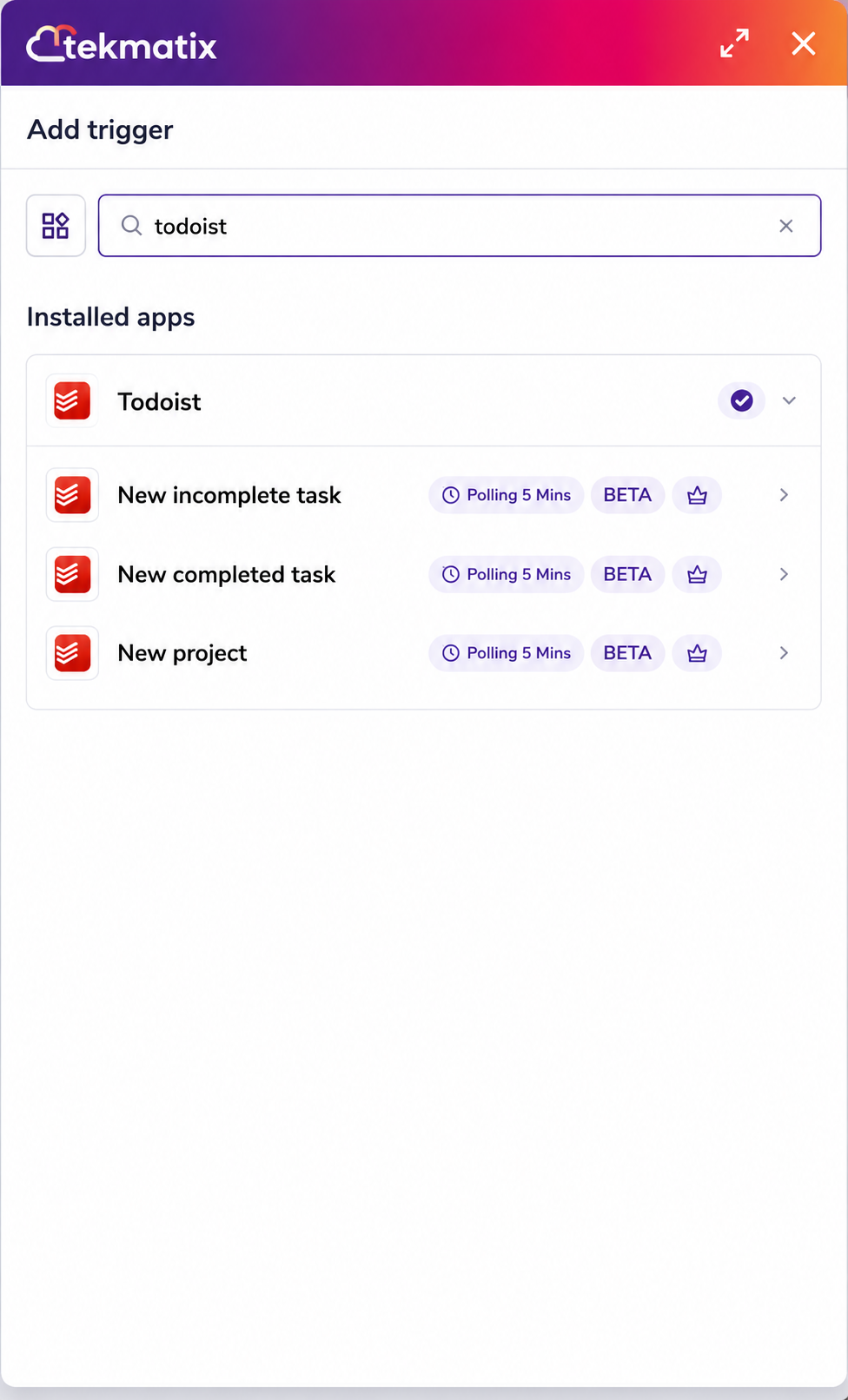
Tekmatix can now trigger workflows whenever activity occurs inside Todoist, including:
• New incomplete task created
• Task marked as completed
• New project created
These triggers check for new activity every five minutes, making it easy to build automations around your team's task management.
Manage Todoist Directly from Workflows
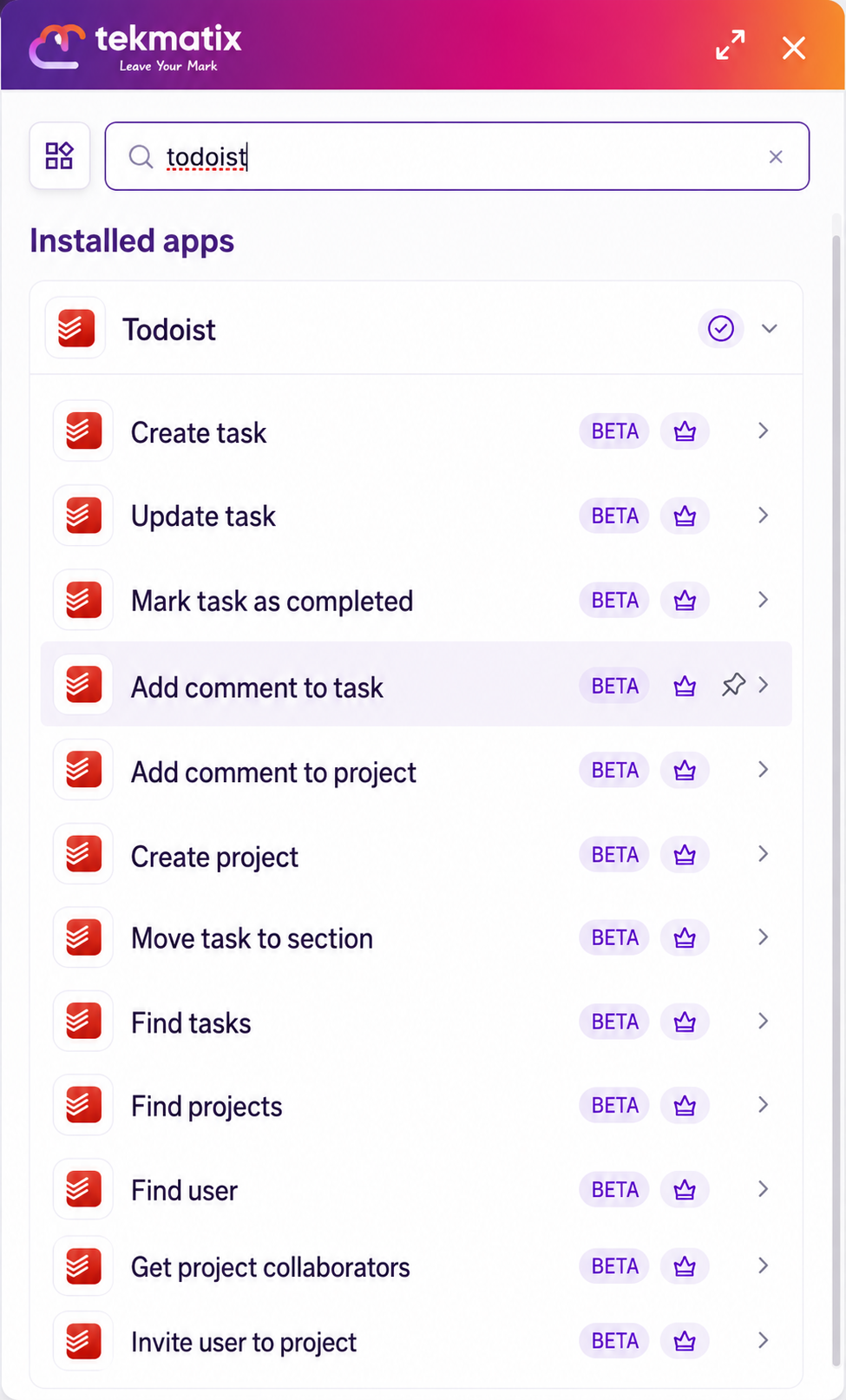
Your workflows can now perform a wide range of actions inside Todoist, including:
• Create new tasks
• Update existing tasks
• Mark tasks as complete
• Create projects
• Move tasks between sections
• Add comments to tasks
• Add comments to projects
• Find tasks
• Find projects
• Find users
• Retrieve collaborators
• Invite collaborators
This means your workflows can fully manage your Todoist workspace without requiring your team to switch between applications.
Secure OAuth Connection
Connecting Todoist uses secure OAuth authentication, allowing you to safely authorise Tekmatix to access your Todoist workspace without sharing passwords.
Once connected, your account remains available for future workflows until you disconnect it.
How to Connect Todoist
You can connect your Todoist account in two ways.
Option 1: Connect from the Workflow Builder
Navigate to Automation → Workflows.
Open an existing workflow or create a new one.
Add a Todoist trigger or action.
Click Connect your account.
Sign into Todoist and approve the requested permissions.
Return to Tekmatix where your account will now appear as connected.
Option 2: Connect from Settings
Navigate to Settings → Integrations.
Locate Todoist.
Click Connect.
Complete the secure authentication process.
Once connected, your Todoist account will be available throughout the Workflow Builder.
Creating a Todoist Trigger
Triggers allow Todoist activity to start automations inside Tekmatix.
For example, you may want to launch a workflow whenever someone creates a new task in a particular project.
Step 1
Open your workflow and add a new trigger.
Choose:
Apps → Todoist → New Incomplete Task
Step 2
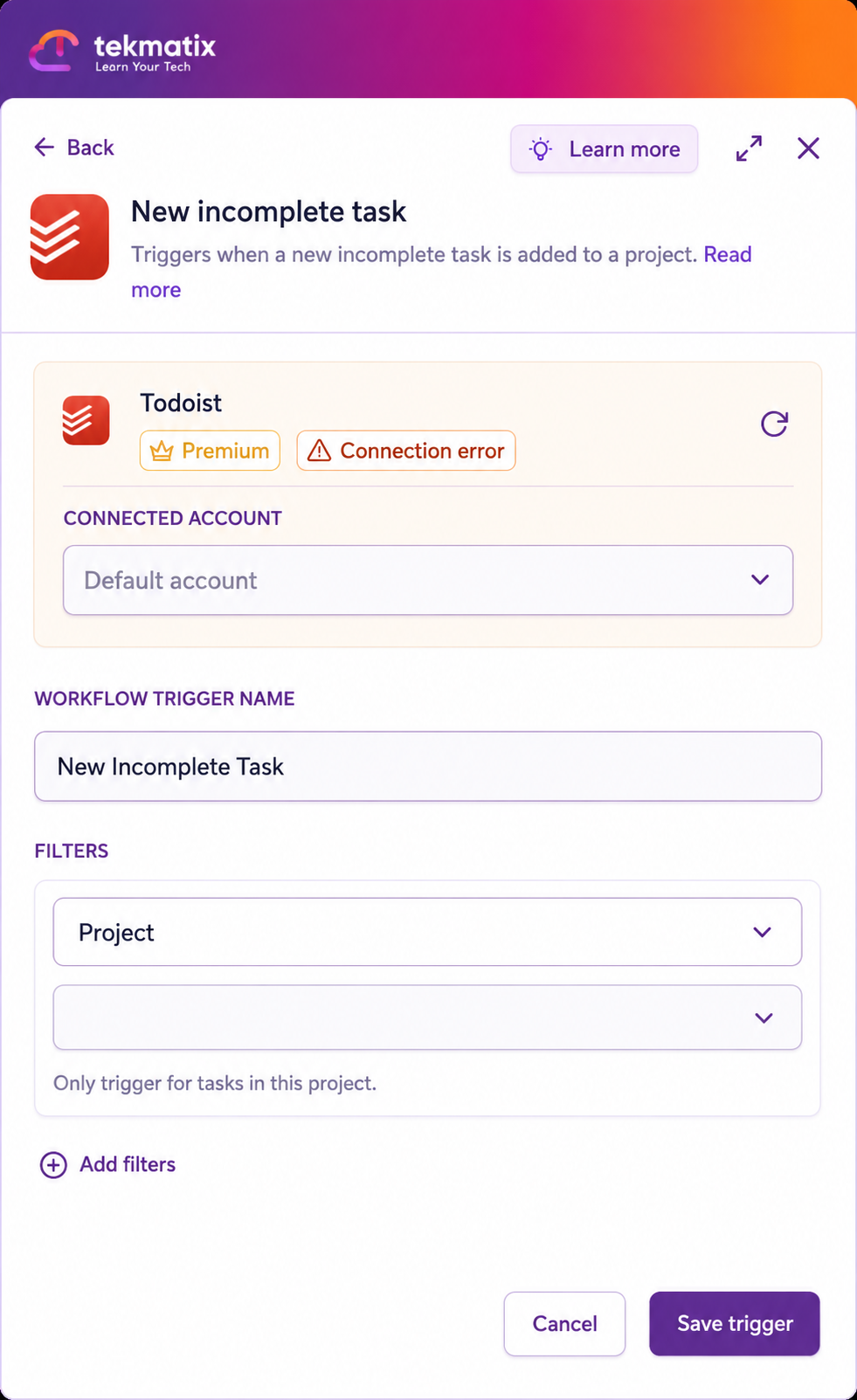
Configure the trigger.
Select:
• Connected Todoist account
• Trigger name
• Project (optional)
• Additional filters such as:
• Labels
• Priority
• Due dates
Leaving the project blank allows the trigger to monitor every project.
Step 3
Test the trigger.
Click Find New Records.
If no tasks appear:
• Create a new task inside Todoist.
• Wait for the next five-minute polling cycle.
• Refresh the trigger test.
Once a matching task appears, save the trigger.
Creating a Todoist Action
Actions allow Tekmatix workflows to create and manage Todoist tasks automatically.
The most common example is automatically creating a task after a customer submits a form.
Step 1
Add a new workflow action.
Choose:
Apps → Todoist → Create Task
Step 2
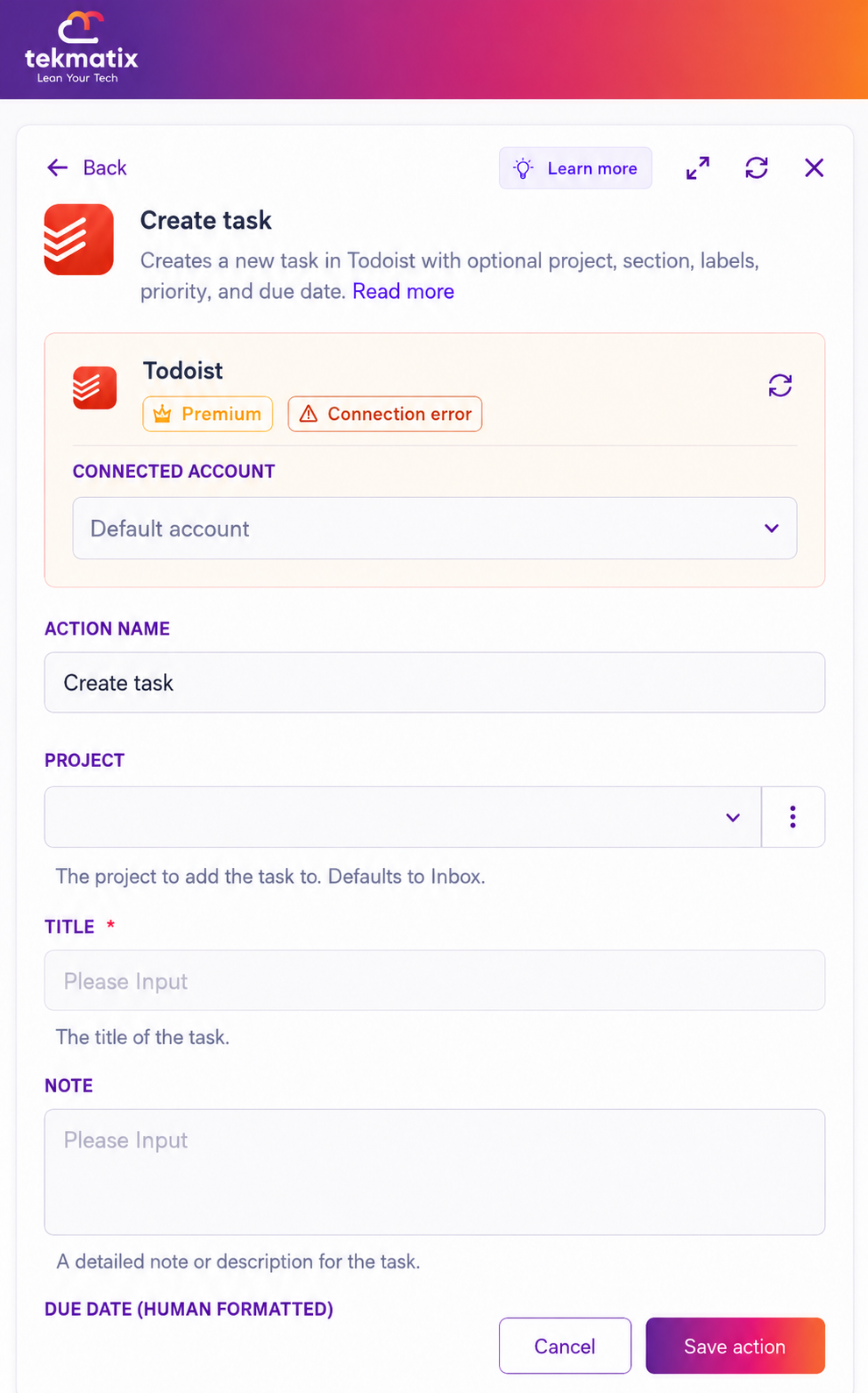
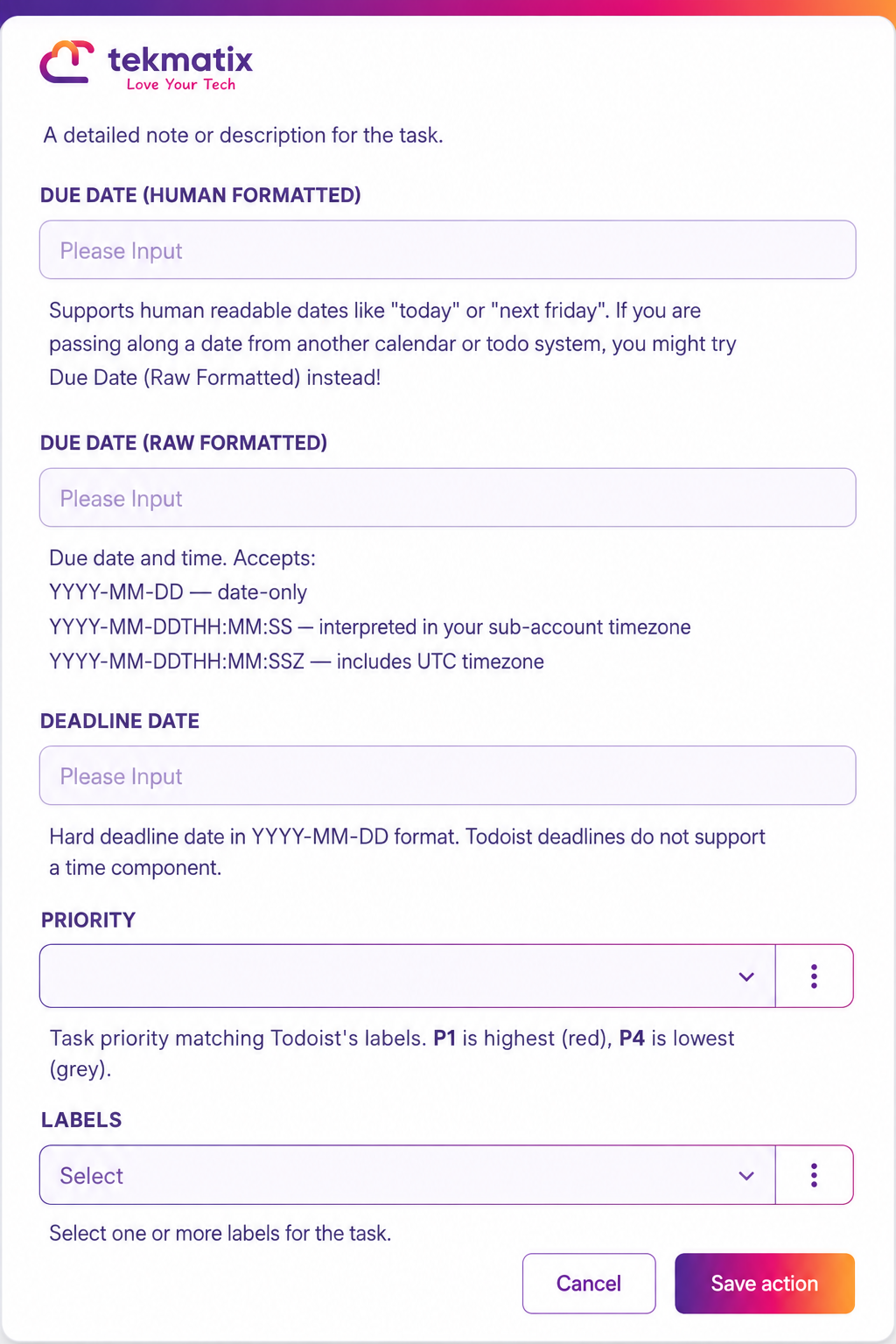
Configure the action.
Choose:
• Connected Todoist account
• Action name
• Project
• Task title
• Task description (optional)
• Due date
• Deadline (optional)
You can dynamically populate these values using information collected earlier in your workflow.
Step 3
Test the action.
Click Test Action.
This creates a real task inside Todoist, so it's recommended to clearly label test tasks before running production workflows.
After confirming the task has been created successfully, save your workflow.
Testing Your Automation
Always test every trigger and action before publishing your workflow.
Testing Triggers
• Click Find New Records.
• Perform the activity inside Todoist.
• Wait for the five-minute polling interval if required.
• Select the returned record.
• Save.
Testing Actions
• Click Test Action.
• Confirm the task or project appears correctly inside Todoist.
• Remove any test records if necessary.
Testing ensures all fields are correctly mapped before your workflow goes live.
Practical Ways to Use the Todoist Integration
Automatically Create Tasks from Form Submissions
Whenever someone submits a form, Tekmatix can automatically create a Todoist task for your team.
For example:
• Support requests
• Sales enquiries
• Client onboarding
• Internal approvals
Tasks can automatically include:
• Project
• Priority
• Labels
• Full submission details
This ensures every request is assigned immediately without manual data entry.
Update Customer Records When Tasks Are Completed
When a Todoist task is marked complete, Tekmatix can automatically continue your customer journey.
For example, after completing a follow-up task, your workflow can:
• Update a CRM contact
• Advance a pipeline stage
• Notify another team member
• Trigger the next automation
Your team continues working from Todoist while Tekmatix keeps your CRM fully synchronised.
Create Team Tasks with Complete Context
Operational workflows can automatically create detailed tasks for your team.
For example:
• Customer abandons checkout
• Contract requires review
• New lead requires qualification
• Client requests additional information
Each task can include:
• Assigned project
• Priority
• Labels
• Comments
• Supporting links
• Customer information
This gives your team all the context they need without switching between systems.
Why This Matters
Many businesses rely on Todoist to manage daily work, while Tekmatix handles customer journeys and automation.
Bringing both together removes repetitive administration and ensures tasks and customer data stay connected.
With the Todoist integration, you can:
• Automatically create tasks from workflow events.
• Trigger automations from Todoist activity.
• Keep customer records synchronised.
• Reduce manual administration.
• Improve collaboration across your team.
• Build smarter operational workflows that connect customer actions with internal task management.
Whether you're managing sales, customer support, onboarding, or internal operations, the Todoist integration helps your team stay organised while allowing Tekmatix to automate the work happening behind the scenes.
