
TekMatix Help Articles

Afilliates / Appointment

💙 New Feature Alert: Bluesky Comment Management is Now Inside Tekmatix Social Planner
🚀 New in Tekmatix: Manage Bluesky Comments Directly from Social Planner

✨ Another platform added to your Tekmatix Unified Inbox 💜
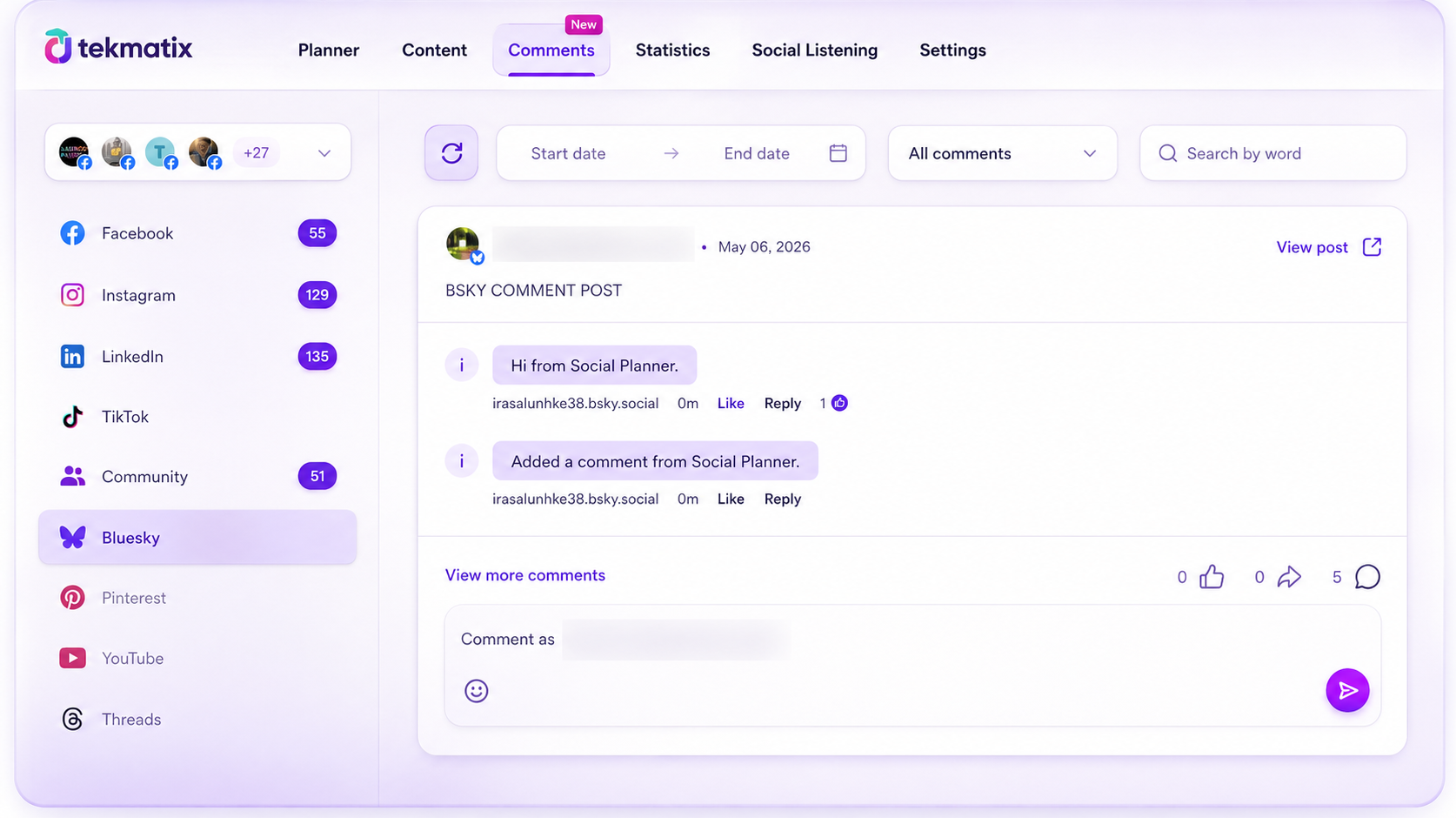
You can now manage your Bluesky conversations directly inside Tekmatix Social Planner — alongside all your other social channels in one place.
No more jumping between platforms just to stay on top of engagement.
🚀 What’s New
💬 Reply to Bluesky Comments
Respond to Bluesky comments directly inside Social Planner without opening the native platform.
😄 Emoji Support
Add personality and engagement to your replies with emoji support.
🧵 Threaded Replies
Keep conversations organized with support for replies up to 3 levels deep.
🔄 Auto Comment Sync
Recent post comments automatically sync to keep your inbox updated.
👷 How to Use It
Go to:
Marketing → Social Planner → Comments
✔ Open the Comments tab
✔ Select your Bluesky account
✔ View and reply to comments directly inside Tekmatix
💡 Why It Matters
✅ Manage Bluesky engagement without switching tools
✅ Respond faster to your audience
✅ Keep conversations organized across platforms
✅ Run your social engagement from one AI-powered, all-in-one business platform
📝 Notes
• Reply limit: 300 characters
• Text + emojis supported (no media attachments yet)
• Profile tagging currently unsupported
• Replies visible up to 3 levels deep
• Comments sync for the latest 15 posts
• Sync runs every 6 hours

Blogs / Calendars / Campaign
💙 New Feature Alert: Bluesky Comment Management is Now Inside Tekmatix Social Planner
🚀 New in Tekmatix: Manage Bluesky Comments Directly from Social Planner
✨ Another platform added to your Tekmatix Unified Inbox 💜
You can now manage your Bluesky conversations directly inside Tekmatix Social Planner — alongside all your other social channels in one place.
No more jumping between platforms just to stay on top of engagement.
🚀 What’s New
💬 Reply to Bluesky Comments
Respond to Bluesky comments directly inside Social Planner without opening the native platform.
😄 Emoji Support
Add personality and engagement to your replies with emoji support.
🧵 Threaded Replies
Keep conversations organized with support for replies up to 3 levels deep.
🔄 Auto Comment Sync
Recent post comments automatically sync to keep your inbox updated.
👷 How to Use It
Go to:
Marketing → Social Planner → Comments
✔ Open the Comments tab
✔ Select your Bluesky account
✔ View and reply to comments directly inside Tekmatix
💡 Why It Matters
✅ Manage Bluesky engagement without switching tools
✅ Respond faster to your audience
✅ Keep conversations organized across platforms
✅ Run your social engagement from one AI-powered, all-in-one business platform
📝 Notes
• Reply limit: 300 characters
• Text + emojis supported (no media attachments yet)
• Profile tagging currently unsupported
• Replies visible up to 3 levels deep
• Comments sync for the latest 15 posts
• Sync runs every 6 hours
Course / CRM / Chat Widget
💙 New Feature Alert: Bluesky Comment Management is Now Inside Tekmatix Social Planner
🚀 New in Tekmatix: Manage Bluesky Comments Directly from Social Planner
✨ Another platform added to your Tekmatix Unified Inbox 💜
You can now manage your Bluesky conversations directly inside Tekmatix Social Planner — alongside all your other social channels in one place.
No more jumping between platforms just to stay on top of engagement.
🚀 What’s New
💬 Reply to Bluesky Comments
Respond to Bluesky comments directly inside Social Planner without opening the native platform.
😄 Emoji Support
Add personality and engagement to your replies with emoji support.
🧵 Threaded Replies
Keep conversations organized with support for replies up to 3 levels deep.
🔄 Auto Comment Sync
Recent post comments automatically sync to keep your inbox updated.
👷 How to Use It
Go to:
Marketing → Social Planner → Comments
✔ Open the Comments tab
✔ Select your Bluesky account
✔ View and reply to comments directly inside Tekmatix
💡 Why It Matters
✅ Manage Bluesky engagement without switching tools
✅ Respond faster to your audience
✅ Keep conversations organized across platforms
✅ Run your social engagement from one AI-powered, all-in-one business platform
📝 Notes
• Reply limit: 300 characters
• Text + emojis supported (no media attachments yet)
• Profile tagging currently unsupported
• Replies visible up to 3 levels deep
• Comments sync for the latest 15 posts
• Sync runs every 6 hours
Compliance / Custom Fields
💙 New Feature Alert: Bluesky Comment Management is Now Inside Tekmatix Social Planner
🚀 New in Tekmatix: Manage Bluesky Comments Directly from Social Planner
✨ Another platform added to your Tekmatix Unified Inbox 💜
You can now manage your Bluesky conversations directly inside Tekmatix Social Planner — alongside all your other social channels in one place.
No more jumping between platforms just to stay on top of engagement.
🚀 What’s New
💬 Reply to Bluesky Comments
Respond to Bluesky comments directly inside Social Planner without opening the native platform.
😄 Emoji Support
Add personality and engagement to your replies with emoji support.
🧵 Threaded Replies
Keep conversations organized with support for replies up to 3 levels deep.
🔄 Auto Comment Sync
Recent post comments automatically sync to keep your inbox updated.
👷 How to Use It
Go to:
Marketing → Social Planner → Comments
✔ Open the Comments tab
✔ Select your Bluesky account
✔ View and reply to comments directly inside Tekmatix
💡 Why It Matters
✅ Manage Bluesky engagement without switching tools
✅ Respond faster to your audience
✅ Keep conversations organized across platforms
✅ Run your social engagement from one AI-powered, all-in-one business platform
📝 Notes
• Reply limit: 300 characters
• Text + emojis supported (no media attachments yet)
• Profile tagging currently unsupported
• Replies visible up to 3 levels deep
• Comments sync for the latest 15 posts
• Sync runs every 6 hours
Dashboard / Domain
💙 New Feature Alert: Bluesky Comment Management is Now Inside Tekmatix Social Planner
🚀 New in Tekmatix: Manage Bluesky Comments Directly from Social Planner
✨ Another platform added to your Tekmatix Unified Inbox 💜
You can now manage your Bluesky conversations directly inside Tekmatix Social Planner — alongside all your other social channels in one place.
No more jumping between platforms just to stay on top of engagement.
🚀 What’s New
💬 Reply to Bluesky Comments
Respond to Bluesky comments directly inside Social Planner without opening the native platform.
😄 Emoji Support
Add personality and engagement to your replies with emoji support.
🧵 Threaded Replies
Keep conversations organized with support for replies up to 3 levels deep.
🔄 Auto Comment Sync
Recent post comments automatically sync to keep your inbox updated.
👷 How to Use It
Go to:
Marketing → Social Planner → Comments
✔ Open the Comments tab
✔ Select your Bluesky account
✔ View and reply to comments directly inside Tekmatix
💡 Why It Matters
✅ Manage Bluesky engagement without switching tools
✅ Respond faster to your audience
✅ Keep conversations organized across platforms
✅ Run your social engagement from one AI-powered, all-in-one business platform
📝 Notes
• Reply limit: 300 characters
• Text + emojis supported (no media attachments yet)
• Profile tagging currently unsupported
• Replies visible up to 3 levels deep
• Comments sync for the latest 15 posts
• Sync runs every 6 hours
Email Builder / Email Deliverability
💙 New Feature Alert: Bluesky Comment Management is Now Inside Tekmatix Social Planner
🚀 New in Tekmatix: Manage Bluesky Comments Directly from Social Planner
✨ Another platform added to your Tekmatix Unified Inbox 💜
You can now manage your Bluesky conversations directly inside Tekmatix Social Planner — alongside all your other social channels in one place.
No more jumping between platforms just to stay on top of engagement.
🚀 What’s New
💬 Reply to Bluesky Comments
Respond to Bluesky comments directly inside Social Planner without opening the native platform.
😄 Emoji Support
Add personality and engagement to your replies with emoji support.
🧵 Threaded Replies
Keep conversations organized with support for replies up to 3 levels deep.
🔄 Auto Comment Sync
Recent post comments automatically sync to keep your inbox updated.
👷 How to Use It
Go to:
Marketing → Social Planner → Comments
✔ Open the Comments tab
✔ Select your Bluesky account
✔ View and reply to comments directly inside Tekmatix
💡 Why It Matters
✅ Manage Bluesky engagement without switching tools
✅ Respond faster to your audience
✅ Keep conversations organized across platforms
✅ Run your social engagement from one AI-powered, all-in-one business platform
📝 Notes
• Reply limit: 300 characters
• Text + emojis supported (no media attachments yet)
• Profile tagging currently unsupported
• Replies visible up to 3 levels deep
• Comments sync for the latest 15 posts
• Sync runs every 6 hours
Form / Funnels
💙 New Feature Alert: Bluesky Comment Management is Now Inside Tekmatix Social Planner
🚀 New in Tekmatix: Manage Bluesky Comments Directly from Social Planner
✨ Another platform added to your Tekmatix Unified Inbox 💜
You can now manage your Bluesky conversations directly inside Tekmatix Social Planner — alongside all your other social channels in one place.
No more jumping between platforms just to stay on top of engagement.
🚀 What’s New
💬 Reply to Bluesky Comments
Respond to Bluesky comments directly inside Social Planner without opening the native platform.
😄 Emoji Support
Add personality and engagement to your replies with emoji support.
🧵 Threaded Replies
Keep conversations organized with support for replies up to 3 levels deep.
🔄 Auto Comment Sync
Recent post comments automatically sync to keep your inbox updated.
👷 How to Use It
Go to:
Marketing → Social Planner → Comments
✔ Open the Comments tab
✔ Select your Bluesky account
✔ View and reply to comments directly inside Tekmatix
💡 Why It Matters
✅ Manage Bluesky engagement without switching tools
✅ Respond faster to your audience
✅ Keep conversations organized across platforms
✅ Run your social engagement from one AI-powered, all-in-one business platform
📝 Notes
• Reply limit: 300 characters
• Text + emojis supported (no media attachments yet)
• Profile tagging currently unsupported
• Replies visible up to 3 levels deep
• Comments sync for the latest 15 posts
• Sync runs every 6 hours
Google My Business / Integrations
💙 New Feature Alert: Bluesky Comment Management is Now Inside Tekmatix Social Planner
🚀 New in Tekmatix: Manage Bluesky Comments Directly from Social Planner
✨ Another platform added to your Tekmatix Unified Inbox 💜
You can now manage your Bluesky conversations directly inside Tekmatix Social Planner — alongside all your other social channels in one place.
No more jumping between platforms just to stay on top of engagement.
🚀 What’s New
💬 Reply to Bluesky Comments
Respond to Bluesky comments directly inside Social Planner without opening the native platform.
😄 Emoji Support
Add personality and engagement to your replies with emoji support.
🧵 Threaded Replies
Keep conversations organized with support for replies up to 3 levels deep.
🔄 Auto Comment Sync
Recent post comments automatically sync to keep your inbox updated.
👷 How to Use It
Go to:
Marketing → Social Planner → Comments
✔ Open the Comments tab
✔ Select your Bluesky account
✔ View and reply to comments directly inside Tekmatix
💡 Why It Matters
✅ Manage Bluesky engagement without switching tools
✅ Respond faster to your audience
✅ Keep conversations organized across platforms
✅ Run your social engagement from one AI-powered, all-in-one business platform
📝 Notes
• Reply limit: 300 characters
• Text + emojis supported (no media attachments yet)
• Profile tagging currently unsupported
• Replies visible up to 3 levels deep
• Comments sync for the latest 15 posts
• Sync runs every 6 hours
Invoices / LC Email / LC Phone
💙 New Feature Alert: Bluesky Comment Management is Now Inside Tekmatix Social Planner
🚀 New in Tekmatix: Manage Bluesky Comments Directly from Social Planner
✨ Another platform added to your Tekmatix Unified Inbox 💜
You can now manage your Bluesky conversations directly inside Tekmatix Social Planner — alongside all your other social channels in one place.
No more jumping between platforms just to stay on top of engagement.
🚀 What’s New
💬 Reply to Bluesky Comments
Respond to Bluesky comments directly inside Social Planner without opening the native platform.
😄 Emoji Support
Add personality and engagement to your replies with emoji support.
🧵 Threaded Replies
Keep conversations organized with support for replies up to 3 levels deep.
🔄 Auto Comment Sync
Recent post comments automatically sync to keep your inbox updated.
👷 How to Use It
Go to:
Marketing → Social Planner → Comments
✔ Open the Comments tab
✔ Select your Bluesky account
✔ View and reply to comments directly inside Tekmatix
💡 Why It Matters
✅ Manage Bluesky engagement without switching tools
✅ Respond faster to your audience
✅ Keep conversations organized across platforms
✅ Run your social engagement from one AI-powered, all-in-one business platform
📝 Notes
• Reply limit: 300 characters
• Text + emojis supported (no media attachments yet)
• Profile tagging currently unsupported
• Replies visible up to 3 levels deep
• Comments sync for the latest 15 posts
• Sync runs every 6 hours
Memberships Area
💙 New Feature Alert: Bluesky Comment Management is Now Inside Tekmatix Social Planner
🚀 New in Tekmatix: Manage Bluesky Comments Directly from Social Planner
✨ Another platform added to your Tekmatix Unified Inbox 💜
You can now manage your Bluesky conversations directly inside Tekmatix Social Planner — alongside all your other social channels in one place.
No more jumping between platforms just to stay on top of engagement.
🚀 What’s New
💬 Reply to Bluesky Comments
Respond to Bluesky comments directly inside Social Planner without opening the native platform.
😄 Emoji Support
Add personality and engagement to your replies with emoji support.
🧵 Threaded Replies
Keep conversations organized with support for replies up to 3 levels deep.
🔄 Auto Comment Sync
Recent post comments automatically sync to keep your inbox updated.
👷 How to Use It
Go to:
Marketing → Social Planner → Comments
✔ Open the Comments tab
✔ Select your Bluesky account
✔ View and reply to comments directly inside Tekmatix
💡 Why It Matters
✅ Manage Bluesky engagement without switching tools
✅ Respond faster to your audience
✅ Keep conversations organized across platforms
✅ Run your social engagement from one AI-powered, all-in-one business platform
📝 Notes
• Reply limit: 300 characters
• Text + emojis supported (no media attachments yet)
• Profile tagging currently unsupported
• Replies visible up to 3 levels deep
• Comments sync for the latest 15 posts
• Sync runs every 6 hours
Opportunities & Pipeline / Payment
💙 New Feature Alert: Bluesky Comment Management is Now Inside Tekmatix Social Planner
🚀 New in Tekmatix: Manage Bluesky Comments Directly from Social Planner
✨ Another platform added to your Tekmatix Unified Inbox 💜
You can now manage your Bluesky conversations directly inside Tekmatix Social Planner — alongside all your other social channels in one place.
No more jumping between platforms just to stay on top of engagement.
🚀 What’s New
💬 Reply to Bluesky Comments
Respond to Bluesky comments directly inside Social Planner without opening the native platform.
😄 Emoji Support
Add personality and engagement to your replies with emoji support.
🧵 Threaded Replies
Keep conversations organized with support for replies up to 3 levels deep.
🔄 Auto Comment Sync
Recent post comments automatically sync to keep your inbox updated.
👷 How to Use It
Go to:
Marketing → Social Planner → Comments
✔ Open the Comments tab
✔ Select your Bluesky account
✔ View and reply to comments directly inside Tekmatix
💡 Why It Matters
✅ Manage Bluesky engagement without switching tools
✅ Respond faster to your audience
✅ Keep conversations organized across platforms
✅ Run your social engagement from one AI-powered, all-in-one business platform
📝 Notes
• Reply limit: 300 characters
• Text + emojis supported (no media attachments yet)
• Profile tagging currently unsupported
• Replies visible up to 3 levels deep
• Comments sync for the latest 15 posts
• Sync runs every 6 hours
Reputation Management / Review Request
💙 New Feature Alert: Bluesky Comment Management is Now Inside Tekmatix Social Planner
🚀 New in Tekmatix: Manage Bluesky Comments Directly from Social Planner
✨ Another platform added to your Tekmatix Unified Inbox 💜
You can now manage your Bluesky conversations directly inside Tekmatix Social Planner — alongside all your other social channels in one place.
No more jumping between platforms just to stay on top of engagement.
🚀 What’s New
💬 Reply to Bluesky Comments
Respond to Bluesky comments directly inside Social Planner without opening the native platform.
😄 Emoji Support
Add personality and engagement to your replies with emoji support.
🧵 Threaded Replies
Keep conversations organized with support for replies up to 3 levels deep.
🔄 Auto Comment Sync
Recent post comments automatically sync to keep your inbox updated.
👷 How to Use It
Go to:
Marketing → Social Planner → Comments
✔ Open the Comments tab
✔ Select your Bluesky account
✔ View and reply to comments directly inside Tekmatix
💡 Why It Matters
✅ Manage Bluesky engagement without switching tools
✅ Respond faster to your audience
✅ Keep conversations organized across platforms
✅ Run your social engagement from one AI-powered, all-in-one business platform
📝 Notes
• Reply limit: 300 characters
• Text + emojis supported (no media attachments yet)
• Profile tagging currently unsupported
• Replies visible up to 3 levels deep
• Comments sync for the latest 15 posts
• Sync runs every 6 hours
Settings / SMS / SMTP Providers
💙 New Feature Alert: Bluesky Comment Management is Now Inside Tekmatix Social Planner
🚀 New in Tekmatix: Manage Bluesky Comments Directly from Social Planner
✨ Another platform added to your Tekmatix Unified Inbox 💜
You can now manage your Bluesky conversations directly inside Tekmatix Social Planner — alongside all your other social channels in one place.
No more jumping between platforms just to stay on top of engagement.
🚀 What’s New
💬 Reply to Bluesky Comments
Respond to Bluesky comments directly inside Social Planner without opening the native platform.
😄 Emoji Support
Add personality and engagement to your replies with emoji support.
🧵 Threaded Replies
Keep conversations organized with support for replies up to 3 levels deep.
🔄 Auto Comment Sync
Recent post comments automatically sync to keep your inbox updated.
👷 How to Use It
Go to:
Marketing → Social Planner → Comments
✔ Open the Comments tab
✔ Select your Bluesky account
✔ View and reply to comments directly inside Tekmatix
💡 Why It Matters
✅ Manage Bluesky engagement without switching tools
✅ Respond faster to your audience
✅ Keep conversations organized across platforms
✅ Run your social engagement from one AI-powered, all-in-one business platform
📝 Notes
• Reply limit: 300 characters
• Text + emojis supported (no media attachments yet)
• Profile tagging currently unsupported
• Replies visible up to 3 levels deep
• Comments sync for the latest 15 posts
• Sync runs every 6 hours
Website / WordPress / Workflow
💙 New Feature Alert: Bluesky Comment Management is Now Inside Tekmatix Social Planner
🚀 New in Tekmatix: Manage Bluesky Comments Directly from Social Planner
✨ Another platform added to your Tekmatix Unified Inbox 💜
You can now manage your Bluesky conversations directly inside Tekmatix Social Planner — alongside all your other social channels in one place.
No more jumping between platforms just to stay on top of engagement.
🚀 What’s New
💬 Reply to Bluesky Comments
Respond to Bluesky comments directly inside Social Planner without opening the native platform.
😄 Emoji Support
Add personality and engagement to your replies with emoji support.
🧵 Threaded Replies
Keep conversations organized with support for replies up to 3 levels deep.
🔄 Auto Comment Sync
Recent post comments automatically sync to keep your inbox updated.
👷 How to Use It
Go to:
Marketing → Social Planner → Comments
✔ Open the Comments tab
✔ Select your Bluesky account
✔ View and reply to comments directly inside Tekmatix
💡 Why It Matters
✅ Manage Bluesky engagement without switching tools
✅ Respond faster to your audience
✅ Keep conversations organized across platforms
✅ Run your social engagement from one AI-powered, all-in-one business platform
📝 Notes
• Reply limit: 300 characters
• Text + emojis supported (no media attachments yet)
• Profile tagging currently unsupported
• Replies visible up to 3 levels deep
• Comments sync for the latest 15 posts
• Sync runs every 6 hours
Copyright © 2022 TekMatix. All rights reserved | [email protected]