
TekMatix Help Articles

Afilliates / Appointment
New Feature Alert: QR Codes Are Now Supported Inside Tekmatix Certificates 🚀
New Feature Alert: QR Codes Are Now Supported Inside Tekmatix Certificates 🚀
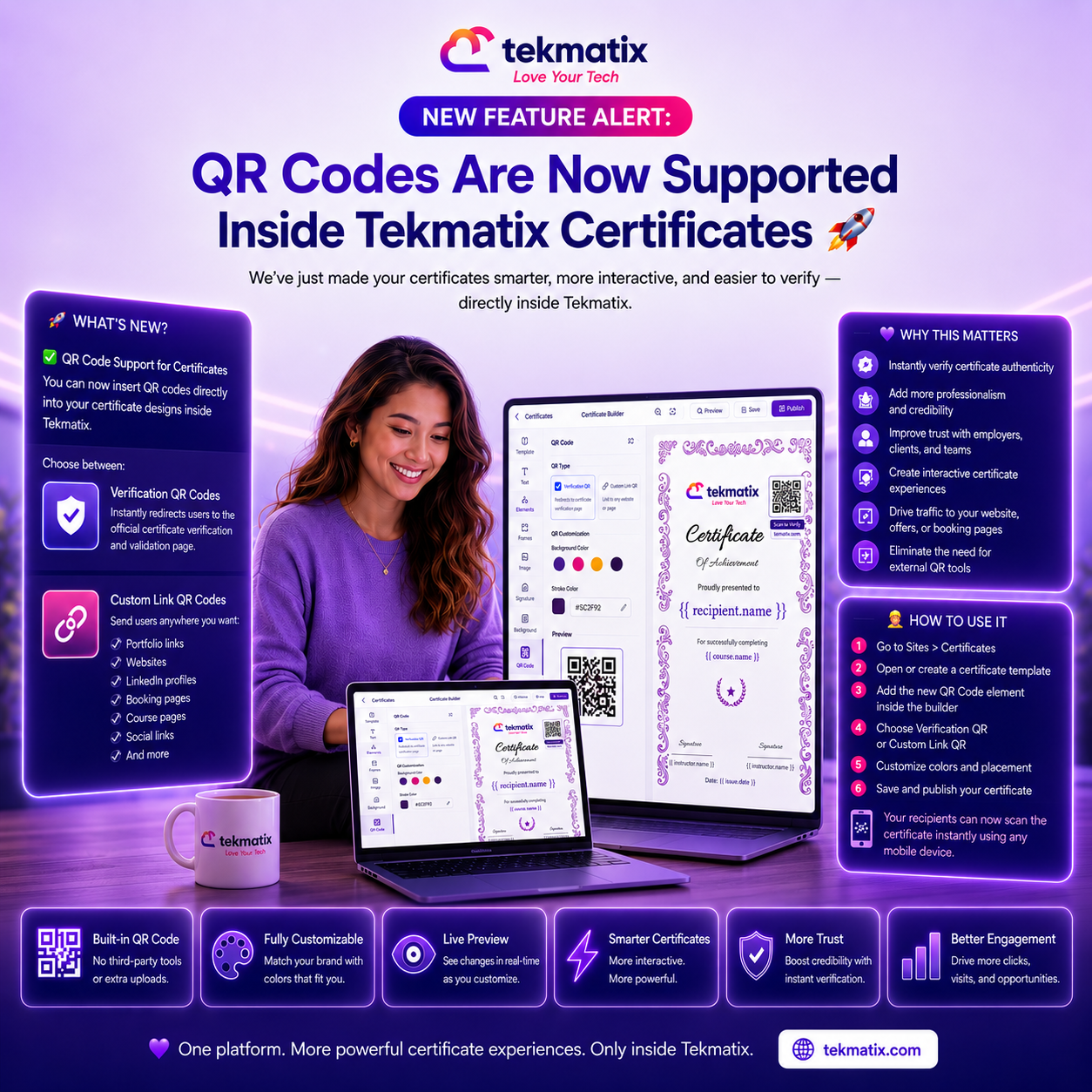
We’ve just made your certificates smarter, more interactive, and easier to verify — directly inside Tekmatix.
You can now add QR codes directly to your certificates without using external QR generators, extra uploads, or third-party tools.
Everything works natively inside the Tekmatix Certificate Builder.
🚀 What’s New?
✅ QR Code Support for Certificates
You can now insert QR codes directly into your certificate designs inside Tekmatix.
Choose between:
Verification QR Codes — Instantly redirects users to the official certificate verification and validation page.
Custom Link QR Codes — Send users anywhere you want:
Portfolio links
Websites
LinkedIn profiles
Booking pages
Course pages
Social links
And more
🎨 Customize Your QR Codes
Match your branding directly inside the certificate editor with:
Background color customization
Stroke color customization
Live preview updates while editing your certificate
💜 Why This Matters
QR-powered certificates help you:
Instantly verify certificate authenticity
Add more professionalism and credibility
Improve trust with employers, clients, and teams
Create interactive certificate experiences
Drive traffic to your website, offers, or booking pages
Eliminate the need for external QR tools
👷 How To Use It
1️⃣ Go to Sites > Certificates inside Tekmatix
2️⃣ Open or create a certificate template
3️⃣ Add the new QR Code element inside the builder
4️⃣ Choose either:
Verification QR
Custom Link QR
5️⃣ Customize the QR colors and placement
6️⃣ Save and publish your certificate
Your recipients can now scan the certificate instantly using any mobile device.
💜 One platform. More powerful certificate experiences. Only inside Tekmatix.

Blogs / Calendars / Campaign
New Feature Alert: QR Codes Are Now Supported Inside Tekmatix Certificates 🚀
New Feature Alert: QR Codes Are Now Supported Inside Tekmatix Certificates 🚀
We’ve just made your certificates smarter, more interactive, and easier to verify — directly inside Tekmatix.
You can now add QR codes directly to your certificates without using external QR generators, extra uploads, or third-party tools.
Everything works natively inside the Tekmatix Certificate Builder.
🚀 What’s New?
✅ QR Code Support for Certificates
You can now insert QR codes directly into your certificate designs inside Tekmatix.
Choose between:
Verification QR Codes — Instantly redirects users to the official certificate verification and validation page.
Custom Link QR Codes — Send users anywhere you want:
Portfolio links
Websites
LinkedIn profiles
Booking pages
Course pages
Social links
And more
🎨 Customize Your QR Codes
Match your branding directly inside the certificate editor with:
Background color customization
Stroke color customization
Live preview updates while editing your certificate
💜 Why This Matters
QR-powered certificates help you:
Instantly verify certificate authenticity
Add more professionalism and credibility
Improve trust with employers, clients, and teams
Create interactive certificate experiences
Drive traffic to your website, offers, or booking pages
Eliminate the need for external QR tools
👷 How To Use It
1️⃣ Go to Sites > Certificates inside Tekmatix
2️⃣ Open or create a certificate template
3️⃣ Add the new QR Code element inside the builder
4️⃣ Choose either:
Verification QR
Custom Link QR
5️⃣ Customize the QR colors and placement
6️⃣ Save and publish your certificate
Your recipients can now scan the certificate instantly using any mobile device.
💜 One platform. More powerful certificate experiences. Only inside Tekmatix.
Course / CRM / Chat Widget
New Feature Alert: QR Codes Are Now Supported Inside Tekmatix Certificates 🚀
New Feature Alert: QR Codes Are Now Supported Inside Tekmatix Certificates 🚀
We’ve just made your certificates smarter, more interactive, and easier to verify — directly inside Tekmatix.
You can now add QR codes directly to your certificates without using external QR generators, extra uploads, or third-party tools.
Everything works natively inside the Tekmatix Certificate Builder.
🚀 What’s New?
✅ QR Code Support for Certificates
You can now insert QR codes directly into your certificate designs inside Tekmatix.
Choose between:
Verification QR Codes — Instantly redirects users to the official certificate verification and validation page.
Custom Link QR Codes — Send users anywhere you want:
Portfolio links
Websites
LinkedIn profiles
Booking pages
Course pages
Social links
And more
🎨 Customize Your QR Codes
Match your branding directly inside the certificate editor with:
Background color customization
Stroke color customization
Live preview updates while editing your certificate
💜 Why This Matters
QR-powered certificates help you:
Instantly verify certificate authenticity
Add more professionalism and credibility
Improve trust with employers, clients, and teams
Create interactive certificate experiences
Drive traffic to your website, offers, or booking pages
Eliminate the need for external QR tools
👷 How To Use It
1️⃣ Go to Sites > Certificates inside Tekmatix
2️⃣ Open or create a certificate template
3️⃣ Add the new QR Code element inside the builder
4️⃣ Choose either:
Verification QR
Custom Link QR
5️⃣ Customize the QR colors and placement
6️⃣ Save and publish your certificate
Your recipients can now scan the certificate instantly using any mobile device.
💜 One platform. More powerful certificate experiences. Only inside Tekmatix.
Compliance / Custom Fields
New Feature Alert: QR Codes Are Now Supported Inside Tekmatix Certificates 🚀
New Feature Alert: QR Codes Are Now Supported Inside Tekmatix Certificates 🚀
We’ve just made your certificates smarter, more interactive, and easier to verify — directly inside Tekmatix.
You can now add QR codes directly to your certificates without using external QR generators, extra uploads, or third-party tools.
Everything works natively inside the Tekmatix Certificate Builder.
🚀 What’s New?
✅ QR Code Support for Certificates
You can now insert QR codes directly into your certificate designs inside Tekmatix.
Choose between:
Verification QR Codes — Instantly redirects users to the official certificate verification and validation page.
Custom Link QR Codes — Send users anywhere you want:
Portfolio links
Websites
LinkedIn profiles
Booking pages
Course pages
Social links
And more
🎨 Customize Your QR Codes
Match your branding directly inside the certificate editor with:
Background color customization
Stroke color customization
Live preview updates while editing your certificate
💜 Why This Matters
QR-powered certificates help you:
Instantly verify certificate authenticity
Add more professionalism and credibility
Improve trust with employers, clients, and teams
Create interactive certificate experiences
Drive traffic to your website, offers, or booking pages
Eliminate the need for external QR tools
👷 How To Use It
1️⃣ Go to Sites > Certificates inside Tekmatix
2️⃣ Open or create a certificate template
3️⃣ Add the new QR Code element inside the builder
4️⃣ Choose either:
Verification QR
Custom Link QR
5️⃣ Customize the QR colors and placement
6️⃣ Save and publish your certificate
Your recipients can now scan the certificate instantly using any mobile device.
💜 One platform. More powerful certificate experiences. Only inside Tekmatix.
Dashboard / Domain
New Feature Alert: QR Codes Are Now Supported Inside Tekmatix Certificates 🚀
New Feature Alert: QR Codes Are Now Supported Inside Tekmatix Certificates 🚀
We’ve just made your certificates smarter, more interactive, and easier to verify — directly inside Tekmatix.
You can now add QR codes directly to your certificates without using external QR generators, extra uploads, or third-party tools.
Everything works natively inside the Tekmatix Certificate Builder.
🚀 What’s New?
✅ QR Code Support for Certificates
You can now insert QR codes directly into your certificate designs inside Tekmatix.
Choose between:
Verification QR Codes — Instantly redirects users to the official certificate verification and validation page.
Custom Link QR Codes — Send users anywhere you want:
Portfolio links
Websites
LinkedIn profiles
Booking pages
Course pages
Social links
And more
🎨 Customize Your QR Codes
Match your branding directly inside the certificate editor with:
Background color customization
Stroke color customization
Live preview updates while editing your certificate
💜 Why This Matters
QR-powered certificates help you:
Instantly verify certificate authenticity
Add more professionalism and credibility
Improve trust with employers, clients, and teams
Create interactive certificate experiences
Drive traffic to your website, offers, or booking pages
Eliminate the need for external QR tools
👷 How To Use It
1️⃣ Go to Sites > Certificates inside Tekmatix
2️⃣ Open or create a certificate template
3️⃣ Add the new QR Code element inside the builder
4️⃣ Choose either:
Verification QR
Custom Link QR
5️⃣ Customize the QR colors and placement
6️⃣ Save and publish your certificate
Your recipients can now scan the certificate instantly using any mobile device.
💜 One platform. More powerful certificate experiences. Only inside Tekmatix.
Email Builder / Email Deliverability
New Feature Alert: QR Codes Are Now Supported Inside Tekmatix Certificates 🚀
New Feature Alert: QR Codes Are Now Supported Inside Tekmatix Certificates 🚀
We’ve just made your certificates smarter, more interactive, and easier to verify — directly inside Tekmatix.
You can now add QR codes directly to your certificates without using external QR generators, extra uploads, or third-party tools.
Everything works natively inside the Tekmatix Certificate Builder.
🚀 What’s New?
✅ QR Code Support for Certificates
You can now insert QR codes directly into your certificate designs inside Tekmatix.
Choose between:
Verification QR Codes — Instantly redirects users to the official certificate verification and validation page.
Custom Link QR Codes — Send users anywhere you want:
Portfolio links
Websites
LinkedIn profiles
Booking pages
Course pages
Social links
And more
🎨 Customize Your QR Codes
Match your branding directly inside the certificate editor with:
Background color customization
Stroke color customization
Live preview updates while editing your certificate
💜 Why This Matters
QR-powered certificates help you:
Instantly verify certificate authenticity
Add more professionalism and credibility
Improve trust with employers, clients, and teams
Create interactive certificate experiences
Drive traffic to your website, offers, or booking pages
Eliminate the need for external QR tools
👷 How To Use It
1️⃣ Go to Sites > Certificates inside Tekmatix
2️⃣ Open or create a certificate template
3️⃣ Add the new QR Code element inside the builder
4️⃣ Choose either:
Verification QR
Custom Link QR
5️⃣ Customize the QR colors and placement
6️⃣ Save and publish your certificate
Your recipients can now scan the certificate instantly using any mobile device.
💜 One platform. More powerful certificate experiences. Only inside Tekmatix.
Form / Funnels
New Feature Alert: QR Codes Are Now Supported Inside Tekmatix Certificates 🚀
New Feature Alert: QR Codes Are Now Supported Inside Tekmatix Certificates 🚀
We’ve just made your certificates smarter, more interactive, and easier to verify — directly inside Tekmatix.
You can now add QR codes directly to your certificates without using external QR generators, extra uploads, or third-party tools.
Everything works natively inside the Tekmatix Certificate Builder.
🚀 What’s New?
✅ QR Code Support for Certificates
You can now insert QR codes directly into your certificate designs inside Tekmatix.
Choose between:
Verification QR Codes — Instantly redirects users to the official certificate verification and validation page.
Custom Link QR Codes — Send users anywhere you want:
Portfolio links
Websites
LinkedIn profiles
Booking pages
Course pages
Social links
And more
🎨 Customize Your QR Codes
Match your branding directly inside the certificate editor with:
Background color customization
Stroke color customization
Live preview updates while editing your certificate
💜 Why This Matters
QR-powered certificates help you:
Instantly verify certificate authenticity
Add more professionalism and credibility
Improve trust with employers, clients, and teams
Create interactive certificate experiences
Drive traffic to your website, offers, or booking pages
Eliminate the need for external QR tools
👷 How To Use It
1️⃣ Go to Sites > Certificates inside Tekmatix
2️⃣ Open or create a certificate template
3️⃣ Add the new QR Code element inside the builder
4️⃣ Choose either:
Verification QR
Custom Link QR
5️⃣ Customize the QR colors and placement
6️⃣ Save and publish your certificate
Your recipients can now scan the certificate instantly using any mobile device.
💜 One platform. More powerful certificate experiences. Only inside Tekmatix.
Google My Business / Integrations
New Feature Alert: QR Codes Are Now Supported Inside Tekmatix Certificates 🚀
New Feature Alert: QR Codes Are Now Supported Inside Tekmatix Certificates 🚀
We’ve just made your certificates smarter, more interactive, and easier to verify — directly inside Tekmatix.
You can now add QR codes directly to your certificates without using external QR generators, extra uploads, or third-party tools.
Everything works natively inside the Tekmatix Certificate Builder.
🚀 What’s New?
✅ QR Code Support for Certificates
You can now insert QR codes directly into your certificate designs inside Tekmatix.
Choose between:
Verification QR Codes — Instantly redirects users to the official certificate verification and validation page.
Custom Link QR Codes — Send users anywhere you want:
Portfolio links
Websites
LinkedIn profiles
Booking pages
Course pages
Social links
And more
🎨 Customize Your QR Codes
Match your branding directly inside the certificate editor with:
Background color customization
Stroke color customization
Live preview updates while editing your certificate
💜 Why This Matters
QR-powered certificates help you:
Instantly verify certificate authenticity
Add more professionalism and credibility
Improve trust with employers, clients, and teams
Create interactive certificate experiences
Drive traffic to your website, offers, or booking pages
Eliminate the need for external QR tools
👷 How To Use It
1️⃣ Go to Sites > Certificates inside Tekmatix
2️⃣ Open or create a certificate template
3️⃣ Add the new QR Code element inside the builder
4️⃣ Choose either:
Verification QR
Custom Link QR
5️⃣ Customize the QR colors and placement
6️⃣ Save and publish your certificate
Your recipients can now scan the certificate instantly using any mobile device.
💜 One platform. More powerful certificate experiences. Only inside Tekmatix.
Invoices / LC Email / LC Phone
New Feature Alert: QR Codes Are Now Supported Inside Tekmatix Certificates 🚀
New Feature Alert: QR Codes Are Now Supported Inside Tekmatix Certificates 🚀
We’ve just made your certificates smarter, more interactive, and easier to verify — directly inside Tekmatix.
You can now add QR codes directly to your certificates without using external QR generators, extra uploads, or third-party tools.
Everything works natively inside the Tekmatix Certificate Builder.
🚀 What’s New?
✅ QR Code Support for Certificates
You can now insert QR codes directly into your certificate designs inside Tekmatix.
Choose between:
Verification QR Codes — Instantly redirects users to the official certificate verification and validation page.
Custom Link QR Codes — Send users anywhere you want:
Portfolio links
Websites
LinkedIn profiles
Booking pages
Course pages
Social links
And more
🎨 Customize Your QR Codes
Match your branding directly inside the certificate editor with:
Background color customization
Stroke color customization
Live preview updates while editing your certificate
💜 Why This Matters
QR-powered certificates help you:
Instantly verify certificate authenticity
Add more professionalism and credibility
Improve trust with employers, clients, and teams
Create interactive certificate experiences
Drive traffic to your website, offers, or booking pages
Eliminate the need for external QR tools
👷 How To Use It
1️⃣ Go to Sites > Certificates inside Tekmatix
2️⃣ Open or create a certificate template
3️⃣ Add the new QR Code element inside the builder
4️⃣ Choose either:
Verification QR
Custom Link QR
5️⃣ Customize the QR colors and placement
6️⃣ Save and publish your certificate
Your recipients can now scan the certificate instantly using any mobile device.
💜 One platform. More powerful certificate experiences. Only inside Tekmatix.
Memberships Area
New Feature Alert: QR Codes Are Now Supported Inside Tekmatix Certificates 🚀
New Feature Alert: QR Codes Are Now Supported Inside Tekmatix Certificates 🚀
We’ve just made your certificates smarter, more interactive, and easier to verify — directly inside Tekmatix.
You can now add QR codes directly to your certificates without using external QR generators, extra uploads, or third-party tools.
Everything works natively inside the Tekmatix Certificate Builder.
🚀 What’s New?
✅ QR Code Support for Certificates
You can now insert QR codes directly into your certificate designs inside Tekmatix.
Choose between:
Verification QR Codes — Instantly redirects users to the official certificate verification and validation page.
Custom Link QR Codes — Send users anywhere you want:
Portfolio links
Websites
LinkedIn profiles
Booking pages
Course pages
Social links
And more
🎨 Customize Your QR Codes
Match your branding directly inside the certificate editor with:
Background color customization
Stroke color customization
Live preview updates while editing your certificate
💜 Why This Matters
QR-powered certificates help you:
Instantly verify certificate authenticity
Add more professionalism and credibility
Improve trust with employers, clients, and teams
Create interactive certificate experiences
Drive traffic to your website, offers, or booking pages
Eliminate the need for external QR tools
👷 How To Use It
1️⃣ Go to Sites > Certificates inside Tekmatix
2️⃣ Open or create a certificate template
3️⃣ Add the new QR Code element inside the builder
4️⃣ Choose either:
Verification QR
Custom Link QR
5️⃣ Customize the QR colors and placement
6️⃣ Save and publish your certificate
Your recipients can now scan the certificate instantly using any mobile device.
💜 One platform. More powerful certificate experiences. Only inside Tekmatix.
Opportunities & Pipeline / Payment
New Feature Alert: QR Codes Are Now Supported Inside Tekmatix Certificates 🚀
New Feature Alert: QR Codes Are Now Supported Inside Tekmatix Certificates 🚀
We’ve just made your certificates smarter, more interactive, and easier to verify — directly inside Tekmatix.
You can now add QR codes directly to your certificates without using external QR generators, extra uploads, or third-party tools.
Everything works natively inside the Tekmatix Certificate Builder.
🚀 What’s New?
✅ QR Code Support for Certificates
You can now insert QR codes directly into your certificate designs inside Tekmatix.
Choose between:
Verification QR Codes — Instantly redirects users to the official certificate verification and validation page.
Custom Link QR Codes — Send users anywhere you want:
Portfolio links
Websites
LinkedIn profiles
Booking pages
Course pages
Social links
And more
🎨 Customize Your QR Codes
Match your branding directly inside the certificate editor with:
Background color customization
Stroke color customization
Live preview updates while editing your certificate
💜 Why This Matters
QR-powered certificates help you:
Instantly verify certificate authenticity
Add more professionalism and credibility
Improve trust with employers, clients, and teams
Create interactive certificate experiences
Drive traffic to your website, offers, or booking pages
Eliminate the need for external QR tools
👷 How To Use It
1️⃣ Go to Sites > Certificates inside Tekmatix
2️⃣ Open or create a certificate template
3️⃣ Add the new QR Code element inside the builder
4️⃣ Choose either:
Verification QR
Custom Link QR
5️⃣ Customize the QR colors and placement
6️⃣ Save and publish your certificate
Your recipients can now scan the certificate instantly using any mobile device.
💜 One platform. More powerful certificate experiences. Only inside Tekmatix.
Reputation Management / Review Request
New Feature Alert: QR Codes Are Now Supported Inside Tekmatix Certificates 🚀
New Feature Alert: QR Codes Are Now Supported Inside Tekmatix Certificates 🚀
We’ve just made your certificates smarter, more interactive, and easier to verify — directly inside Tekmatix.
You can now add QR codes directly to your certificates without using external QR generators, extra uploads, or third-party tools.
Everything works natively inside the Tekmatix Certificate Builder.
🚀 What’s New?
✅ QR Code Support for Certificates
You can now insert QR codes directly into your certificate designs inside Tekmatix.
Choose between:
Verification QR Codes — Instantly redirects users to the official certificate verification and validation page.
Custom Link QR Codes — Send users anywhere you want:
Portfolio links
Websites
LinkedIn profiles
Booking pages
Course pages
Social links
And more
🎨 Customize Your QR Codes
Match your branding directly inside the certificate editor with:
Background color customization
Stroke color customization
Live preview updates while editing your certificate
💜 Why This Matters
QR-powered certificates help you:
Instantly verify certificate authenticity
Add more professionalism and credibility
Improve trust with employers, clients, and teams
Create interactive certificate experiences
Drive traffic to your website, offers, or booking pages
Eliminate the need for external QR tools
👷 How To Use It
1️⃣ Go to Sites > Certificates inside Tekmatix
2️⃣ Open or create a certificate template
3️⃣ Add the new QR Code element inside the builder
4️⃣ Choose either:
Verification QR
Custom Link QR
5️⃣ Customize the QR colors and placement
6️⃣ Save and publish your certificate
Your recipients can now scan the certificate instantly using any mobile device.
💜 One platform. More powerful certificate experiences. Only inside Tekmatix.
Settings / SMS / SMTP Providers
New Feature Alert: QR Codes Are Now Supported Inside Tekmatix Certificates 🚀
New Feature Alert: QR Codes Are Now Supported Inside Tekmatix Certificates 🚀
We’ve just made your certificates smarter, more interactive, and easier to verify — directly inside Tekmatix.
You can now add QR codes directly to your certificates without using external QR generators, extra uploads, or third-party tools.
Everything works natively inside the Tekmatix Certificate Builder.
🚀 What’s New?
✅ QR Code Support for Certificates
You can now insert QR codes directly into your certificate designs inside Tekmatix.
Choose between:
Verification QR Codes — Instantly redirects users to the official certificate verification and validation page.
Custom Link QR Codes — Send users anywhere you want:
Portfolio links
Websites
LinkedIn profiles
Booking pages
Course pages
Social links
And more
🎨 Customize Your QR Codes
Match your branding directly inside the certificate editor with:
Background color customization
Stroke color customization
Live preview updates while editing your certificate
💜 Why This Matters
QR-powered certificates help you:
Instantly verify certificate authenticity
Add more professionalism and credibility
Improve trust with employers, clients, and teams
Create interactive certificate experiences
Drive traffic to your website, offers, or booking pages
Eliminate the need for external QR tools
👷 How To Use It
1️⃣ Go to Sites > Certificates inside Tekmatix
2️⃣ Open or create a certificate template
3️⃣ Add the new QR Code element inside the builder
4️⃣ Choose either:
Verification QR
Custom Link QR
5️⃣ Customize the QR colors and placement
6️⃣ Save and publish your certificate
Your recipients can now scan the certificate instantly using any mobile device.
💜 One platform. More powerful certificate experiences. Only inside Tekmatix.
Website / WordPress / Workflow
New Feature Alert: QR Codes Are Now Supported Inside Tekmatix Certificates 🚀
New Feature Alert: QR Codes Are Now Supported Inside Tekmatix Certificates 🚀
We’ve just made your certificates smarter, more interactive, and easier to verify — directly inside Tekmatix.
You can now add QR codes directly to your certificates without using external QR generators, extra uploads, or third-party tools.
Everything works natively inside the Tekmatix Certificate Builder.
🚀 What’s New?
✅ QR Code Support for Certificates
You can now insert QR codes directly into your certificate designs inside Tekmatix.
Choose between:
Verification QR Codes — Instantly redirects users to the official certificate verification and validation page.
Custom Link QR Codes — Send users anywhere you want:
Portfolio links
Websites
LinkedIn profiles
Booking pages
Course pages
Social links
And more
🎨 Customize Your QR Codes
Match your branding directly inside the certificate editor with:
Background color customization
Stroke color customization
Live preview updates while editing your certificate
💜 Why This Matters
QR-powered certificates help you:
Instantly verify certificate authenticity
Add more professionalism and credibility
Improve trust with employers, clients, and teams
Create interactive certificate experiences
Drive traffic to your website, offers, or booking pages
Eliminate the need for external QR tools
👷 How To Use It
1️⃣ Go to Sites > Certificates inside Tekmatix
2️⃣ Open or create a certificate template
3️⃣ Add the new QR Code element inside the builder
4️⃣ Choose either:
Verification QR
Custom Link QR
5️⃣ Customize the QR colors and placement
6️⃣ Save and publish your certificate
Your recipients can now scan the certificate instantly using any mobile device.
💜 One platform. More powerful certificate experiences. Only inside Tekmatix.
Copyright © 2022 TekMatix. All rights reserved | [email protected]