
TekMatix Help Articles

Afilliates / Appointment

New QR Code Sharing in Funnel Builder | Tekmatix
📝 Overview
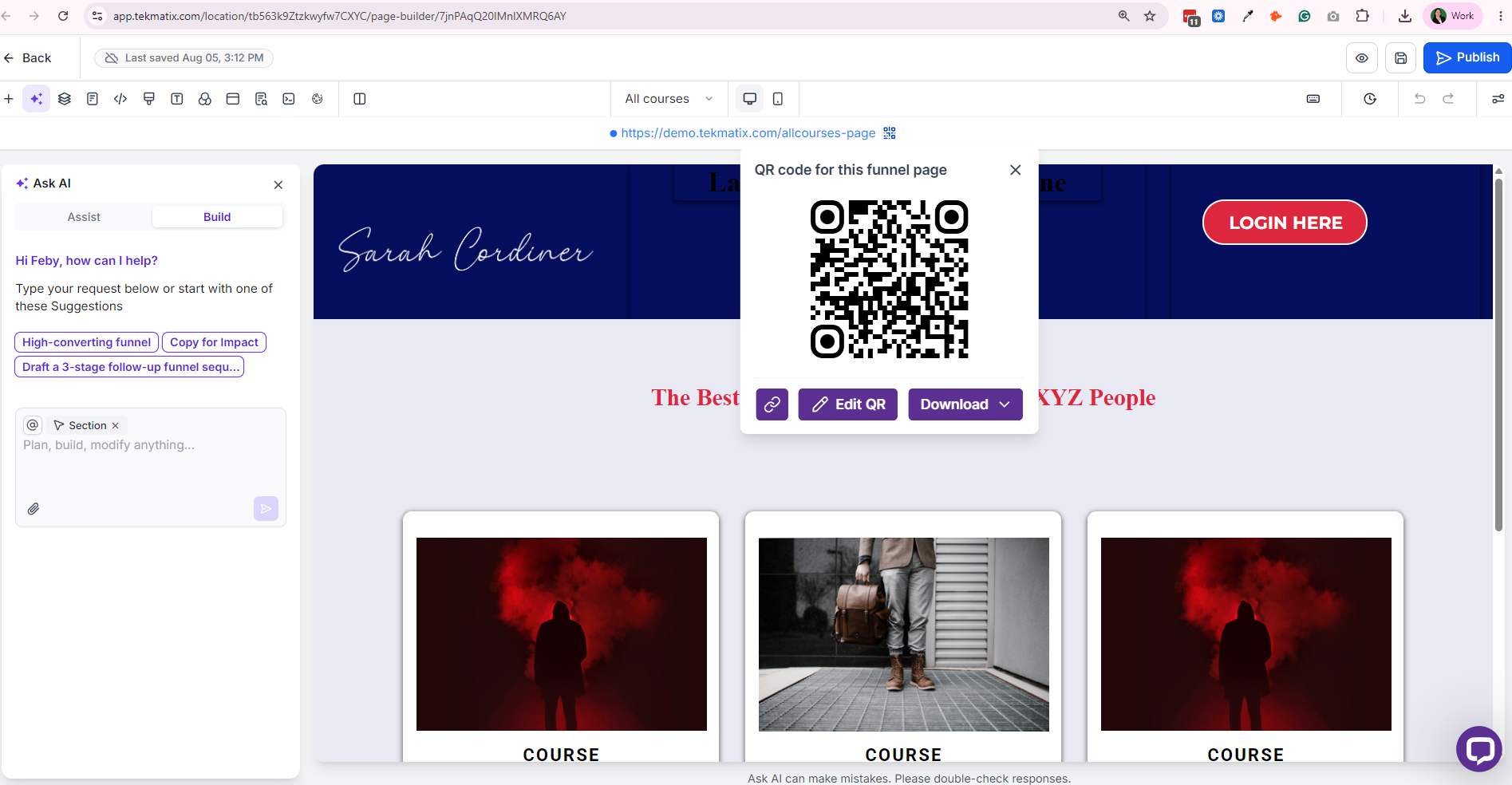
We've added QR code sharing directly inside Funnel Builder, making it easier than ever to create and download QR codes for your funnel pages without leaving your workflow.
With this update, you can instantly generate a QR code linked to your current funnel step, helping you connect online and offline marketing efforts more efficiently.
🆕 What's Improved
Generate a QR code directly from Funnel Builder.
QR codes are automatically linked to the current funnel step.
Download QR codes in PNG, SVG, or PDF formats.
Select Edit QR to access additional customization options.
QR code generation is available when a custom domain is connected or the funnel is hosted.
🔍 How to Access
Open a funnel in Funnel Builder.
Locate the Funnel URL at the top of the page.
Click the QR Code icon next to the URL.
Download your QR code or select Edit QR for further customization.
🎯 Why It Matters
Saves time by eliminating the need for third-party QR code generators.
Reduces the risk of linking to the wrong page or funnel step.
Makes it easier to promote funnels through print materials, events, product packaging, signage, business cards, and other offline channels.
Keeps QR code creation within the same workflow where you build and manage your funnels.
Helps bridge the gap between offline marketing and digital conversions.
QR codes are a simple but powerful way to drive traffic to your funnels, and now creating them is built directly into the TekMatix Funnel Builder experience.

Blogs / Calendars / Campaign
New QR Code Sharing in Funnel Builder | Tekmatix
📝 Overview
We've added QR code sharing directly inside Funnel Builder, making it easier than ever to create and download QR codes for your funnel pages without leaving your workflow.
With this update, you can instantly generate a QR code linked to your current funnel step, helping you connect online and offline marketing efforts more efficiently.
🆕 What's Improved
Generate a QR code directly from Funnel Builder.
QR codes are automatically linked to the current funnel step.
Download QR codes in PNG, SVG, or PDF formats.
Select Edit QR to access additional customization options.
QR code generation is available when a custom domain is connected or the funnel is hosted.
🔍 How to Access
Open a funnel in Funnel Builder.
Locate the Funnel URL at the top of the page.
Click the QR Code icon next to the URL.
Download your QR code or select Edit QR for further customization.
🎯 Why It Matters
Saves time by eliminating the need for third-party QR code generators.
Reduces the risk of linking to the wrong page or funnel step.
Makes it easier to promote funnels through print materials, events, product packaging, signage, business cards, and other offline channels.
Keeps QR code creation within the same workflow where you build and manage your funnels.
Helps bridge the gap between offline marketing and digital conversions.
QR codes are a simple but powerful way to drive traffic to your funnels, and now creating them is built directly into the TekMatix Funnel Builder experience.
Course / CRM / Chat Widget
New QR Code Sharing in Funnel Builder | Tekmatix
📝 Overview
We've added QR code sharing directly inside Funnel Builder, making it easier than ever to create and download QR codes for your funnel pages without leaving your workflow.
With this update, you can instantly generate a QR code linked to your current funnel step, helping you connect online and offline marketing efforts more efficiently.
🆕 What's Improved
Generate a QR code directly from Funnel Builder.
QR codes are automatically linked to the current funnel step.
Download QR codes in PNG, SVG, or PDF formats.
Select Edit QR to access additional customization options.
QR code generation is available when a custom domain is connected or the funnel is hosted.
🔍 How to Access
Open a funnel in Funnel Builder.
Locate the Funnel URL at the top of the page.
Click the QR Code icon next to the URL.
Download your QR code or select Edit QR for further customization.
🎯 Why It Matters
Saves time by eliminating the need for third-party QR code generators.
Reduces the risk of linking to the wrong page or funnel step.
Makes it easier to promote funnels through print materials, events, product packaging, signage, business cards, and other offline channels.
Keeps QR code creation within the same workflow where you build and manage your funnels.
Helps bridge the gap between offline marketing and digital conversions.
QR codes are a simple but powerful way to drive traffic to your funnels, and now creating them is built directly into the TekMatix Funnel Builder experience.
Compliance / Custom Fields
New QR Code Sharing in Funnel Builder | Tekmatix
📝 Overview
We've added QR code sharing directly inside Funnel Builder, making it easier than ever to create and download QR codes for your funnel pages without leaving your workflow.
With this update, you can instantly generate a QR code linked to your current funnel step, helping you connect online and offline marketing efforts more efficiently.
🆕 What's Improved
Generate a QR code directly from Funnel Builder.
QR codes are automatically linked to the current funnel step.
Download QR codes in PNG, SVG, or PDF formats.
Select Edit QR to access additional customization options.
QR code generation is available when a custom domain is connected or the funnel is hosted.
🔍 How to Access
Open a funnel in Funnel Builder.
Locate the Funnel URL at the top of the page.
Click the QR Code icon next to the URL.
Download your QR code or select Edit QR for further customization.
🎯 Why It Matters
Saves time by eliminating the need for third-party QR code generators.
Reduces the risk of linking to the wrong page or funnel step.
Makes it easier to promote funnels through print materials, events, product packaging, signage, business cards, and other offline channels.
Keeps QR code creation within the same workflow where you build and manage your funnels.
Helps bridge the gap between offline marketing and digital conversions.
QR codes are a simple but powerful way to drive traffic to your funnels, and now creating them is built directly into the TekMatix Funnel Builder experience.
Dashboard / Domain
New QR Code Sharing in Funnel Builder | Tekmatix
📝 Overview
We've added QR code sharing directly inside Funnel Builder, making it easier than ever to create and download QR codes for your funnel pages without leaving your workflow.
With this update, you can instantly generate a QR code linked to your current funnel step, helping you connect online and offline marketing efforts more efficiently.
🆕 What's Improved
Generate a QR code directly from Funnel Builder.
QR codes are automatically linked to the current funnel step.
Download QR codes in PNG, SVG, or PDF formats.
Select Edit QR to access additional customization options.
QR code generation is available when a custom domain is connected or the funnel is hosted.
🔍 How to Access
Open a funnel in Funnel Builder.
Locate the Funnel URL at the top of the page.
Click the QR Code icon next to the URL.
Download your QR code or select Edit QR for further customization.
🎯 Why It Matters
Saves time by eliminating the need for third-party QR code generators.
Reduces the risk of linking to the wrong page or funnel step.
Makes it easier to promote funnels through print materials, events, product packaging, signage, business cards, and other offline channels.
Keeps QR code creation within the same workflow where you build and manage your funnels.
Helps bridge the gap between offline marketing and digital conversions.
QR codes are a simple but powerful way to drive traffic to your funnels, and now creating them is built directly into the TekMatix Funnel Builder experience.
Email Builder / Email Deliverability
New QR Code Sharing in Funnel Builder | Tekmatix
📝 Overview
We've added QR code sharing directly inside Funnel Builder, making it easier than ever to create and download QR codes for your funnel pages without leaving your workflow.
With this update, you can instantly generate a QR code linked to your current funnel step, helping you connect online and offline marketing efforts more efficiently.
🆕 What's Improved
Generate a QR code directly from Funnel Builder.
QR codes are automatically linked to the current funnel step.
Download QR codes in PNG, SVG, or PDF formats.
Select Edit QR to access additional customization options.
QR code generation is available when a custom domain is connected or the funnel is hosted.
🔍 How to Access
Open a funnel in Funnel Builder.
Locate the Funnel URL at the top of the page.
Click the QR Code icon next to the URL.
Download your QR code or select Edit QR for further customization.
🎯 Why It Matters
Saves time by eliminating the need for third-party QR code generators.
Reduces the risk of linking to the wrong page or funnel step.
Makes it easier to promote funnels through print materials, events, product packaging, signage, business cards, and other offline channels.
Keeps QR code creation within the same workflow where you build and manage your funnels.
Helps bridge the gap between offline marketing and digital conversions.
QR codes are a simple but powerful way to drive traffic to your funnels, and now creating them is built directly into the TekMatix Funnel Builder experience.
Form / Funnels
New QR Code Sharing in Funnel Builder | Tekmatix
📝 Overview
We've added QR code sharing directly inside Funnel Builder, making it easier than ever to create and download QR codes for your funnel pages without leaving your workflow.
With this update, you can instantly generate a QR code linked to your current funnel step, helping you connect online and offline marketing efforts more efficiently.
🆕 What's Improved
Generate a QR code directly from Funnel Builder.
QR codes are automatically linked to the current funnel step.
Download QR codes in PNG, SVG, or PDF formats.
Select Edit QR to access additional customization options.
QR code generation is available when a custom domain is connected or the funnel is hosted.
🔍 How to Access
Open a funnel in Funnel Builder.
Locate the Funnel URL at the top of the page.
Click the QR Code icon next to the URL.
Download your QR code or select Edit QR for further customization.
🎯 Why It Matters
Saves time by eliminating the need for third-party QR code generators.
Reduces the risk of linking to the wrong page or funnel step.
Makes it easier to promote funnels through print materials, events, product packaging, signage, business cards, and other offline channels.
Keeps QR code creation within the same workflow where you build and manage your funnels.
Helps bridge the gap between offline marketing and digital conversions.
QR codes are a simple but powerful way to drive traffic to your funnels, and now creating them is built directly into the TekMatix Funnel Builder experience.
Google My Business / Integrations
New QR Code Sharing in Funnel Builder | Tekmatix
📝 Overview
We've added QR code sharing directly inside Funnel Builder, making it easier than ever to create and download QR codes for your funnel pages without leaving your workflow.
With this update, you can instantly generate a QR code linked to your current funnel step, helping you connect online and offline marketing efforts more efficiently.
🆕 What's Improved
Generate a QR code directly from Funnel Builder.
QR codes are automatically linked to the current funnel step.
Download QR codes in PNG, SVG, or PDF formats.
Select Edit QR to access additional customization options.
QR code generation is available when a custom domain is connected or the funnel is hosted.
🔍 How to Access
Open a funnel in Funnel Builder.
Locate the Funnel URL at the top of the page.
Click the QR Code icon next to the URL.
Download your QR code or select Edit QR for further customization.
🎯 Why It Matters
Saves time by eliminating the need for third-party QR code generators.
Reduces the risk of linking to the wrong page or funnel step.
Makes it easier to promote funnels through print materials, events, product packaging, signage, business cards, and other offline channels.
Keeps QR code creation within the same workflow where you build and manage your funnels.
Helps bridge the gap between offline marketing and digital conversions.
QR codes are a simple but powerful way to drive traffic to your funnels, and now creating them is built directly into the TekMatix Funnel Builder experience.
Invoices / LC Email / LC Phone
New QR Code Sharing in Funnel Builder | Tekmatix
📝 Overview
We've added QR code sharing directly inside Funnel Builder, making it easier than ever to create and download QR codes for your funnel pages without leaving your workflow.
With this update, you can instantly generate a QR code linked to your current funnel step, helping you connect online and offline marketing efforts more efficiently.
🆕 What's Improved
Generate a QR code directly from Funnel Builder.
QR codes are automatically linked to the current funnel step.
Download QR codes in PNG, SVG, or PDF formats.
Select Edit QR to access additional customization options.
QR code generation is available when a custom domain is connected or the funnel is hosted.
🔍 How to Access
Open a funnel in Funnel Builder.
Locate the Funnel URL at the top of the page.
Click the QR Code icon next to the URL.
Download your QR code or select Edit QR for further customization.
🎯 Why It Matters
Saves time by eliminating the need for third-party QR code generators.
Reduces the risk of linking to the wrong page or funnel step.
Makes it easier to promote funnels through print materials, events, product packaging, signage, business cards, and other offline channels.
Keeps QR code creation within the same workflow where you build and manage your funnels.
Helps bridge the gap between offline marketing and digital conversions.
QR codes are a simple but powerful way to drive traffic to your funnels, and now creating them is built directly into the TekMatix Funnel Builder experience.
Memberships Area
New QR Code Sharing in Funnel Builder | Tekmatix
📝 Overview
We've added QR code sharing directly inside Funnel Builder, making it easier than ever to create and download QR codes for your funnel pages without leaving your workflow.
With this update, you can instantly generate a QR code linked to your current funnel step, helping you connect online and offline marketing efforts more efficiently.
🆕 What's Improved
Generate a QR code directly from Funnel Builder.
QR codes are automatically linked to the current funnel step.
Download QR codes in PNG, SVG, or PDF formats.
Select Edit QR to access additional customization options.
QR code generation is available when a custom domain is connected or the funnel is hosted.
🔍 How to Access
Open a funnel in Funnel Builder.
Locate the Funnel URL at the top of the page.
Click the QR Code icon next to the URL.
Download your QR code or select Edit QR for further customization.
🎯 Why It Matters
Saves time by eliminating the need for third-party QR code generators.
Reduces the risk of linking to the wrong page or funnel step.
Makes it easier to promote funnels through print materials, events, product packaging, signage, business cards, and other offline channels.
Keeps QR code creation within the same workflow where you build and manage your funnels.
Helps bridge the gap between offline marketing and digital conversions.
QR codes are a simple but powerful way to drive traffic to your funnels, and now creating them is built directly into the TekMatix Funnel Builder experience.
Opportunities & Pipeline / Payment
New QR Code Sharing in Funnel Builder | Tekmatix
📝 Overview
We've added QR code sharing directly inside Funnel Builder, making it easier than ever to create and download QR codes for your funnel pages without leaving your workflow.
With this update, you can instantly generate a QR code linked to your current funnel step, helping you connect online and offline marketing efforts more efficiently.
🆕 What's Improved
Generate a QR code directly from Funnel Builder.
QR codes are automatically linked to the current funnel step.
Download QR codes in PNG, SVG, or PDF formats.
Select Edit QR to access additional customization options.
QR code generation is available when a custom domain is connected or the funnel is hosted.
🔍 How to Access
Open a funnel in Funnel Builder.
Locate the Funnel URL at the top of the page.
Click the QR Code icon next to the URL.
Download your QR code or select Edit QR for further customization.
🎯 Why It Matters
Saves time by eliminating the need for third-party QR code generators.
Reduces the risk of linking to the wrong page or funnel step.
Makes it easier to promote funnels through print materials, events, product packaging, signage, business cards, and other offline channels.
Keeps QR code creation within the same workflow where you build and manage your funnels.
Helps bridge the gap between offline marketing and digital conversions.
QR codes are a simple but powerful way to drive traffic to your funnels, and now creating them is built directly into the TekMatix Funnel Builder experience.
Reputation Management / Review Request
New QR Code Sharing in Funnel Builder | Tekmatix
📝 Overview
We've added QR code sharing directly inside Funnel Builder, making it easier than ever to create and download QR codes for your funnel pages without leaving your workflow.
With this update, you can instantly generate a QR code linked to your current funnel step, helping you connect online and offline marketing efforts more efficiently.
🆕 What's Improved
Generate a QR code directly from Funnel Builder.
QR codes are automatically linked to the current funnel step.
Download QR codes in PNG, SVG, or PDF formats.
Select Edit QR to access additional customization options.
QR code generation is available when a custom domain is connected or the funnel is hosted.
🔍 How to Access
Open a funnel in Funnel Builder.
Locate the Funnel URL at the top of the page.
Click the QR Code icon next to the URL.
Download your QR code or select Edit QR for further customization.
🎯 Why It Matters
Saves time by eliminating the need for third-party QR code generators.
Reduces the risk of linking to the wrong page or funnel step.
Makes it easier to promote funnels through print materials, events, product packaging, signage, business cards, and other offline channels.
Keeps QR code creation within the same workflow where you build and manage your funnels.
Helps bridge the gap between offline marketing and digital conversions.
QR codes are a simple but powerful way to drive traffic to your funnels, and now creating them is built directly into the TekMatix Funnel Builder experience.
Settings / SMS / SMTP Providers
New QR Code Sharing in Funnel Builder | Tekmatix
📝 Overview
We've added QR code sharing directly inside Funnel Builder, making it easier than ever to create and download QR codes for your funnel pages without leaving your workflow.
With this update, you can instantly generate a QR code linked to your current funnel step, helping you connect online and offline marketing efforts more efficiently.
🆕 What's Improved
Generate a QR code directly from Funnel Builder.
QR codes are automatically linked to the current funnel step.
Download QR codes in PNG, SVG, or PDF formats.
Select Edit QR to access additional customization options.
QR code generation is available when a custom domain is connected or the funnel is hosted.
🔍 How to Access
Open a funnel in Funnel Builder.
Locate the Funnel URL at the top of the page.
Click the QR Code icon next to the URL.
Download your QR code or select Edit QR for further customization.
🎯 Why It Matters
Saves time by eliminating the need for third-party QR code generators.
Reduces the risk of linking to the wrong page or funnel step.
Makes it easier to promote funnels through print materials, events, product packaging, signage, business cards, and other offline channels.
Keeps QR code creation within the same workflow where you build and manage your funnels.
Helps bridge the gap between offline marketing and digital conversions.
QR codes are a simple but powerful way to drive traffic to your funnels, and now creating them is built directly into the TekMatix Funnel Builder experience.
Website / WordPress / Workflow
New QR Code Sharing in Funnel Builder | Tekmatix
📝 Overview
We've added QR code sharing directly inside Funnel Builder, making it easier than ever to create and download QR codes for your funnel pages without leaving your workflow.
With this update, you can instantly generate a QR code linked to your current funnel step, helping you connect online and offline marketing efforts more efficiently.
🆕 What's Improved
Generate a QR code directly from Funnel Builder.
QR codes are automatically linked to the current funnel step.
Download QR codes in PNG, SVG, or PDF formats.
Select Edit QR to access additional customization options.
QR code generation is available when a custom domain is connected or the funnel is hosted.
🔍 How to Access
Open a funnel in Funnel Builder.
Locate the Funnel URL at the top of the page.
Click the QR Code icon next to the URL.
Download your QR code or select Edit QR for further customization.
🎯 Why It Matters
Saves time by eliminating the need for third-party QR code generators.
Reduces the risk of linking to the wrong page or funnel step.
Makes it easier to promote funnels through print materials, events, product packaging, signage, business cards, and other offline channels.
Keeps QR code creation within the same workflow where you build and manage your funnels.
Helps bridge the gap between offline marketing and digital conversions.
QR codes are a simple but powerful way to drive traffic to your funnels, and now creating them is built directly into the TekMatix Funnel Builder experience.
Copyright © 2022 TekMatix. All rights reserved | [email protected]