
TekMatix Blog & Help Articles
Use the search bar below to look for help articles you need.
How to Use WhatsApp Notifications for Rental Bookings in Tekmatix
Overview
Tekmatix Rentals now supports WhatsApp notifications, giving you a faster and more reliable way to communicate with customers and team members throughout the rental booking process.
You can now automatically send important rental updates through WhatsApp, helping ensure messages are seen quickly and acted on.
Whether you need to confirm a booking, send a reminder, notify someone about a cancellation or follow up after a rental, WhatsApp notifications can now be added directly to your rental communication workflow.
What’s New?
WhatsApp Support for Rental Notifications
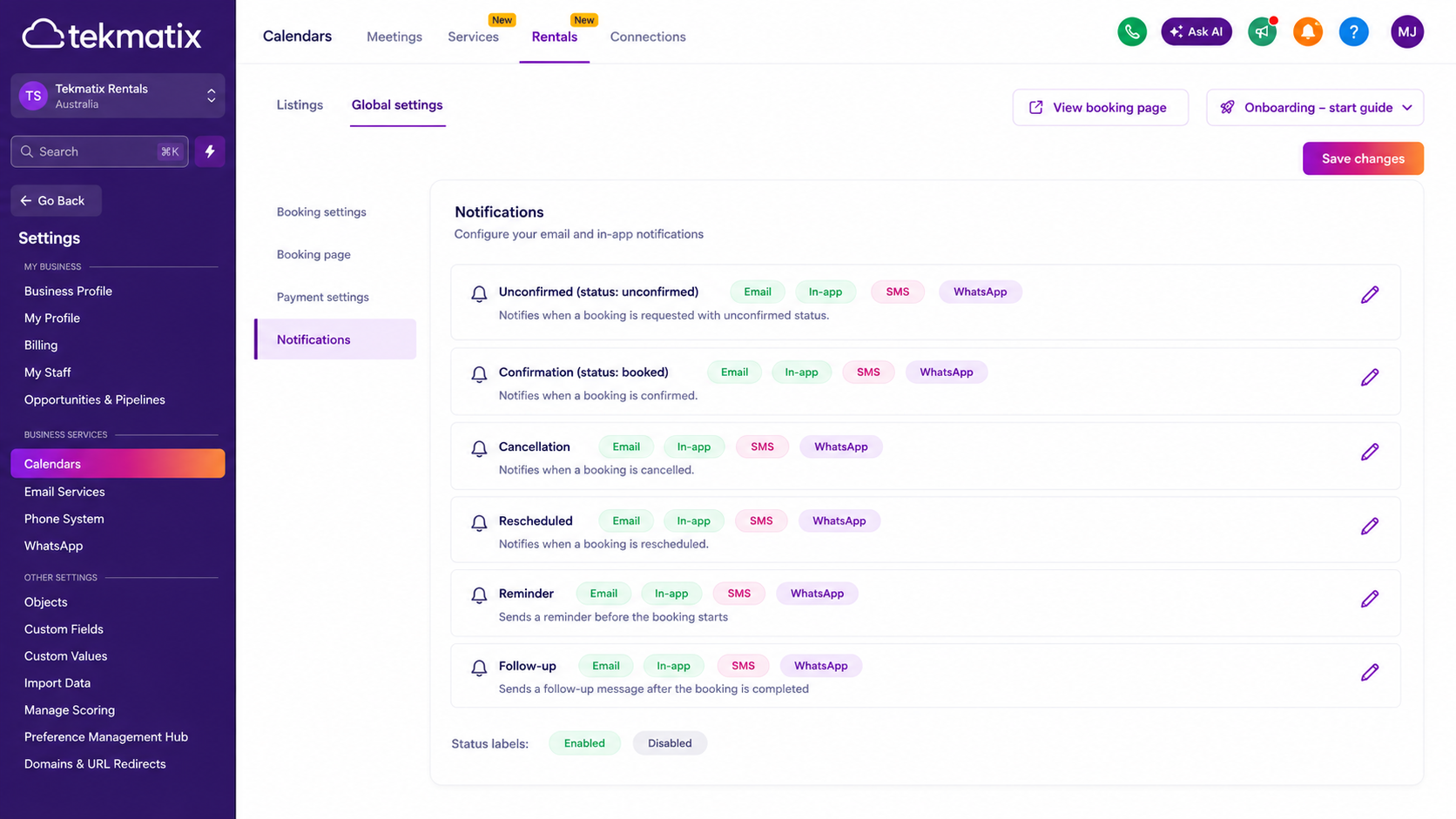
WhatsApp notifications can now be enabled across all major rental booking events, including:
• Unconfirmed bookings
• Confirmed bookings
• Cancellations
• Rescheduled bookings
• Reminders
• Follow-up messages
You can enable or disable WhatsApp individually for each notification type, giving you complete control over when messages are sent.
Flexible Recipient Options
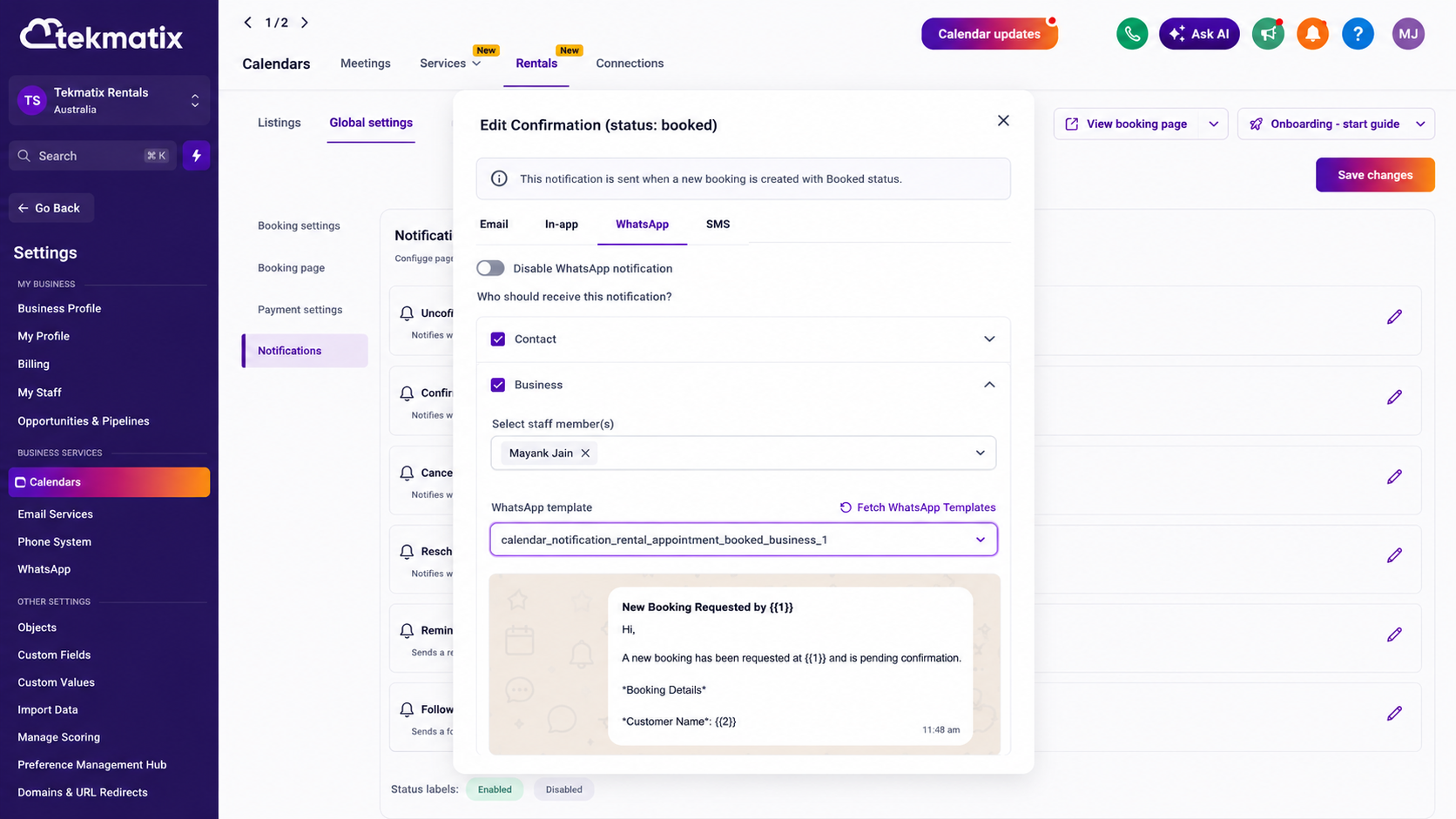
You can choose whether each WhatsApp notification is sent to:
• The contact making the booking
• The business managing the rental
• Both recipients, where required
This makes it easier to keep customers informed while also ensuring your internal team receives the updates they need.
Separate Templates for Contacts and Businesses
Tekmatix allows you to assign different WhatsApp message templates depending on the recipient.
For example, a customer may receive a friendly booking confirmation containing arrival details, while the business receives an internal notification with booking and customer information.
This gives you greater control over the wording, tone and information included in each message.
Choose or Create WhatsApp Templates
Each notification type includes a default template to help you get started quickly.
You can:
• Use the default notification template
• Select an existing approved WhatsApp template
• Create a new template using the built-in template builder
• Refresh your available templates using the Fetch WhatsApp Templates option
WhatsApp templates may need to be approved before they can be used for automated notifications.
Send Test WhatsApp Notifications
Before activating a notification for live rental bookings, you can send a test message.
The Send Test WhatsApp Notification feature allows you to preview the message, check the formatting and confirm that the correct information is being displayed.
This helps you identify any issues before the notification is sent to real customers or team members.
How to Enable WhatsApp Notifications for Rentals
To set up WhatsApp rental notifications:
Go to Calendar Settings.
Select Rentals.
Open Global Settings.
Go to Notifications.
Open the rental notification type you would like to configure.
Toggle WhatsApp on.
Choose whether the notification should be sent to the contact, the business or both.
Select an approved WhatsApp template or create a new template.
Use Send Test WhatsApp Notification to review your message.
Save your settings.
Once enabled, Tekmatix will automatically send the configured WhatsApp messages when the relevant rental booking event occurs.
Why WhatsApp Rental Notifications Matter
Rental businesses often rely on timely communication to prevent missed bookings, reduce confusion and keep daily operations running smoothly.
Adding WhatsApp to your notification options can help you:
• Reach customers through a familiar mobile messaging channel
• Improve booking confirmation and reminder visibility
• Increase customer show-up rates
• Reduce manual follow-up messages
• Keep customers and team members informed automatically
• Create different messages for external and internal recipients
• Maintain greater control over notification templates and delivery
Because WhatsApp messages are delivered directly to a customer’s mobile device, they can provide a convenient addition to your existing email and SMS communication.
Create a Better Rental Booking Experience
WhatsApp notifications make it easier to keep every person involved in a rental booking informed at the right time.
By combining automated notifications, flexible recipient settings, custom templates and test messaging, Tekmatix Rentals gives you more control over how your business communicates before, during and after every booking.

Copyright © 2026 TekMatix. All rights reserved | [email protected]