
TekMatix Blog & Help Articles
Use the search bar below to look for help articles you need.
Workflow Builder: Quick Access Sidebar Toggle
Build Automations Without Losing Your Place
Managing workflows often means jumping between different areas of your business platform. Whether you're checking contacts, reviewing campaigns, updating funnels, or adjusting settings, constantly navigating away from your workflow can interrupt your momentum.
That's why we've introduced a new Workflow Builder sidebar toggle, giving you instant access to the full Tekmatix navigation menu without leaving the workflow you're working on.
What's New?
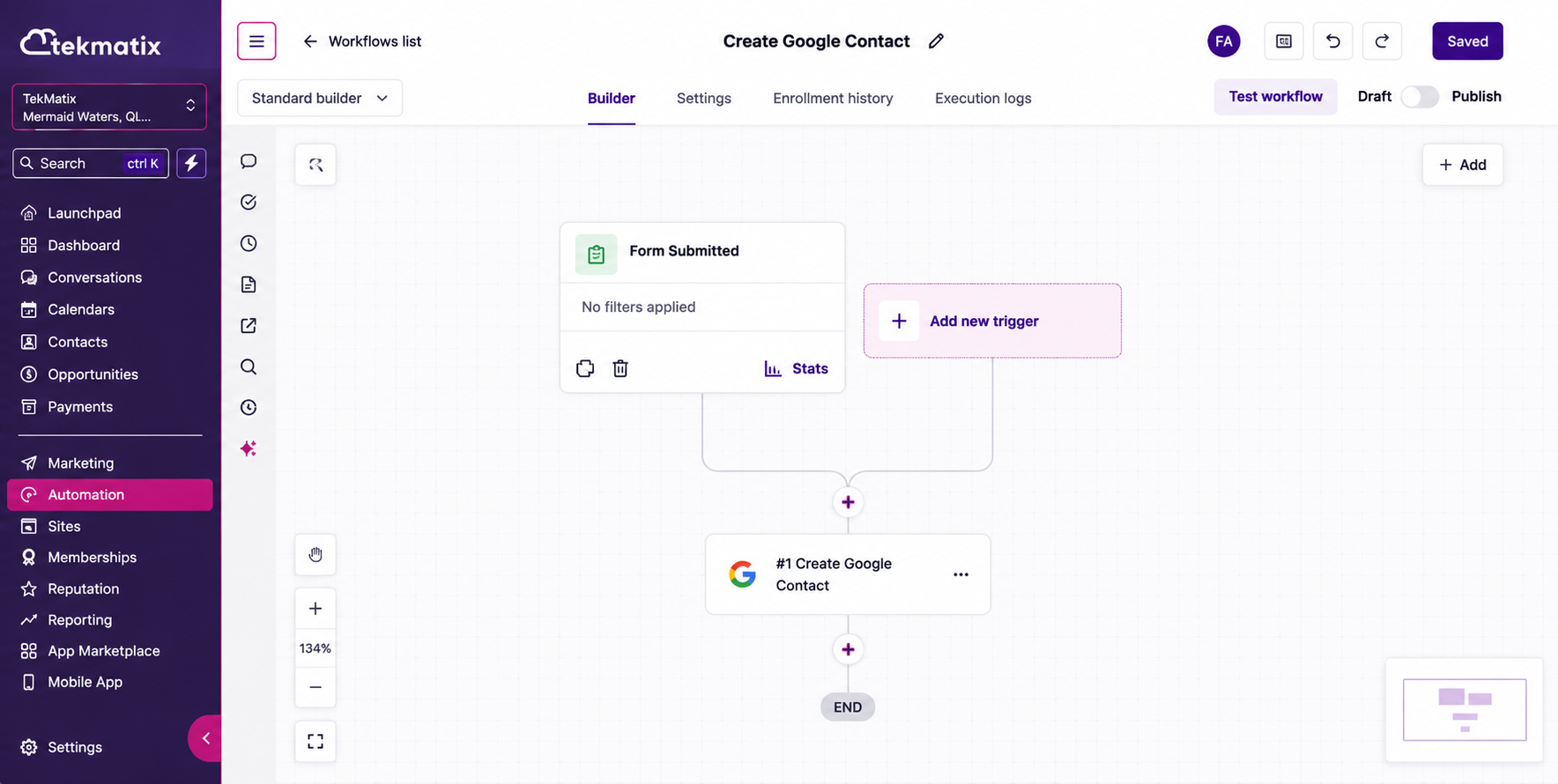
You can now open the standard Tekmatix navigation sidebar directly from within the Workflow Builder.
With a single click, you'll have quick access to other areas of the platform while keeping your workflow open and accessible. For even faster navigation, you can also use keyboard shortcuts to show or hide the sidebar instantly:
Mac: Cmd + \
Windows: Ctrl + \
This enhancement creates a smoother workflow-building experience by reducing unnecessary clicks and helping you move around the platform more efficiently.
How It Works
A new sidebar toggle has been added to the top-left corner of the Workflow Builder.
When activated, the familiar Tekmatix navigation menu appears, allowing you to quickly access other tools, pages, and features across the platform without exiting your workflow.
The sidebar can be opened or hidden whenever needed, helping you customise your workspace based on how you prefer to work.
How to Use It
Open any workflow inside Workflow Builder.
Click the sidebar toggle located in the top-left corner.
Alternatively, press:
Cmd + \ on Mac
Ctrl + \ on Windows
Use the sidebar to navigate throughout Tekmatix while keeping your workflow readily available.
Why This Matters
Building automations often requires moving between multiple areas of your business system.
This update removes unnecessary navigation friction and makes it easier to:
Access other tools without leaving your workflow
Move between business functions more efficiently
Maintain focus while building automations
Enjoy a more consistent experience across the Tekmatix platform
Small usability improvements like this can make a significant difference when you're spending hours creating and optimising automated systems.
Additional Notes
The sidebar can be shown or hidden at any time.
Keyboard shortcuts are available on both Mac and Windows.
This update only improves navigation and does not affect workflow execution.
The experience is consistent with the navigation sidebar used throughout the rest of Tekmatix.
Start Building Faster
The new Workflow Builder sidebar makes navigating Tekmatix easier than ever, helping you stay productive while creating powerful automations for your business.
Open your Workflow Builder today and experience a smoother, faster way to work.

Copyright © 2026 TekMatix. All rights reserved | [email protected]