
TekMatix Blog & Help Articles
Use the search bar below to look for help articles you need.
How to Recover an Expired Domain in Tekmatix
Let’s be honest.
Domain expiry is one of those things that can create unnecessary panic very quickly.
One missed renewal notice.
One expired card.
One busy week where the reminder email got buried.
And suddenly your domain is at risk.
Not ideal.
That’s why Tekmatix has now made it easier for users to recover expired domains directly inside the platform during the redemption window, without needing to wait for support to step in.
This gives you a clearer, faster and more self-serve way to manage expired domains before they are no longer recoverable.
What’s New?
Users can now recover expired domains directly inside Tekmatix during the 41 to 70 day redemption window.
Previously, expired domain recovery often required support assistance. Now, eligible domains can be recovered through a dedicated in-platform flow that handles the recovery process in one place.
The standard renewal popup has also been extended through day 40, giving users a longer grace period to renew domains at the normal renewal fee.
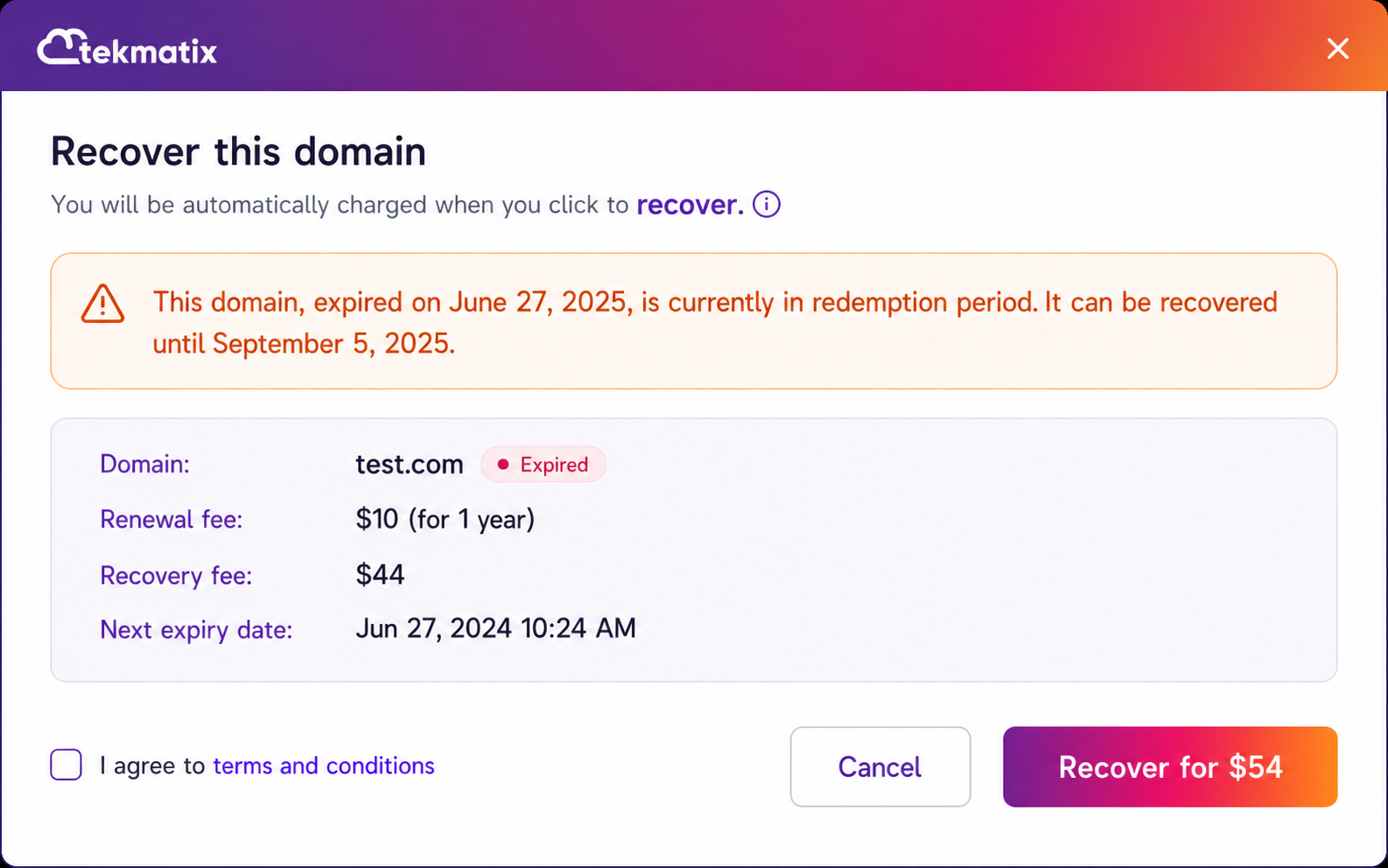
Once a domain enters the redemption period, Tekmatix now displays a dedicated Recover Your Domain flow that includes:
Domain status checking
Recovery fee calculation
Renewal fee calculation
Payment
Domain recovery
All from inside the platform.
No extra back-and-forth.
No guessing what to do next.
No manually chasing support unless the domain status requires it.
How It Works
When a user opens Domain Settings and clicks Recover for an expired domain, Tekmatix checks the domain status in real time.
The system then automatically routes the user to the correct recovery flow based on the domain’s current expiry stage.
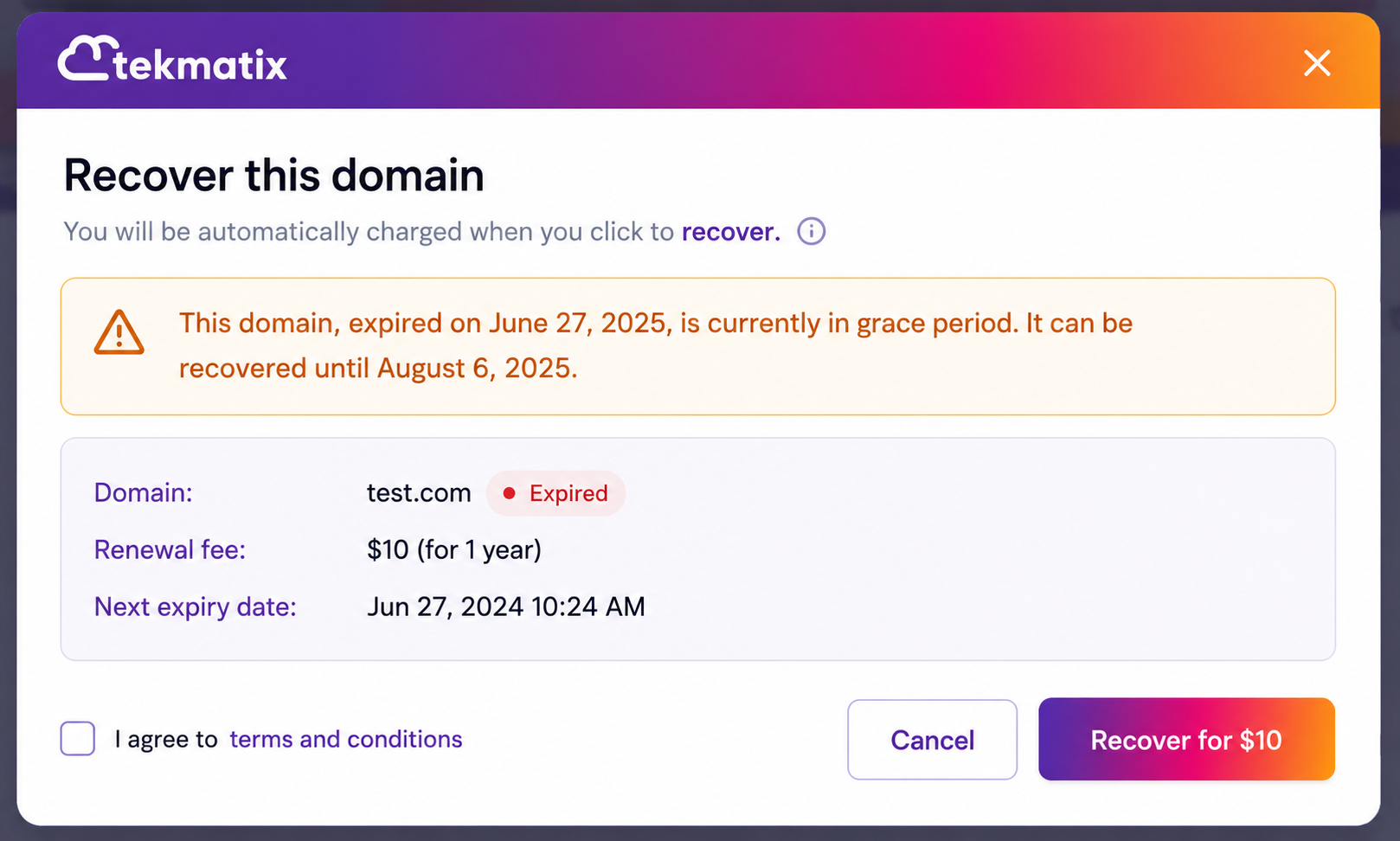
Day 1 to 40: Grace Period
During the first 40 days after expiry, users will see the standard Renew popup.
This allows the domain to be renewed at the normal renewal fee.
The renewal grace period has now been extended from 28 days to 40 days, giving users more time to renew their domain before it enters the redemption period.
Day 41 to 70: Redemption Period
From day 41 to day 70, the domain enters the redemption period.
During this window, users will now see a dedicated Recover Your Domain modal.
This recovery flow includes both:
The standard domain renewal fee
The registry redemption fee
The payment and recovery process can now happen directly inside Tekmatix.
This is especially helpful because the redemption period is time-sensitive. Having everything in one place makes it much easier for users to take action quickly before the domain becomes unavailable for in-platform recovery.
If the Domain Zone Is Inactive
If the domain zone is inactive, users will see a Contact Support modal instead.
This is because some domain situations still require manual assistance, especially if the zone has already been deleted or the domain extension has additional registry requirements.
After the Recovery Window Ends
Once the domain passes day 70, or if the zone has already been deleted, recovery is no longer available inside Tekmatix.
At this stage, the domain will be moved to External.
This means users will no longer be able to recover the domain through the standard in-product recovery flow.
Why This Matters
This update makes domain recovery much easier for Tekmatix users.
Because let’s face it, business owners do not need another support ticket in their life.
They need clear steps.
They need simple buttons.
They need to know exactly what to do when something important, like a domain, is at risk.
This update helps by:
Reducing the need for support tickets
Giving users a clear self-serve recovery process
Helping users recover domains during the critical redemption period
Keeping domain lifecycle management inside Tekmatix
Reducing confusion around domain expiry stages
Helping prevent unnecessary business disruption
And most importantly, it helps users stay in control of their online assets.
Because your domain is not just a technical thing.
It is your website.
Your brand.
Your links.
Your email reputation.
Your online home.
So having a simple way to recover it matters.
Important Notes
There are a few important things to know about this update:
The standard renewal grace period has been extended from 28 days to 40 days
All expiry logic runs on UTC
Redemption fees are charged at the fixed registry rate, with no additional platform markup
Auto-recharge is disabled during recovery to prevent partial payment issues
Some domain extensions, including .co and .uk, may still require support help if the zone has already been deleted
No setup is required
The correct recovery flow appears automatically based on the domain’s current status
What This Means For Tekmatix Users
This update gives Tekmatix users a smoother and clearer way to recover expired domains before it is too late.
Instead of wondering what happened, where to go, who to contact, or what fee applies, users are now guided through the correct renewal or recovery process directly inside the platform.
Simple.
Clear.
Self-serve.
And much less stressful.
Another little update that makes running your business through Tekmatix easier, cleaner and more in your control.

Copyright © 2026 TekMatix. All rights reserved | [email protected]