
TekMatix Blog & Help Articles
Use the search bar below to look for help articles you need.

How to Manage Contacts Faster in the Tekmatix Mobile App
Managing your contacts on the go just got a major upgrade. The latest Tekmatix mobile app update delivers a faster, more intuitive experience with a refreshed design, streamlined navigation, and powerful new ways to manage your contacts from anywhere.
Available now on both iOS and Android, this update makes it easier than ever to find information, take action, and keep your CRM organised while you're on the move.
What's New?
Refreshed Contact List Experience
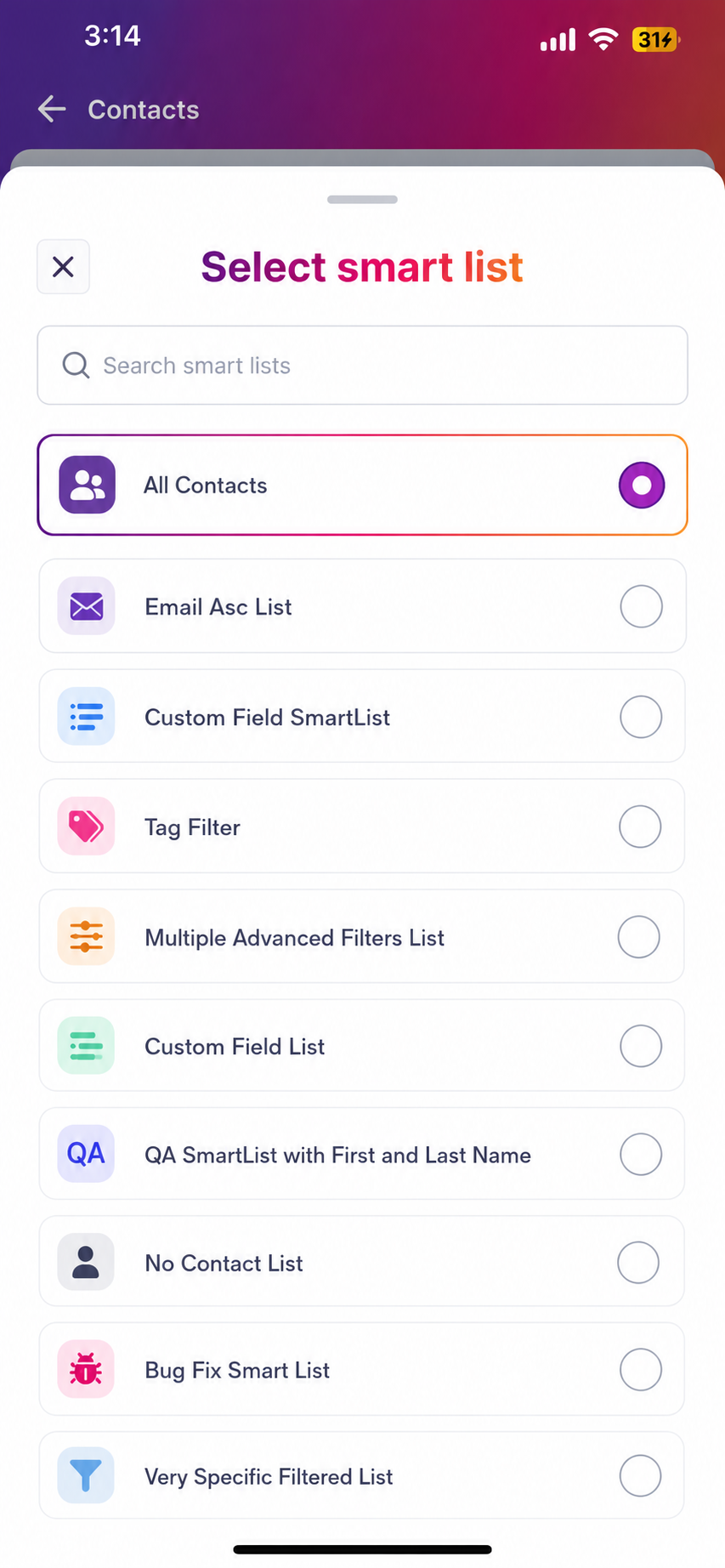
The contact list has been redesigned to help you find and manage contacts faster.
New improvements include:
Updated header and navigation
Faster search functionality
Smart List picker
Swipe actions for quick tasks
Refreshed empty-state screens
This means less time searching and more time taking action.
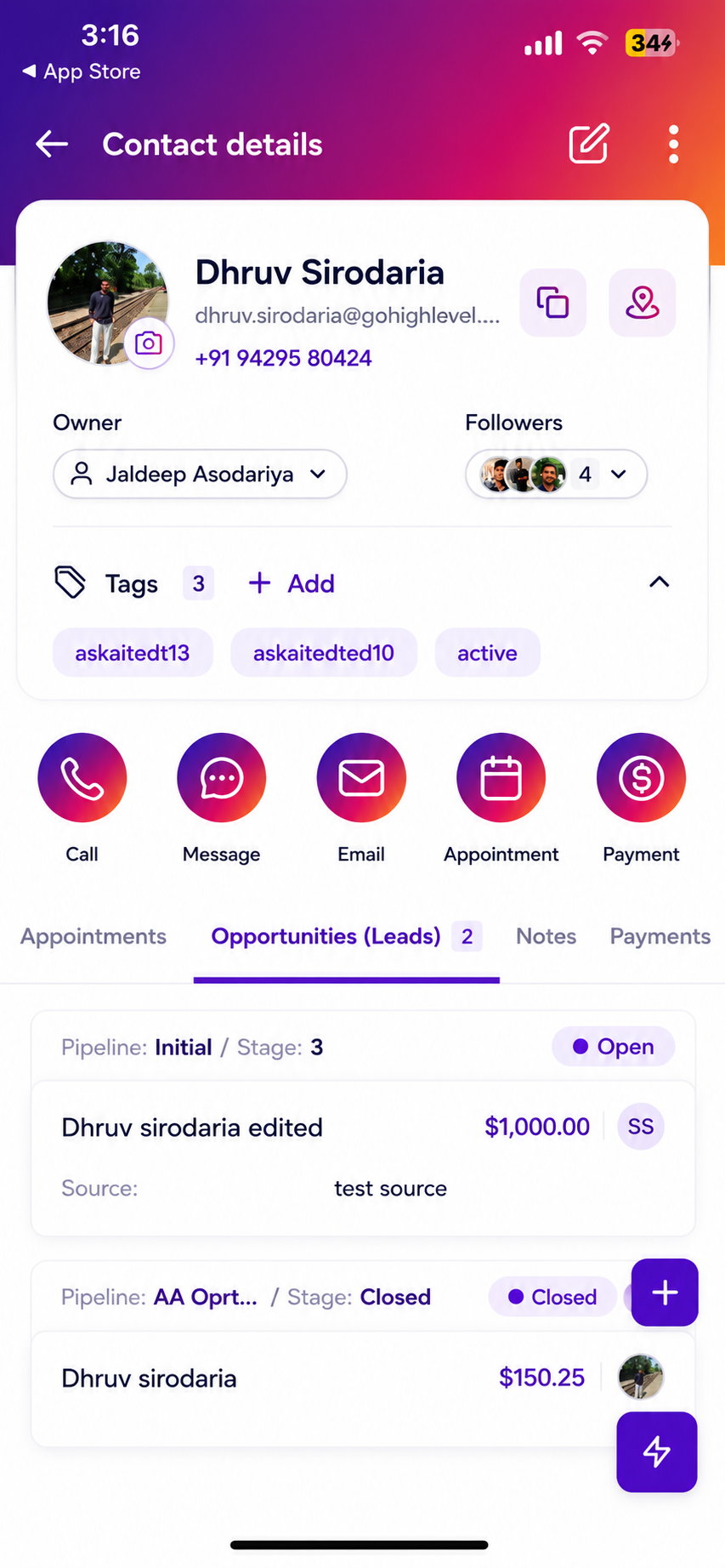
Redesigned Contact Profile Cards
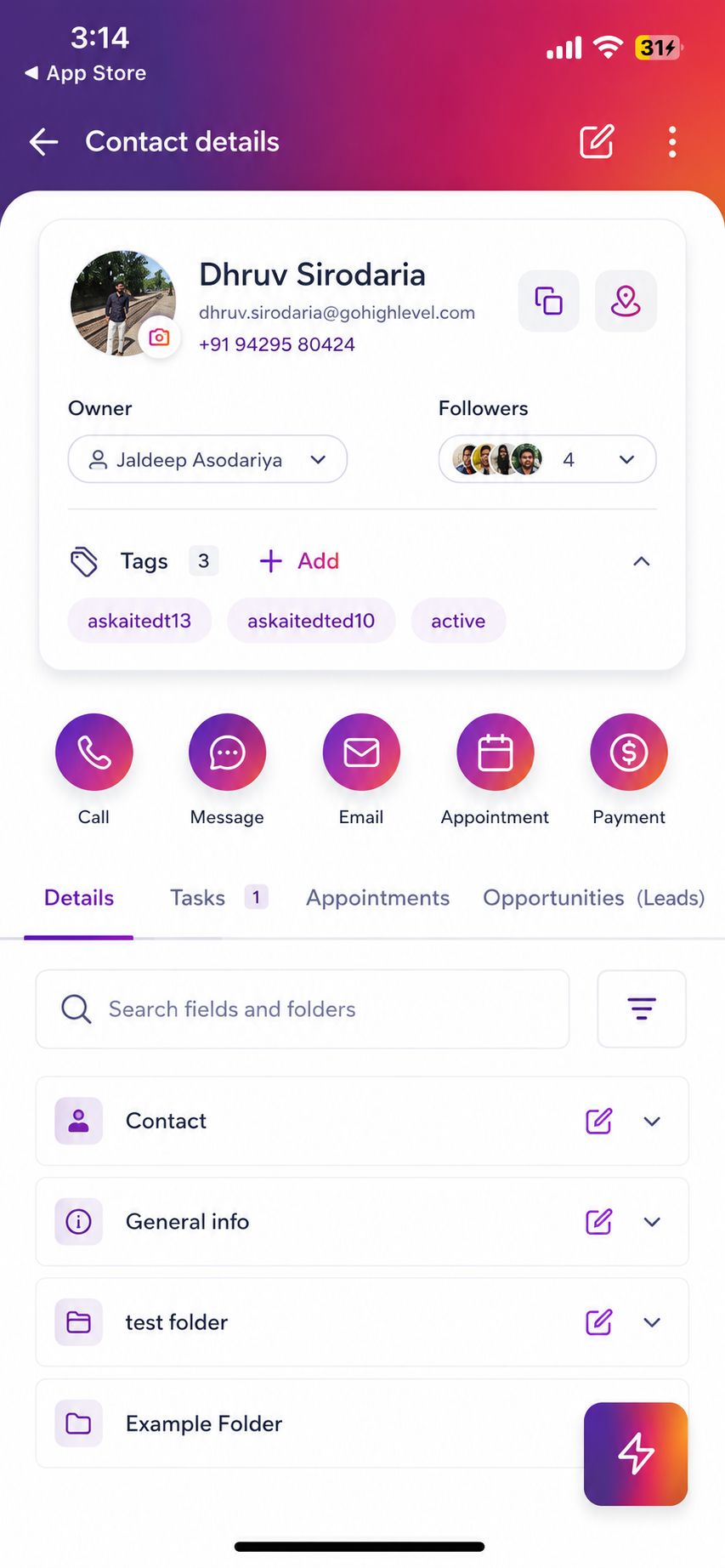
Contact profiles now provide a cleaner, more organised view of important information.
At a glance, you can see:
Profile avatar
Contact owner
Followers
Tags
Everything is displayed in a more scannable layout, helping you quickly understand the status of each contact.
One-Tap Editing
Editing a contact is now easier than ever.
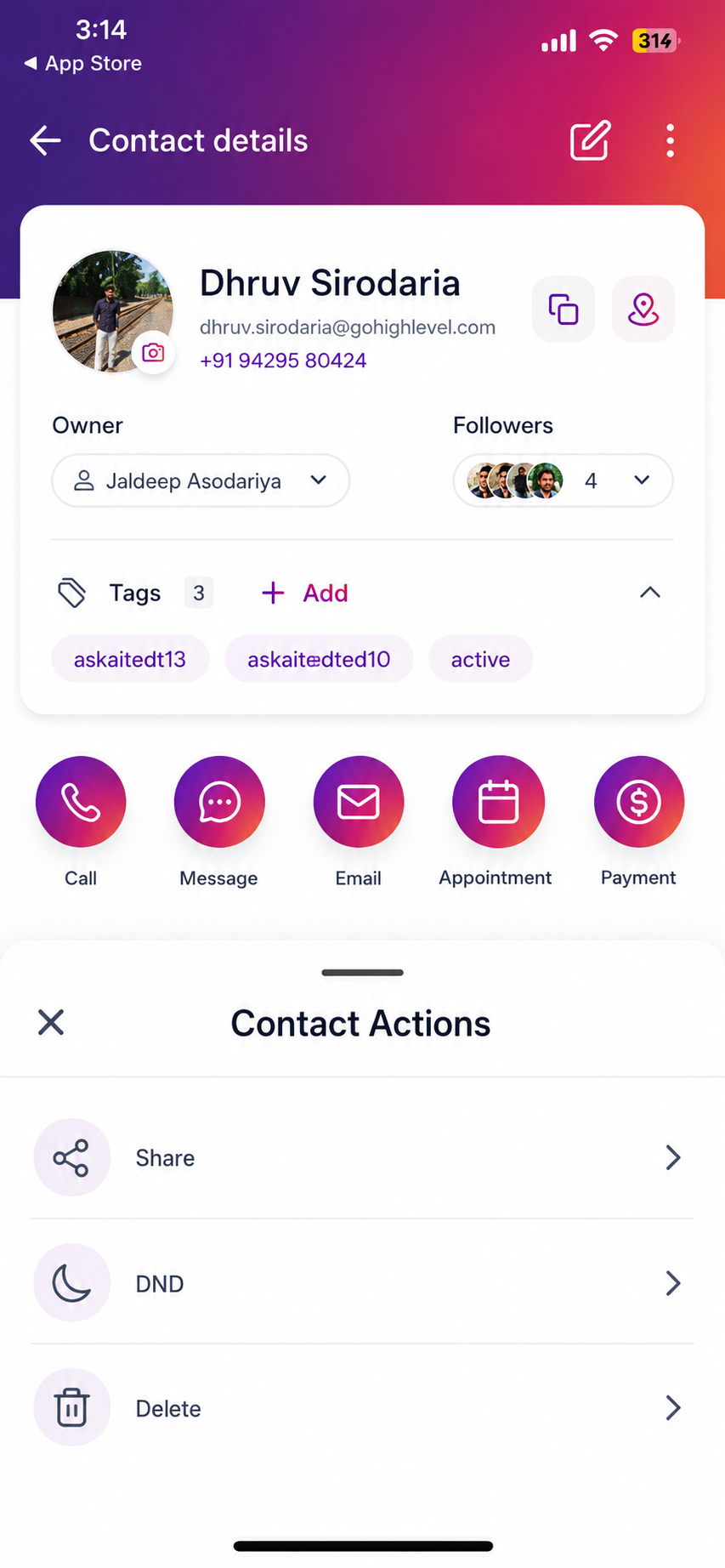
The Edit button is prominently displayed in the profile header, allowing you to make updates with a single tap.
Additional actions are available from the menu, including:
Share Contact
Do Not Disturb
Delete Contact
Smarter Contact Details Management
Search Within Contact Records
Need to find a specific field?
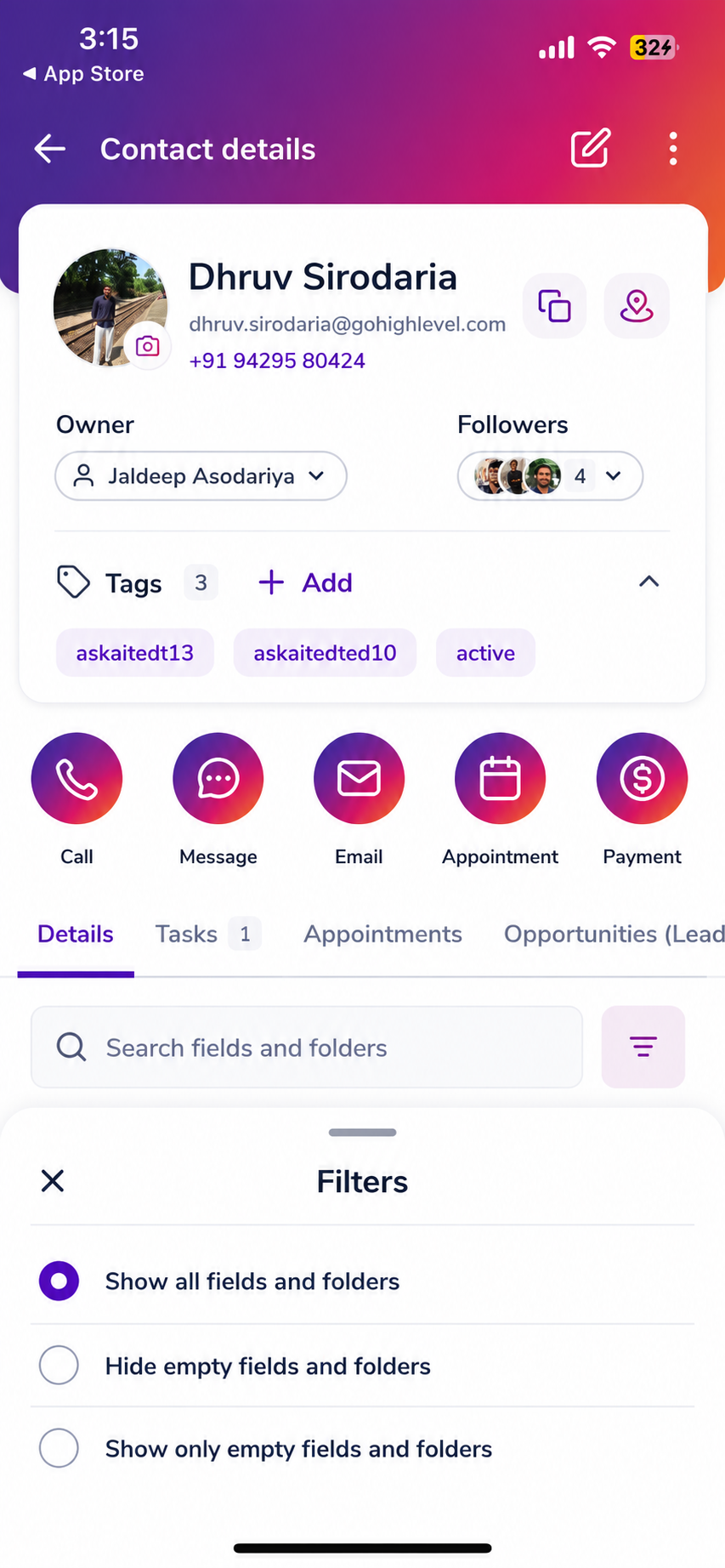
The Details tab now includes search functionality, allowing you to quickly locate information inside contact records.
You can also filter fields to:
Show all fields
Hide empty fields
Display only empty fields
Inline Editing
No more jumping between screens.
Simply tap a field to edit it directly within the contact record.
This makes updating information significantly faster, especially when working from your mobile device.
Improved Folder Structure
Custom fields are now easier to navigate thanks to expandable folders.
Features include:
Expand and collapse folders
Search highlighting
Tap-to-edit functionality
Copy actions
Map integration for address fields
You can update information without losing your place in the contact record.
Enhanced Contact Activity Tabs
All major contact tabs have received a visual refresh, including:
Activity
Tasks
Notes
Appointments
Payments
Docs & Files
Opportunities
Tasks and Opportunities now display counts directly on their tabs, helping you quickly identify contacts that need attention.
Faster Actions with Swipe Gestures
Quick actions are now available directly from the contact list.
Simply swipe to:
Call
Send a message
Share contact details
Delete a contact
Access additional options
Additional actions include copying:
Name
Email address
Phone number
Address
Entire contact details
This reduces the number of taps required to complete everyday tasks.
Better Profile Photo Management
You now have greater control over profile images.
Users can:
Add a photo
Update an existing photo
Remove a photo
Upload from camera
Upload from gallery
Everything can be managed directly from the mobile app.
Why This Matters
This update focuses on speed, consistency, and ease of use.
Key benefits include:
Faster Contact Management
Access editing tools instantly without navigating through multiple menus.
Quicker Communication
Swipe actions allow you to call, message, or share contact details immediately.
Improved Visibility
Task and Opportunity counters help you see what needs attention at a glance.
Easier Data Management
Search, filters, and inline editing make maintaining contact records faster and more efficient.
Better Mobile Experience
Every area of the Contacts experience now follows a consistent design language, creating a smoother workflow throughout the app.
How to Get Started
Open the Contacts section in the Tekmatix mobile app.
Browse your contacts or use the search feature.
Swipe left on a contact for quick actions.
Tap a contact to view their profile.
Use the Edit button to make updates instantly.
Tap any field in the Details section to edit inline.
Use search and filters to customise what information is displayed.
Coming Soon
Contact Customisation on Mobile
A future update will bring web-based contact customisation settings directly into the mobile app.
This means:
Hidden fields on desktop will remain hidden on mobile
Custom field ordering will be respected
Tab visibility settings will sync automatically
Once configured in Tekmatix on desktop, your mobile experience will seamlessly match your CRM setup.
Availability
FeatureAvailabilityStatusAvailable NowPlatformsiOS & AndroidMobile AppTekmatix Mobile App
Stay tuned for more mobile enhancements as we continue improving the way you manage contacts from anywhere.

Copyright © 2026 TekMatix. All rights reserved | [email protected]