
TekMatix Blog & Help Articles
Use the search bar below to look for help articles you need.
How To Organize Your Store Products Using Manual and Smart Collections in Tekmatix
How To Organize Your Store Products Using Manual and Smart Collections in Tekmatix
Why This Feature Is Important
As your online store grows, managing dozens or even hundreds of products can quickly become overwhelming. Without a clear structure, customers may struggle to find what they need, and updating product categories can become time-consuming.
Manual and Smart Collections in Tekmatix help you organize products efficiently so your store stays clean, searchable, and easy to manage.
With collections, you can:
Group related products together
Automatically categorize products using rules
Improve product discoverability
Simplify store management
Improve SEO for your store pages
Using the right collection type can save time while keeping your store organized and optimized for conversions.
What Are Manual and Smart Collections in Tekmatix?
In Tekmatix Stores, collections allow you to group products into categories.
There are two types of collections:
Manual Collections
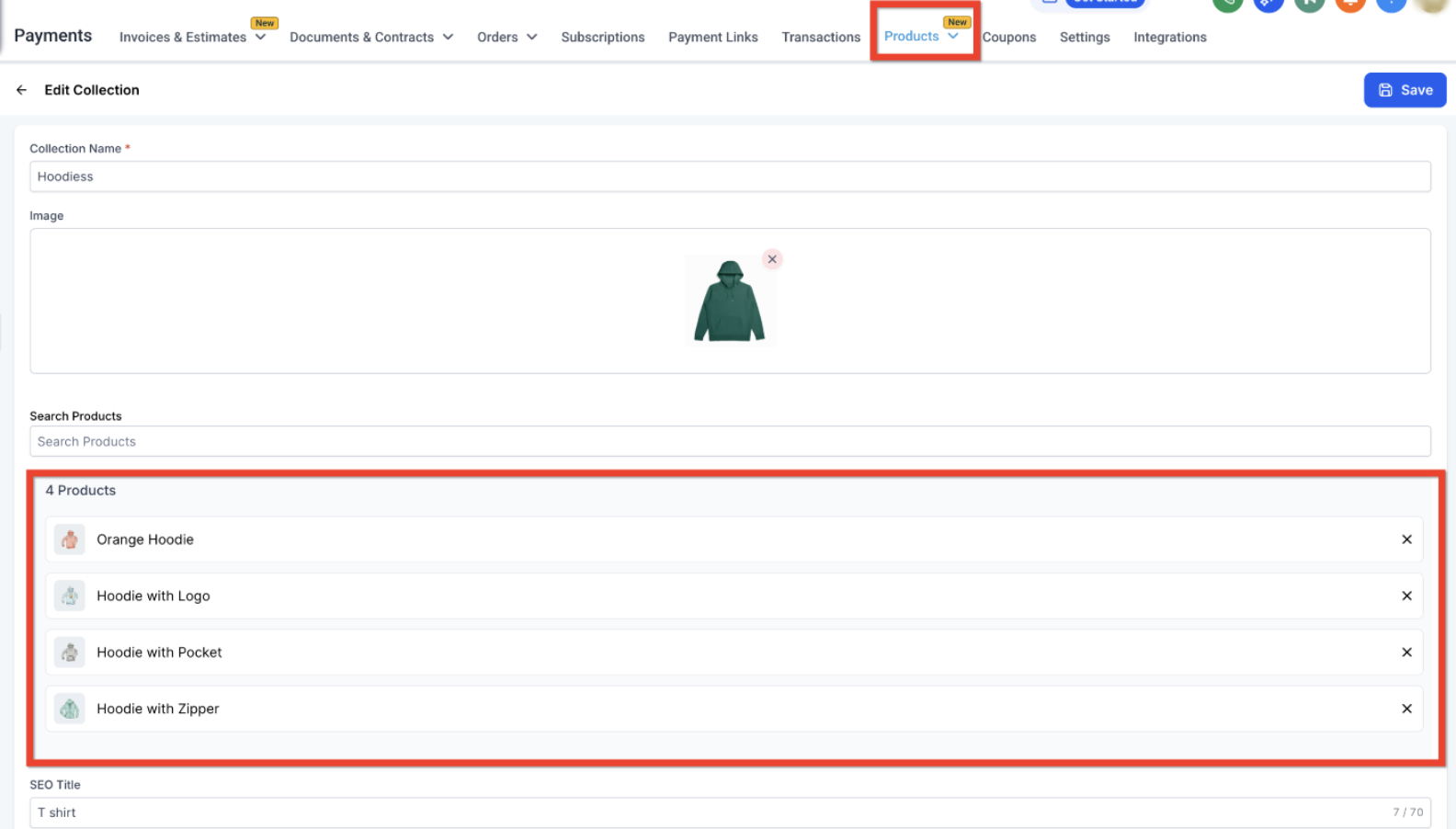
You manually choose which products appear in the collection.
This gives you full control over the items included.
Smart Collections
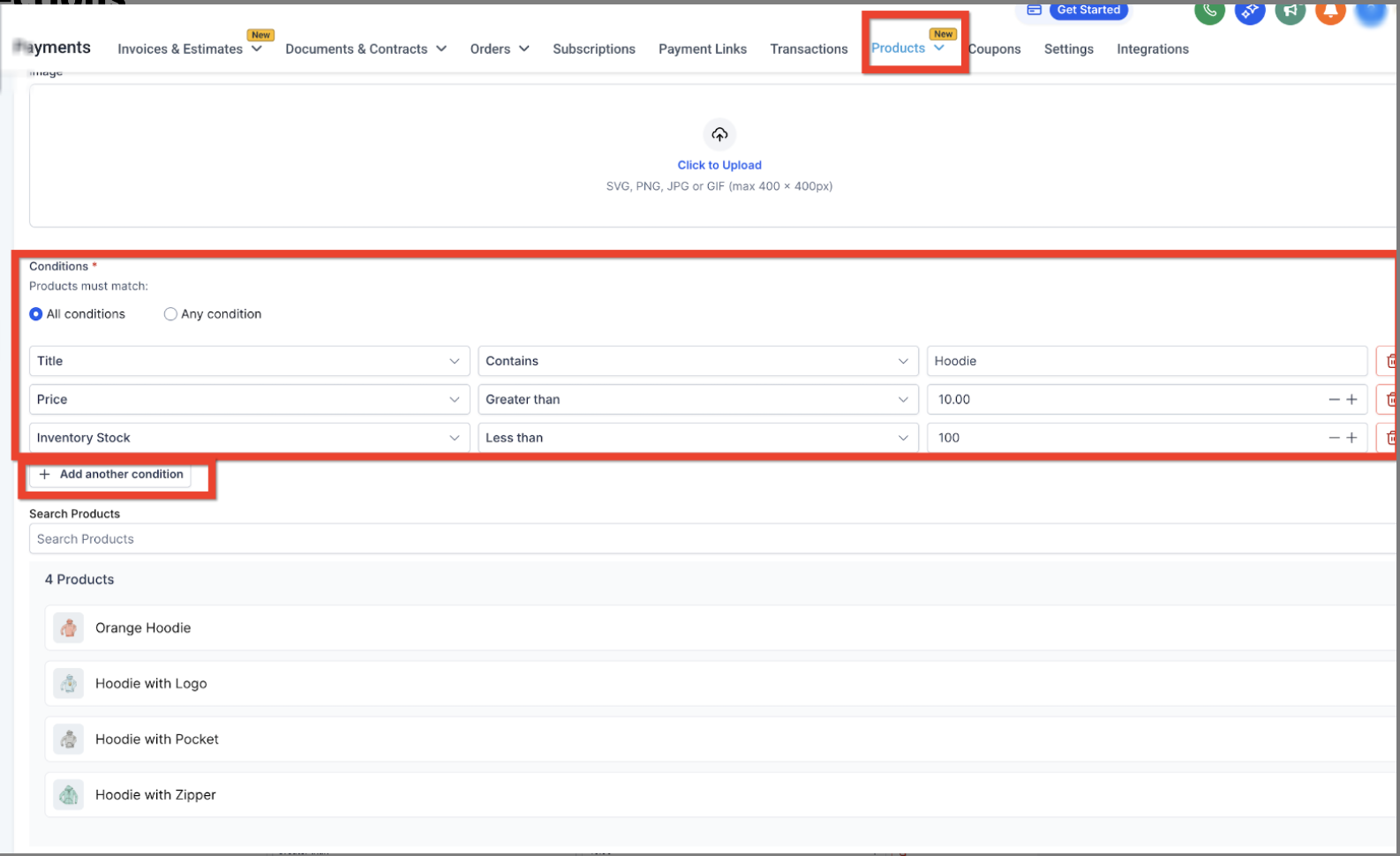
Smart Collections automatically include products based on rules you define, such as:
Product price
Product title
Variant title
Inventory level
These collections update automatically whenever a product matches the rules.
When To Use Each Type of Collection
Use Manual Collections When
You want full control over which products appear in a group.
Examples include:
Holiday promotions
Featured products
Limited-time bundles
Best sellers selected by your team
Use Smart Collections When
You want your store to update product categories automatically.
Examples include:
Products under a specific price
Items currently in stock
Products containing a specific keyword
Seasonal inventory groups
This automation saves time and prevents manual updates whenever product data changes.
How To Create a Manual or Smart Collection in Tekmatix
Follow these steps to create a new collection in your store.
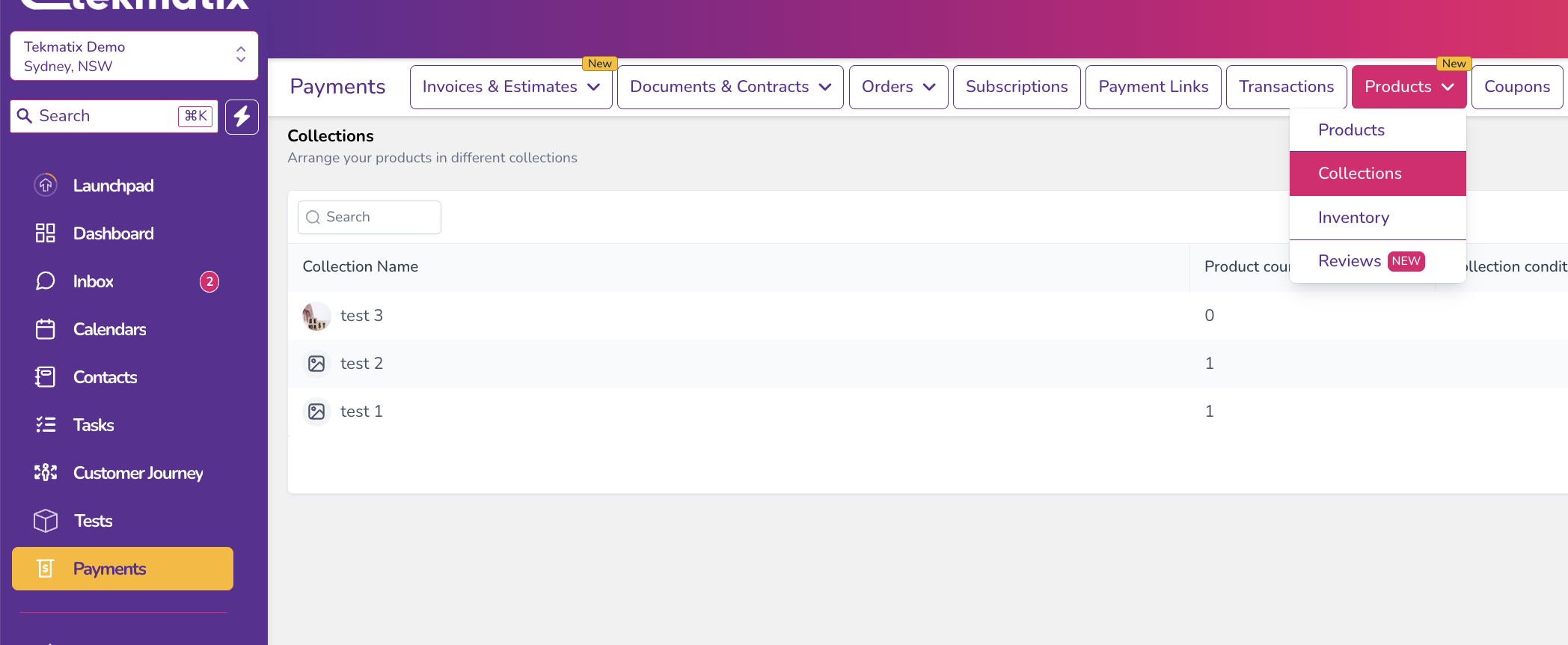
Step 1: Navigate to the Collections Page
Go to Payments
Click Products
Select Collections
Step 2: Create a New Collection
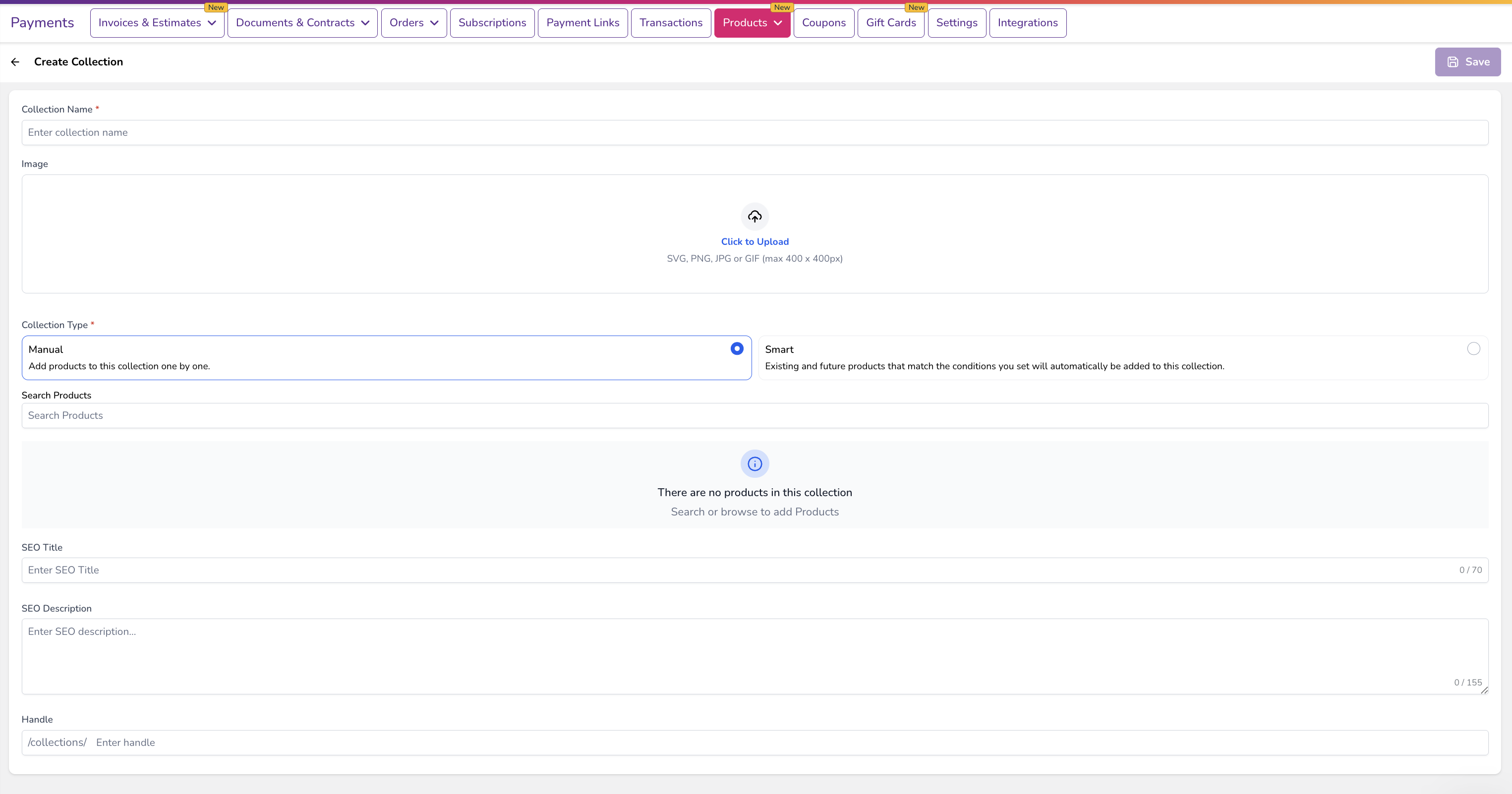
Click Create Collection

Enter the following details:
Collection Name
Optional Image
SEO Title and Description
Adding SEO details can help your collection appear in search results.
Step 3: Choose Your Collection Type
You will need to choose between two types:
Manual Collection - Select products manually from your product list.
Smart Collection - Create rules that automatically add products to the collection.
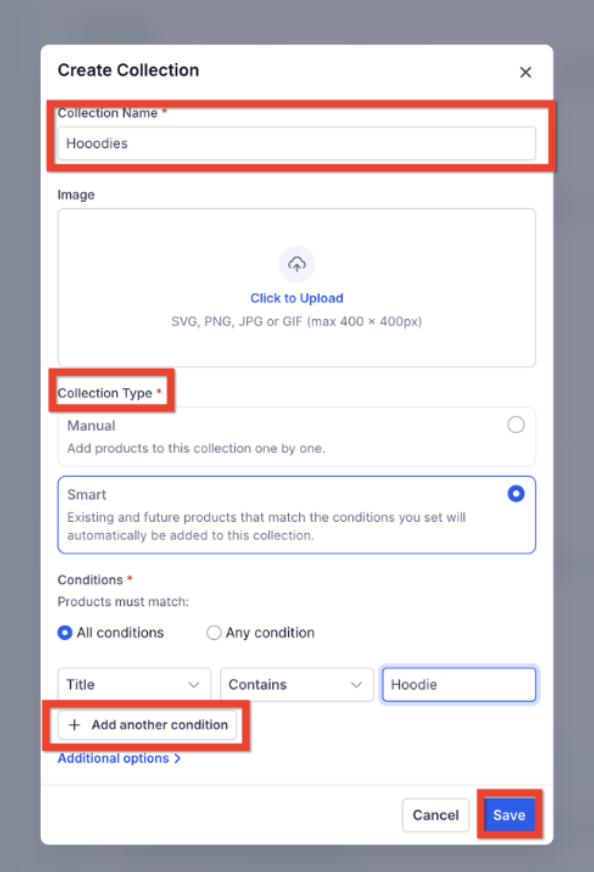
Step 4: Configure Smart Collection Rules (If Applicable)
If you choose a Smart Collection, define the rules that determine which products will be included.
For example:
Price less than $50
Product title contains “Bundle”
Inventory greater than
You can combine multiple rules using:
AND logic (all conditions must match)
OR logic (any condition can match)
Step 5: Save the Collection
Click Save to complete the setup.
If you created a Smart Collection, the system will automatically process the rules and update the product list within a few minutes.
Important Things to Know About Collections
Collection Type Cannot Be Changed
Once you create a collection as Manual or Smart, the type cannot be switched.
If you need a different setup later, you will need to create a new collection.
Products Can Appear in Multiple Collections
A product can belong to several collections at the same time.
For example, a product can appear in:
“New Arrivals”
“Under $50”
“Summer Essentials”
This allows flexible merchandising across your store.
Smart Collections Update Automatically
Whenever product details change—such as price or inventory—Smart Collections update automatically in the background.
This keeps your store categories accurate without manual updates.
Sample Scenario: Using Smart Collections for Automatic Product Organization
Example: An Online Fitness Store
A fitness brand sells products such as:
Protein supplements
Resistance bands
Workout programs
Apparel
The store owner wants to highlight affordable fitness products under $50.
Instead of manually updating the category every time new products are added, they create a Smart Collection with the rule:
Price less than $50
Now, whenever a new product priced under $50 is added to the store, it automatically appears in the collection.
This saves time and ensures customers always see the latest affordable products without any manual work.
Best Practices for Using Collections
To maximize the benefits of collections in Tekmatix:
✔ Use Manual Collections for promotions and featured products
✔ Use Smart Collections for automated categories like price ranges or inventory status
✔ Add SEO titles and descriptions to improve search visibility
✔ Reuse collections across store pages, emails, and workflows
✔ Combine rules carefully to ensure accurate product results
These strategies help keep your store organized while improving the shopping experience for customers.
Frequently Asked Questions
Can I switch a Manual Collection to Smart?
No. Once created, the collection type cannot be changed.
If you need a different type, create a new collection.
What happens if no products match a Smart Collection rule?
The collection will remain empty until a product matches the rule conditions.
Can products belong to multiple collections?
Yes. Products can appear in several collections at the same time.
Can I manually remove a product from a Smart Collection?
No. Smart Collections automatically include or remove products based on the rule logic.
How often do Smart Collections update?
Smart Collections refresh automatically in the background within a few minutes after product updates.
Final Thoughts
Manual and Smart Collections in Tekmatix make it easier to manage your store and organize products efficiently.
By using collections strategically, you can:
Improve product discovery
Save time managing product categories
Keep store pages updated automatically
Create better shopping experiences for customers
Whether you prefer manual control or automated product grouping, collections help your store stay organized and scalable.

Copyright © 2026 TekMatix. All rights reserved | [email protected]