
TekMatix Blog & Help Articles
Use the search bar below to look for help articles you need.

How to Connect SendGrid as your SMTP Service
If you are using SendGrid for emails, you can connect your account to TekMatix to integrate it and send emails directly through TekMatix.
Follow these steps to connect SendGrid today:
Step 1: Create an API Key in SendGrid
In your SendGrid account, create an API key with ‘Full Access’ under your SendGrid account settings > API Keys
Step 2: Connect your API Key to TekMatix to Integrate
Back in TekMatix, navigate to Settings > Email Services
Click ‘Add Service’.

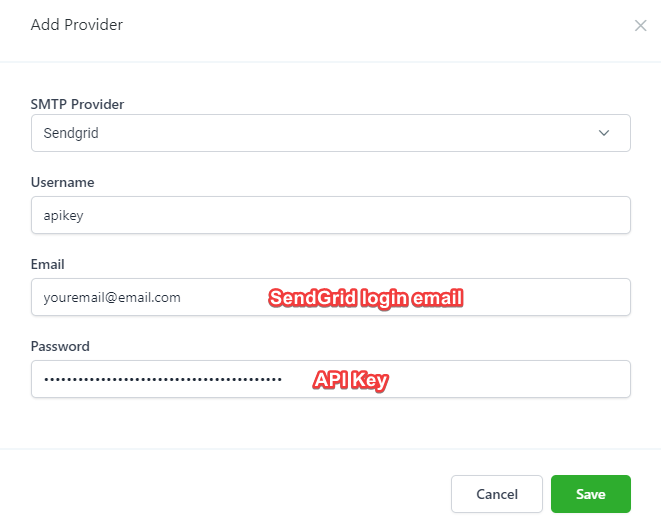
In the popup, select SendGrid.
Set your username as apikey
Set your email as your login email for SendGrid
Set your password to be the API you generated from your SendGrid account (in Step 1).
You can now use SendGrid for sending emails in TekMatix.

Copyright © 2026 TekMatix. All rights reserved | [email protected]