
TekMatix Blog & Help Articles
Use the search bar below to look for help articles you need.

How to Check Email Campaign Performance on the Tekmatix Mobile App
Checking your email campaign performance just got a whole lot easier.
The Campaigns area inside the Tekmatix mobile app has had a major revamp, giving you a cleaner interface, easier navigation, and campaign performance insights that are much closer to what you’re used to seeing on desktop.
Which means?
You can now search, filter, preview, and review your email campaign results directly from your phone, without needing to jump back onto your computer.
And let’s be honest, that is exactly what busy business owners need.
The Problem This Solves
Previously, you could send email campaigns from the web version of Tekmatix, but reviewing how those campaigns performed from mobile was not always ideal.
The older mobile Campaigns experience was harder to scan, lacked some of the deeper campaign detail, and made it tricky to quickly understand what was happening with your sends.
Things like campaign status, delivery breakdowns, recipient-level stats, and performance insights were either hard to find or not available in the same way they were on desktop.
And when you’re running a business, you don’t always have time to log into the desktop app just to check how an email campaign is performing.
Now, you can do it from your phone.
What’s New in Campaigns on Mobile
The new Email Campaigns experience gives you a mobile-friendly way to view your campaign activity, review performance, and understand what is happening with your email sends.
You can now search and filter campaigns in seconds, open any campaign for a full performance view, preview the email inside the app, and browse recipient activity by delivery status.
Even better, the metrics are calculated in line with the web version, so your reporting stays consistent across devices.
Status at a Glance
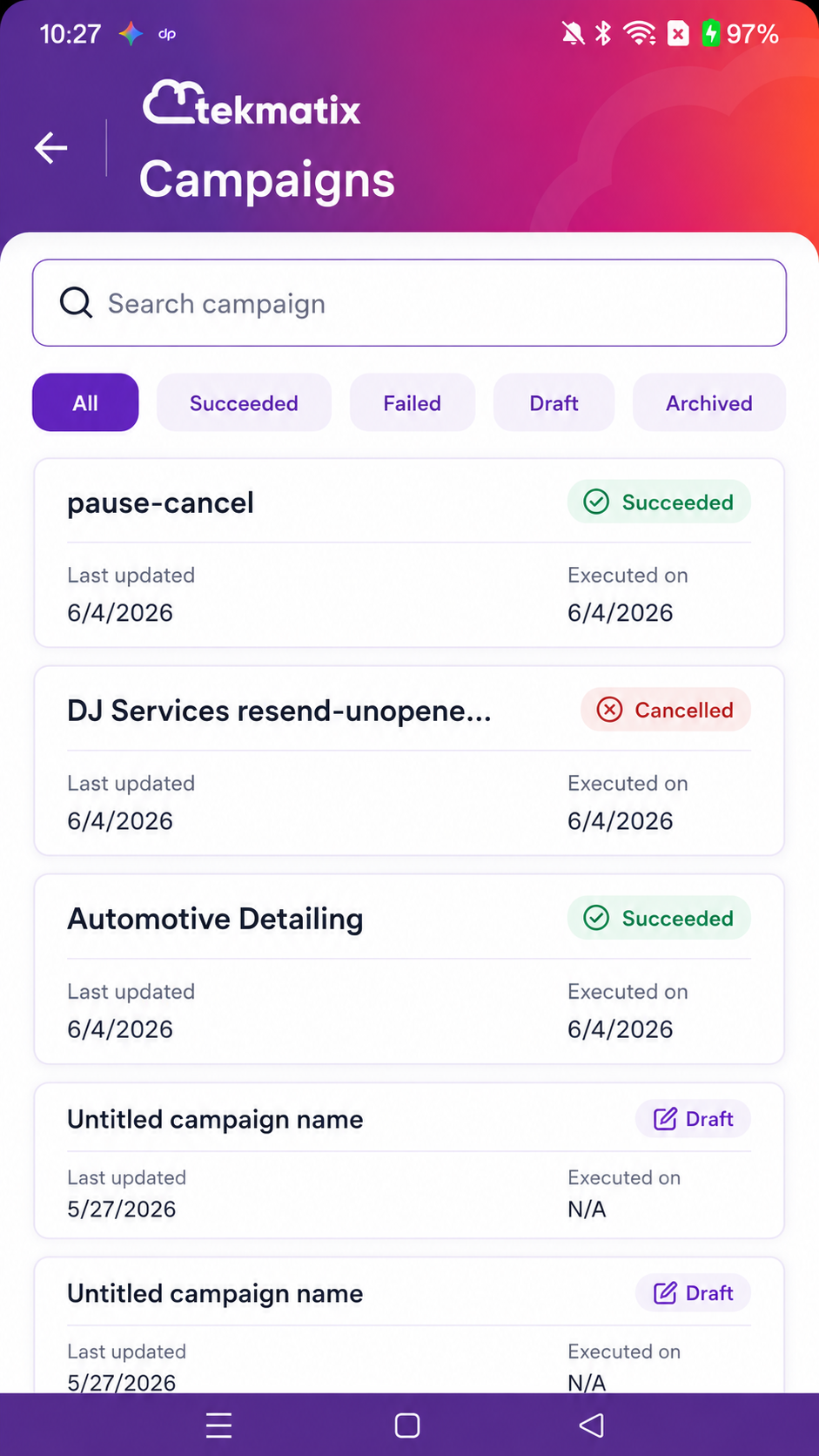
Every campaign card now shows the campaign’s current status directly on the tile.
This may include statuses such as:
Succeeded
Failed
Scheduled
Paused
Draft
Archived
You can also see key dates, including when the campaign was last updated and when it was executed.
This makes it much easier to quickly scan your campaigns and understand what is happening without needing to open each one individually.
New Overview Tab
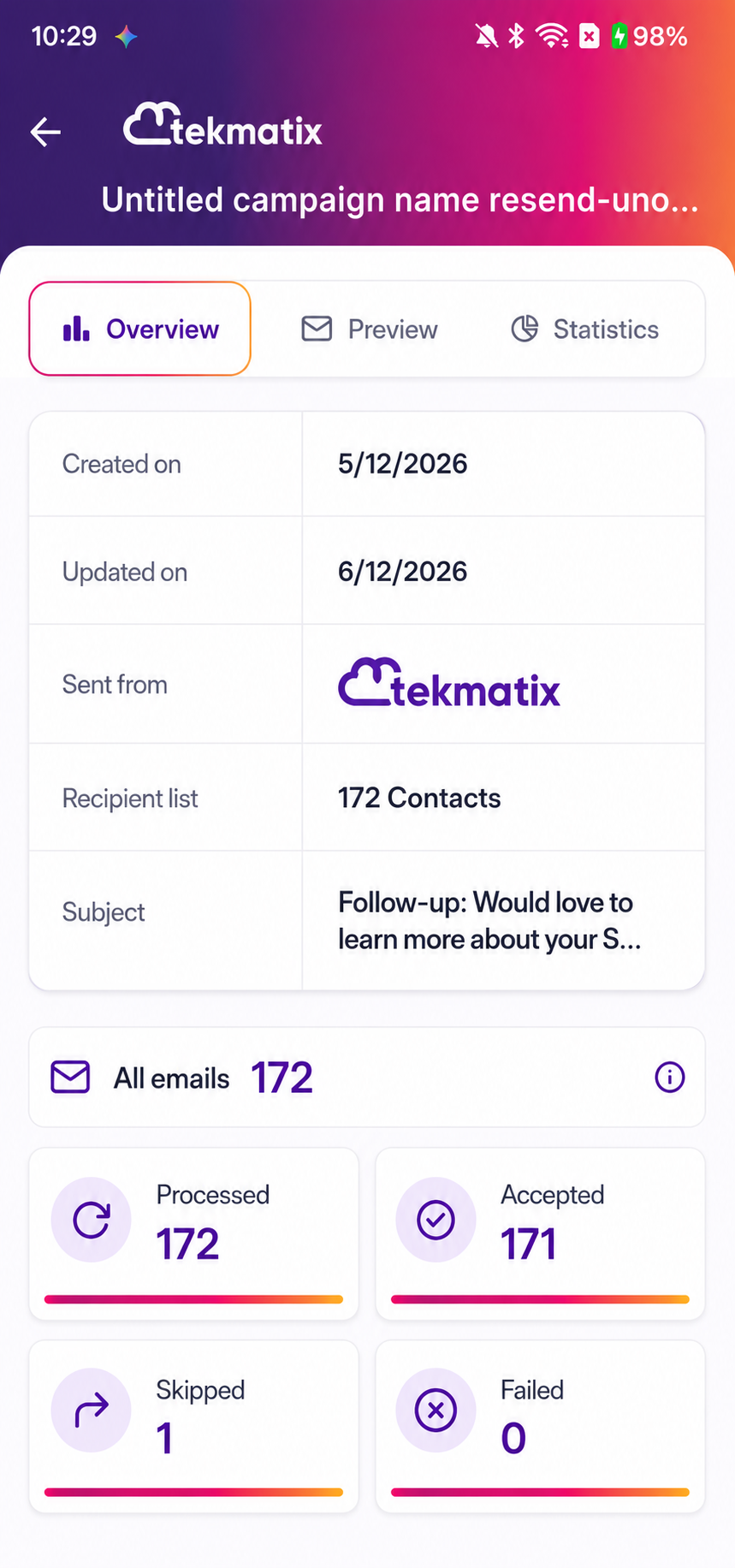
The new Overview tab gives you a clear summary of your campaign details and headline send metrics.
From one scrollable view, you can review information such as:
Created date
Updated date
Sender details
Recipient list
Email subject
Total emails
Processed emails
Accepted emails
Skipped emails
Failed emails
This gives you a quick snapshot of the campaign’s setup and delivery activity.
New Email Preview
You can now preview the campaign email directly inside the mobile app.
The new Preview tab allows you to view the email inline, or open the full message in an expanded view.
This is especially useful when you want to quickly check what was sent, confirm the messaging, or review the email content while looking at the campaign results.
New Statistics Tab
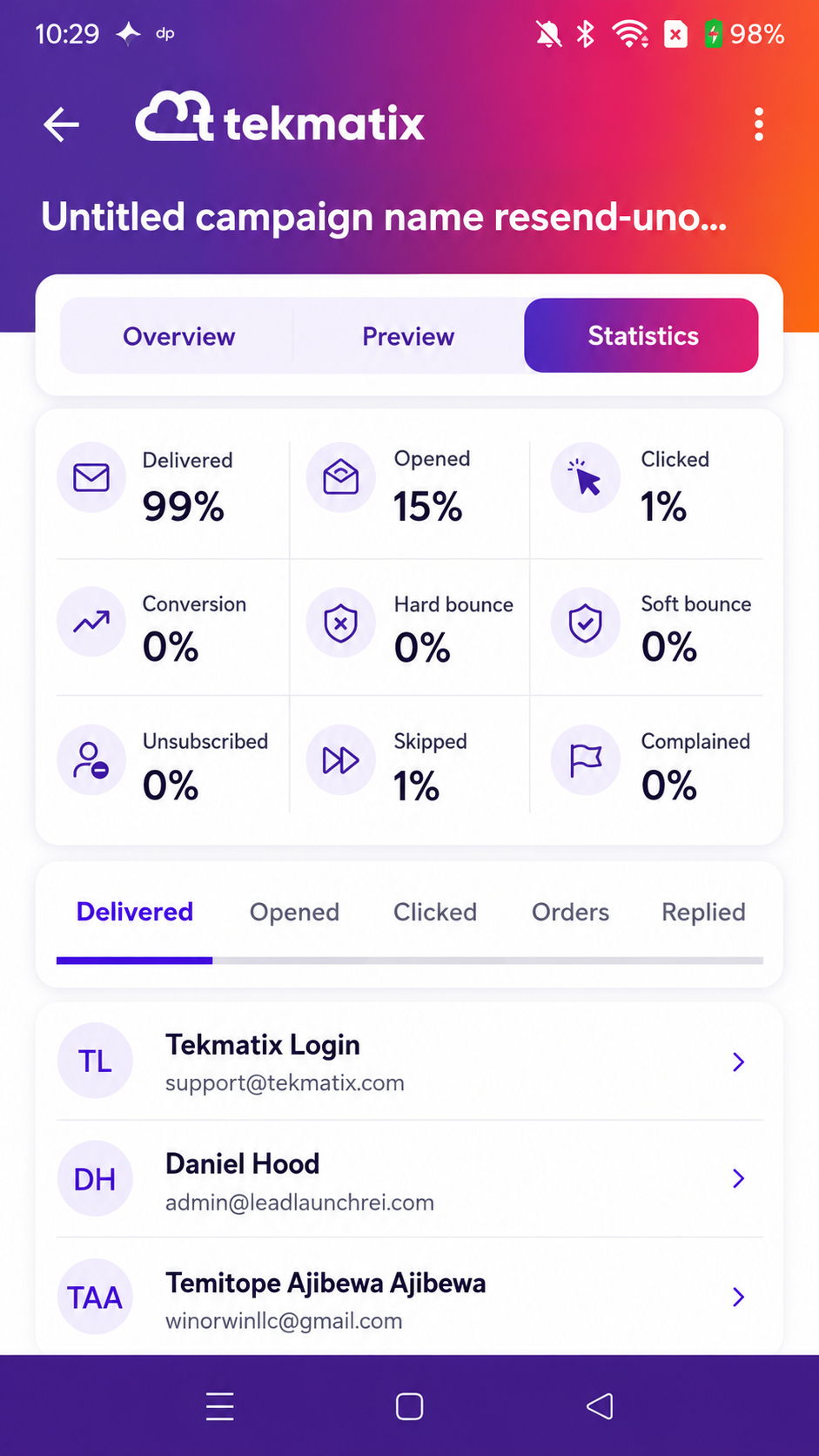
The new Statistics tab brings deeper performance insights into the mobile app.
You can now review key campaign performance rates, including:
Delivered
Opened
Clicked
Conversion
Bounces
Unsubscribed
Complained
And more
You can also browse a paginated recipient list and filter recipients by status.
Available recipient status filters include:
Delivered
Opened
Clicked
Orders
Replied
Hard bounce
Soft bounce
Complained
Unsubscribed
Skipped
Failed
This gives you a much clearer view of how your audience engaged with your campaign, right from your phone.
How to Get Started
To access the updated Campaigns experience, open the Tekmatix mobile app and go to the Campaigns tab from the home navigation.
From there, you can search for a campaign by name or tap a status chip to filter the list.
You can filter by statuses such as:
Succeeded
Failed
Draft
Archived
Once you find the campaign you want to review, tap on it to open the detail view.
You can then switch between:
Overview
Preview
Statistics
This allows you to review the campaign metadata, preview the email, and browse recipient-level stats in one place.
Why This Matters
Email marketing is one of the most powerful assets in your business.
But sending emails is only half the job.
The real power comes from understanding what happened after you hit send.
Who received it?
Who opened it?
Who clicked?
Who bounced?
Who unsubscribed?
Where did the campaign succeed?
Where did it need improvement?
This update gives you more visibility over your campaigns while you are on the move.
So whether you’re between meetings, travelling, on the school run, or simply away from your desk, you can still stay connected to your campaign performance.
Rollout and Availability
Release Date: 6 December 2026
Available Version: 4.18.0
Status: Public
Availability: Tekmatix mobile app
Translation Status: English strings added, additional translations pending
Final Thoughts
The updated Campaigns experience on the Tekmatix mobile app gives you a much cleaner, easier, and more practical way to manage email campaign performance from your phone.
You can now search campaigns, filter by status, preview emails, review headline metrics, and drill into recipient-level results without needing to open the desktop version.
Because business does not only happen at your desk.
And now, neither does campaign reporting.

Copyright © 2026 TekMatix. All rights reserved | [email protected]