
TekMatix Blog & Help Articles
Use the search bar below to look for help articles you need.

How to add funnels inside your course lessons on Tekmatix
How To Add Funnels Inside Course Lessons in Tekmatix
Your course and your funnels have always lived in the same Tekmatix account. Now they can live on the same page. Funnel lessons let you drop a full funnel page straight into a course module, so your students can watch, learn, fill in a form, book a call or buy the next thing without ever leaving the course player.
The short answer
To add a funnel as a lesson in Tekmatix, go to Memberships, then Courses, then Products, open your course outline, choose the module you want, click Add Content, choose Add funnel page, name the lesson, pick the funnel and the exact page you want to embed, then save and publish. The funnel renders live inside the course player, and it works on every current Tekmatix plan.
What funnel lessons actually are
A funnel lesson is any Tekmatix funnel page added to your course outline as a standalone lesson. It sits in your modules and sub-modules alongside your videos, text lessons, quizzes and assignments.
The important bit is that it is not a link. You are not sending students off to another tab and hoping they come back. The whole funnel page renders inside the course player, framed by your course theme, with your navigation and progress tracking still there beside it.
That means every element on that page stays live. Forms collect real submissions. Buttons work. Order forms take payment. Booking calendars take bookings. Pop-ups, countdown timers and multi-step flows all behave exactly as they do on a standalone page.
You can use a funnel you have already built, or build a new one for the job. Either way, you are not duplicating work.
Why this matters for your business
Most course creators lose money in the gap between learning and doing. A student finishes a lesson, feels motivated, and then has to go and find your booking link, or your application form, or your next offer. Most of them never do. Funnel lessons close that gap.
Six things funnel lessons let you do
Turn a lesson into a live exercise. Teach the concept, then have them complete the worksheet, intake form or self-assessment right there while it is fresh.
Sell without breaking their focus. Put your order form, upsell or payment plan inside the course, so nobody has to go hunting for a checkout page.
Reuse the funnels you already have. Your best performing pages get a second life in front of an audience that already trusts you.
Build a proper journey. Watch the lesson, complete the form, book the call, all in one path, all inside one product.
Keep everything on brand. Funnel lessons inherit your course theme and sit neatly beside your other lesson types on desktop and mobile.
Try formats you could not build before. Quiz funnels, decision trees, application flows and challenge sequences, without changing how your course is structured.
Before you start
Three things need to be true before the option will do anything useful for you:
You have at least one course created under Memberships, Courses, Products.
You have at least one funnel with a published page under Sites, Funnels. An unpublished page will not render for your students.
Your user has permission to edit both courses and funnels in the account.
Which Tekmatix plan do you need?
You need both funnels and courses switched on, and every current Tekmatix plan includes both, with no caps.
Starter at $150 AUD per month, or $97 USD, gives you unlimited courses, unlimited students, unlimited video hosting and unlimited funnels and websites. That is everything this feature needs.
Pro at $230 AUD per month, or $149 USD, adds course completion certificates, communities and groups, surveys, signed contracts, an affiliate program and advanced reporting on your courses and products. If you are selling a course seriously, this is the one most people land on.
Max at $497 AUD per month, or $349 USD, adds up to five sub-accounts under one login, the AI Employee Growth plan included rather than billed as an add-on, and a 60 minute strategy call with a senior Tekspert every month.
One thing to watch. The older Launch Plan does not include courses or funnels, so funnel lessons are not available there. If you are on Launch and you want to run courses, you can change your plan here, or compare every plan inclusion here.
How to add a funnel lesson to your course
This takes about two minutes once your funnel is published.
Step 1. Open your course
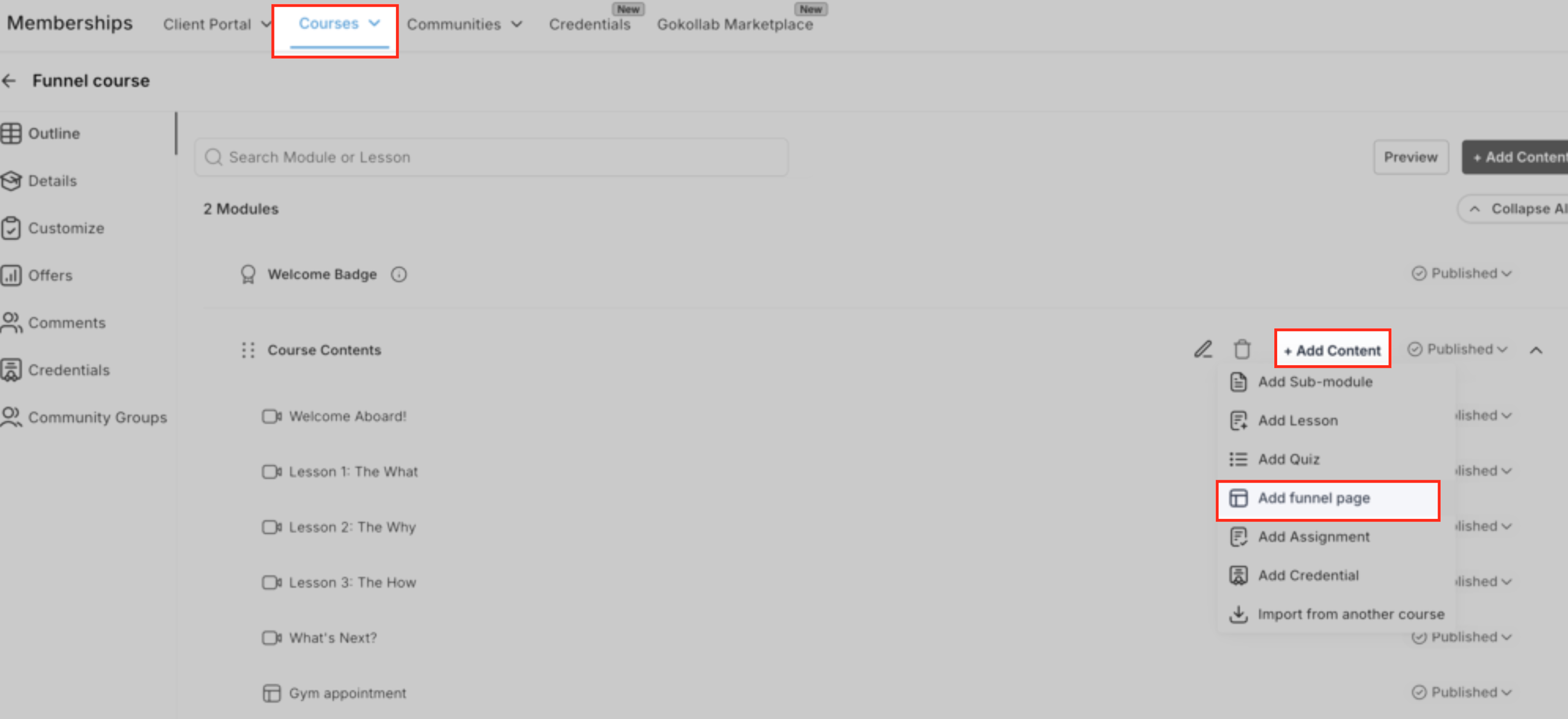
Go to Memberships, then Courses, then Products. Click the course you want to edit, and open the Outline view.
Step 2. Choose where the funnel goes
Expand the module, or sub-module, where you want the funnel lesson to sit. Think about placement here rather than dropping it at the end. A booking page lands far better straight after the lesson that makes someone want to book.
Step 3. Click Add Content, then Add funnel page
In that section of the outline, click Add Content. In the dropdown you will see Add Sub-module, Add Lesson, Add Quiz, Add funnel page, Add Assignment and Add Credential. Choose Add funnel page.
Step 4. Name the lesson and pick your page
Give the lesson a title your students will understand, such as "Book your strategy call" or "Complete your application". Then choose the funnel from the list, and choose the specific page inside that funnel, for example the opt-in page, the order form step, or the application step.
Step 5. Save it
Click Add or Save. Check that the new funnel lesson appears in the module's lesson list, in the right position. If it is not where you want it, drag it.
Editing and managing your funnel lessons
Managing a funnel lesson works much like any other lesson, with a few extra controls for previewing and tidying up the embedded page.
In your course outline, hover over the funnel lesson and click the edit icon, or the lesson title, to open the funnel edit window. From there you can:
Preview the page. See exactly how it will look inside the course player before anyone else does. This is the quickest way to catch a wrong page selection.
Open it in the builder. Jump straight into the funnel builder to change copy, design, forms, buttons and layout. Everything you would normally do in the builder still applies.
Set a thumbnail. Upload or choose an image so the lesson looks finished in your course sidebar or grid. Consistent thumbnails across every lesson make your course far easier to navigate.
Control the publish state. Leave it as a draft while you are still working on it, and click Save and Publish when you are ready for students to see it.
Reorder or move it. Back in the outline, drag the lesson to a new position, or into a different module, whenever your curriculum changes.
What your students see
This is the part that makes the feature worth using. To your students, a funnel lesson does not feel like a separate website. It feels like part of the course.
An embedded page in the course player. The funnel appears in the main lesson area, framed by your course layout and theme, with navigation, progress and comments still available.
A full screen option. Students can expand the lesson into a full page experience, which is ideal for longer forms, multi-step flows and detailed sales pages.
Everything works. Forms and surveys collect real submissions. Buttons trigger the next step, reveal content, or move deeper into the funnel. Pop-ups and countdowns behave normally.
Your rules still apply. Funnel lessons follow the same access rules, drip schedules and prerequisites you have already set on the module and the course, including access controlled through your community private channels.
Test it before you tell anyone
Make sure your course and offer are published, enrol yourself or a test student, then open the funnel lesson from the course player. Submit the form. Click the buttons. Try full screen mode. Run a test payment or booking if there is one. Then check that the funnel analytics are still showing under Sites, Funnels, and that course progress records the lesson as complete. Five minutes here saves a very awkward email later.
Five ways to actually use this
The feature is only worth as much as what you put in it. These are the highest value uses we see.
The application lesson. Put your coaching application form as the final lesson of your free or low priced course. Every graduate finishes standing in front of your enquiry form.
The booking lesson. Drop your calendar page in after the lesson where students realise they want help. Bookings go up because there is nothing to go and find.
The upsell lesson. Add your next program's order form as a bonus module at the end. Warm buyers, already in your ecosystem, one click from purchasing.
The workbook lesson. Turn a downloadable worksheet into an embedded form. Now you can see who is doing the work, and follow up with the ones who stall.
The membership onboarding lesson. Use a funnel page as the welcome step inside your membership so new members set their preferences, join the community and book their first session in one place.
Done for you
Would you rather we just built it for you?
Adding one funnel lesson is easy. Building a whole course portal, with the automations, the checkout, the student emails and the mobile app behind it, is a different job. That one we can take off your hands entirely, for a fixed price, with no hourly surprises.
Course and Learning Portal Set-Up
We build your fully branded learning portal, the course shell for up to 5 modules and 5 lessons per module, your offer and checkout connected to your payment gateway, and your own downloadable mobile app. You also get the four automated workflows that normally never get built: new student onboarding with instant login details, abandoned cart recovery, a stuck student check-in when someone has not logged in for 14 days, and a course completion sequence that congratulates them and offers the next thing. Five written email templates, a student support form, commercial use stock imagery and a personalised handover training video are all included.
This is the one to buy if you have the content and you are tired of the portal being the reason it is not live yet.
See the Course and Learning Portal Set-Up
Membership Set-Up
A membership lives and dies on recurring revenue, and recurring revenue lives and dies on retention. We build your entire membership system inside Tekmatix, including your branded member dashboard, your membership area ready for your content, and your free student mobile app. Behind it you get the three workflows that protect the money: a sign-up confirmation and monthly reminder sequence that keeps retention high, an abandoned cart follow-up that recovers the people who nearly joined, and a professional cancellation sequence so members leave feeling looked after rather than ignored.
Pair it with a funnel lesson as your welcome step and new members are onboarded properly from day one.
See the Membership Set-Up service
Need the funnel itself built too? Our Sales Funnel System builds the pages you will embed, and our Community Set-Up gives your students somewhere to talk between lessons. You can see every fixed price package here.
Frequently asked questions
Do I need to build a separate funnel just for the course?
No. You can use any existing funnel page as a lesson. That said, it is usually worth cloning a high performing funnel and adjusting the wording so it speaks to students rather than cold traffic. That way your live campaigns are not affected by the changes.
Where do I see the analytics for a funnel lesson?
In the same place as always. Embedding a funnel in a course does not move its reporting. Views, submissions and conversions for that page keep showing under Sites, Funnels and the related reports, exactly as they do for a standalone funnel.
What happens if I edit the funnel page after adding it to a course?
Your edits show up in the lesson automatically, because the lesson points at that specific page. The flip side is that deleting or unpublishing the page will stop the lesson rendering properly, so keep any shared page live, or point the lesson at a new page if you retire the old one.
Can I restrict who sees a funnel lesson?
Yes. Funnel lessons respect whatever access rules and drip schedules already apply to that module and course, including access controlled through private channels in your community.
Do pop-ups, timers and custom code still work?
Most standard funnel elements, including forms, pop-ups, timers and show or hide interactions, work as expected. Custom scripts and heavier third party embeds are worth testing carefully inside the course player on both desktop and mobile before you launch, because they are the ones most likely to behave differently.
How is this different from just linking to a funnel?
A link opens a new tab and breaks concentration, and a good number of students never come back to finish the module. With a funnel lesson the page is embedded in the course player, with an optional full screen view, so students stay in the learning environment and pick up the next lesson straight afterwards.
Does this cost extra?
No. Funnel lessons use the funnels and courses you already have, and both are unlimited on every current Tekmatix plan. There is no separate add-on to buy.
Stuck? You are not doing this on your own
Every Tekmatix account comes with real people behind it, not just a help article and a wish of good luck.
Free daily group training with a Tekspert
Bring this exact question to a live session and we will walk you through it on screen. It runs every day, it is included on every plan, and it costs you nothing.
Book your free daily training seat
Hire a Tekspert for an hour
Want it built with you, on your screen, today? Book a 60 minute session and we will set up your funnel lessons, your workflows and your calendar integrations while you watch, so you can repeat it yourself next time.
Quick question, quick answer
If it is a 15 minute problem rather than an hour long one, grab a short advanced tech support session instead. Or open the live chat inside your account, which is staffed 24 hours a day.
Funnel lessons are one of those small features that quietly change your numbers, because they remove the step where your students had to go and find something. Build the course. Put the next action inside it. Let the platform do the rest.
Happy Tekkin'!
Tekmatix is an Australian owned all-in-one business platform for course creators, coaches and service businesses, running on HighLevel infrastructure with our own templates, in-house Teksperts, 24 hour live chat and free daily training on top. New features roll out progressively, so if you cannot see the funnel lesson option in your account yet, open the live chat and we will check it for you.

Copyright © 2026 TekMatix. All rights reserved | [email protected]