
TekMatix Blog & Help Articles
Use the search bar below to look for help articles you need.
How do I send Google Sheets data into my automations on Tekmatix?
A lot of businesses still run on spreadsheets. Enquiries get pasted into a sheet. Project statuses get updated in a sheet. Every month gets its own tab. Then someone has to copy all that into the CRM by hand.
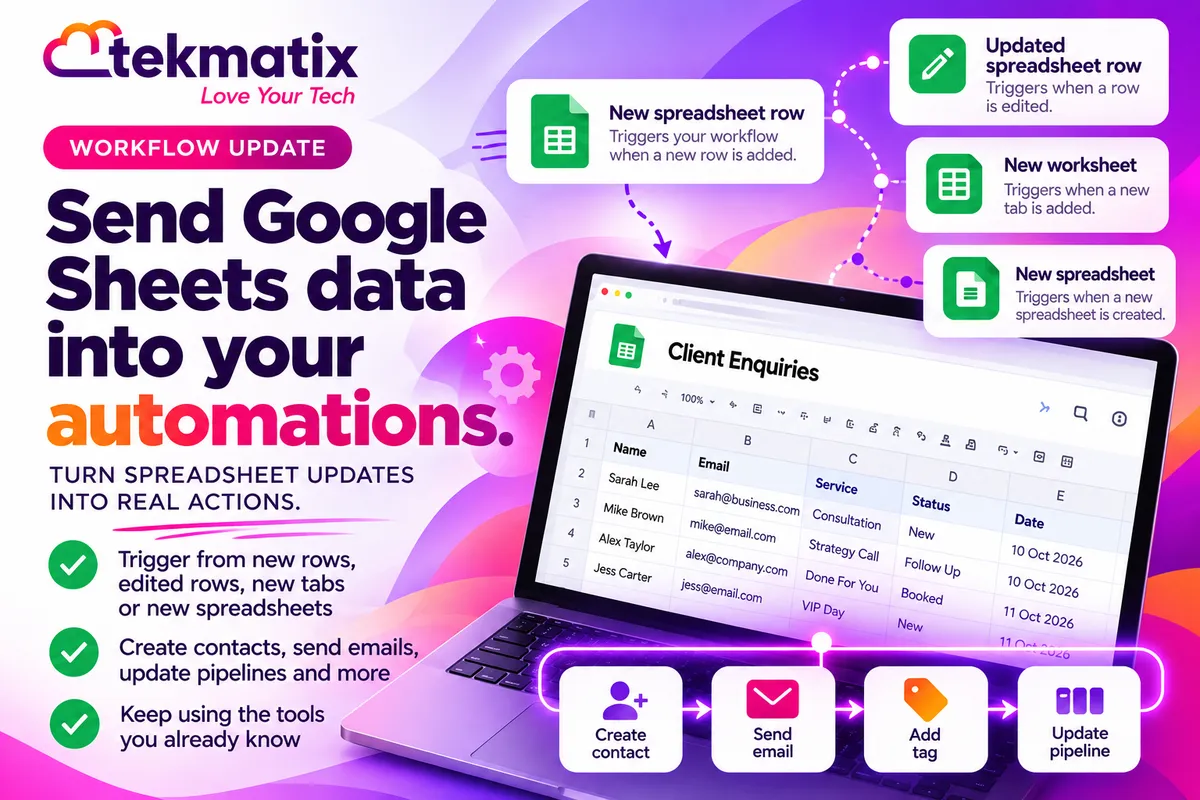
Now your Google Sheets can start your Tekmatix automations for you. There are four Google Sheets workflow triggers, so a new row, an edited row, a new tab or a new spreadsheet can kick off a workflow on its own.
Go to Automation, then Workflows, open a workflow and click Add Trigger. Open the Google sheets category and choose New spreadsheet, New spreadsheet row, Updated spreadsheet row or New worksheet. Pick your Google account, Drive, spreadsheet and tab, save, test with Test, then Test using events, and publish. These are Premium triggers, charged at $0.015 USD per action.
What the Google Sheets triggers are
A trigger is what starts a workflow. These four triggers watch your Google Sheets and start a workflow when something changes.
| Trigger | What starts the workflow |
|---|---|
| New spreadsheet | A new Google Sheets file is created in the Drive you select. |
| New spreadsheet row | A new row is added after the last row of the sheet or tab you select. |
| Updated spreadsheet row | A cell in an existing row is changed. This one doesn't fire for newly added rows. |
| New worksheet | A new tab is added to the spreadsheet you select. |
Why this matters for your business
No more copying and pasting. Data that lands in a sheet can flow straight into your workflows, so nobody has to re-type it.
Leads get followed up faster. When a new enquiry is added to a sheet, your follow-up can start straight away, not whenever someone gets around to it.
Your team can keep the tools they know. If part of your business lives in Google Sheets, you don't have to move it all at once to get it working with your automations.
Fewer mistakes. Every time data is copied by hand, there's a chance of a typo or a missed row. Triggers take that step out.
Before you start
- A Google account connected to your Tekmatix account, with access to the Drive and spreadsheet you want to watch.
- The spreadsheet, and the sheet or tab, you want to use for row triggers.
- A clear idea of what should happen next, such as creating a contact, sending an email or notifying your team.
Which Tekmatix plan do you need?
Workflows are included, unlimited, on the Starter, Pro and Max plans. Google Sheets is marked Premium in the workflow builder, which means usage is charged. Premium triggers and actions are $0.015 USD per action. So if a trigger starts your workflow 1,000 times in a month, that's $15 USD for those triggers.
See current usage pricing at tekmatix.com/rebilling. Compare every plan at tekmatix.com/pricing, or change your plan here.
How to start a workflow from Google Sheets
- Open a workflow and add a triggerGo to Automation, then Workflows, open a workflow and select Add Trigger. Search for the trigger name or open the Google sheets category.
- Choose the eventPick New spreadsheet, New spreadsheet row, Updated spreadsheet row or New worksheet.
- Select the sourceChoose your connected Google account and Drive. For the row and worksheet triggers, select the spreadsheet. For the row triggers, also select the Sheet (Tab).
- Set up Find new recordsUnder Find new records, choose a mapping reference. You can then use the data from the sheet in the actions that follow in your workflow.
- Save, test and publishSave the trigger and the workflow. Use Test, then Test using events to check it against a matching Google Sheets event. Publish when you're happy.
Keeping your sheet trigger-friendly
How you add and remove rows matters for the row triggers.
- Add new rows at the bottom. Inserting rows in the middle of your sheet can retrigger rows at the end.
- Be careful deleting rows. Deleting rows can cause new rows added afterwards to be skipped.
- Pick the right row trigger. New spreadsheet row is for new data. Updated spreadsheet row is for changes to existing rows, and it doesn't fire for newly added ones.
Test it before you rely on it.
Use a copy of your sheet or a test tab first. Add a row at the bottom, then use Test, then Test using events in the workflow to check the trigger picks it up and the data maps the way you expect. Check the workflow does what it should before you point it at your live sheet.
Five ways to actually use this
- Turn sheet enquiries into follow-ups. If enquiries are added to a sheet, use New spreadsheet row to start your lead intake straight away.
- Move work along when a status changes. Use Updated spreadsheet row so that when someone edits a status or project detail, the next step starts on its own.
- Kick off monthly reporting. If you add a new tab each month, use New worksheet to start your monthly reporting process.
- Start a process when a new file appears. Use New spreadsheet to start an internal process whenever a new spreadsheet is created in a chosen Drive.
- Keep costs predictable. Because Premium triggers are charged per action, point them at the sheets that matter and avoid sheets that change constantly for no reason.
Want it done for you?
A trigger is only the start. What happens next is what brings in the money. If you'd rather hand that over, our Teksperts can build it straight into your Tekmatix account.
Lead Magnet and Nurture System
An opt-in page and thank-you page for your free resource, automatic delivery, a 10-step nurture email sequence, a custom opt-in form, tags and clean CRM set-up. New leads get your resource straight away and are warmed up over time, so they're ready when you make an offer.
See the Lead Magnet SystemEmails, Newsletter and Nurture System
Domain authentication to help your emails reach the inbox, Smart Lists, a branded master email template, an opt-in form, a 10-email welcome and nurture sequence and a newsletter workflow that sends your new blog posts to your list. Your email marketing keeps running in the background without you sending every email by hand.
See the Email and Nurture SystemQuick Account Set-Up
A private 90-minute session with a Tekspert to set up your core settings and integrations, email sending, contacts, tags, pipeline, calendars and branding. You get a clean, properly set up account to build your automations on, instead of weeks of trial and error.
See Quick Account Set-UpSee every done-for-you package at tekmatix.com/services.
Frequently asked questions
Which Google Sheets triggers are there?
Four: New spreadsheet, New spreadsheet row, Updated spreadsheet row and New worksheet.
Does Updated spreadsheet row fire when I add a new row?
No. It only fires when a cell in an existing row is changed. Use New spreadsheet row for new data.
Why did my workflow run again for old rows?
Inserting rows in the middle of a sheet can retrigger rows at the end. Add new records at the bottom of the sheet.
Why were some new rows skipped?
Deleting rows can cause new rows added afterwards to be skipped. Try to avoid deleting rows in a sheet that's being watched.
Can I use the sheet data in my workflow?
Yes. Under Find new records, choose a mapping reference, then use the trigger data in the actions that follow.
How do I test a Google Sheets trigger?
Save the trigger and workflow, then use Test, then Test using events to check it against a matching Google Sheets event.
Which Tekmatix plan do I need?
Workflows are included on the Starter, Pro and Max plans. Google Sheets triggers are Premium, so usage is charged. Compare the plans here and change your plan here.
How much do Google Sheets triggers cost?
Google Sheets triggers are Premium triggers, charged at $0.015 USD per action. Current usage pricing is at tekmatix.com/rebilling.
Need a hand?
Free daily group training
Jump on a free group session with a Tekspert and connect your first sheet to a workflow live.
Book free trainingHire a Tekspert for 60 minutes
Share your screen and we'll map your sheet data into your workflows with you.
Book a Tekspert15 minute advanced tech support
Got one quick question, like why a row isn't triggering? A focused 15 minutes sorts it out.
Book 15 minutes24/7 live chat
Our team is on live chat around the clock, right inside your Tekmatix account.
Get supportYour spreadsheets already hold the information. Now they can put it to work.
Happy Tekkin'!

Copyright © 2026 TekMatix. All rights reserved | [email protected]