
TekMatix Blog & Help Articles
Use the search bar below to look for help articles you need.
How to Warm Up Your Email Sending Domain Inside Tekmatix So More Emails Land in the Inbox
You've set up a new sending domain, written a great email and hit send. Then half of it lands in spam. That's because inbox providers don't trust a brand-new domain until it has a sending history.
Tekmatix can now warm up your dedicated sending domain for you, right inside your account. No third-party warm-up tool, no extra SMTP logins and no separate subscription. Switch it on, pick a daily goal and let it build your reputation in the background.
What it does
- Automated warm-up: warm-up mailboxes are created on your domain and daily volume rises gradually towards the goal you choose.
- Real engagement signals: warm-up sends natural, threaded conversations with replies. Emails are marked as important and moved out of spam, which builds your reputation with Gmail, Outlook and Yahoo.
- Your contacts are never touched: the warm-up mailboxes are managed for you, so your contacts never receive warm-up emails.
- Domain health report: each domain shows a health score from 0 to 100, deliverability and emails sent today against your goal, plus SPF, DKIM, DMARC and MX status and an inbox versus saved-from-spam chart.
- Switch it on yourself: turn it on from Labs, no request form needed.
What AI should I use?
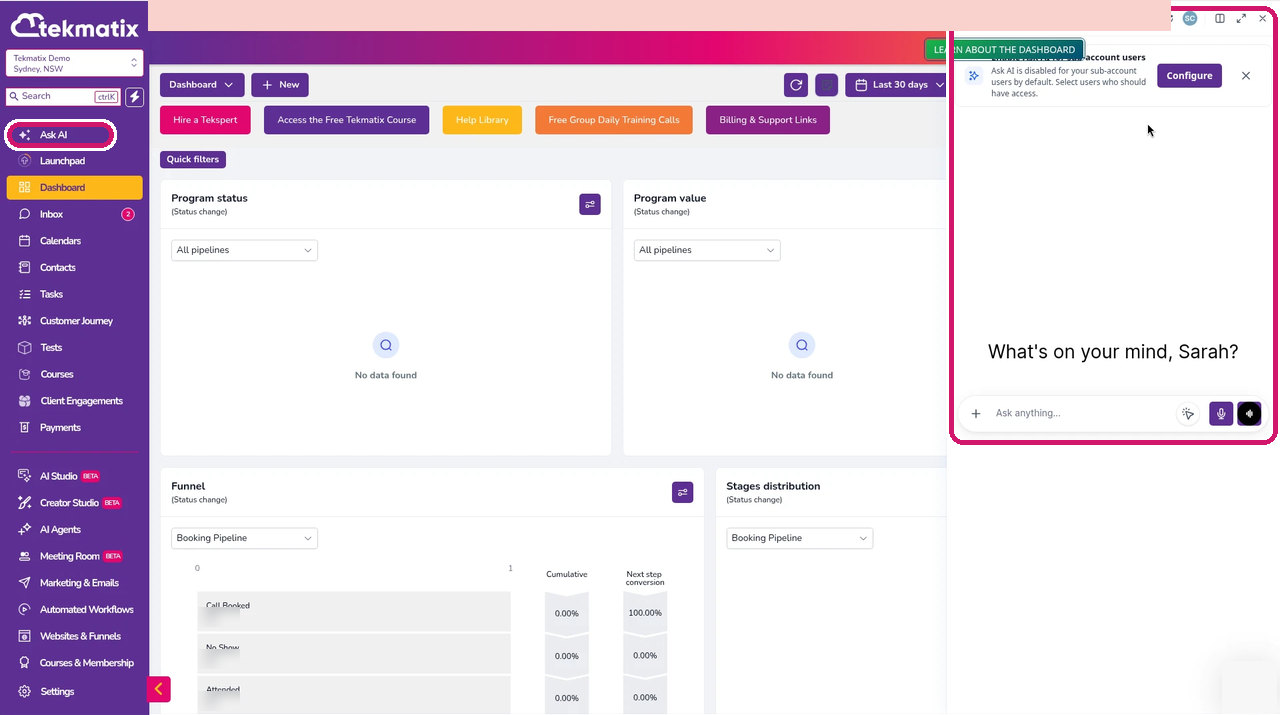
The prompts below should work in Ask AI, Claude, ChatGPT, GrokBot or any other AI you use. If you don't already pay for an external AI and don't want another subscription, start with Ask AI, built right into your Tekmatix dashboard. Click the sparkle icon at the top right of your dashboard (or Ask AI in the sidebar) to open it. Ask AI can check your settings and reports for you, but it can't change them. For the settings steps, your own AI with browser control connected to your Tekmatix account can click through them for you.
*Tekmatix AI usage applies as a billable consumable. You can find out more about pricing on our public page: tekmatix.com/pricing.
How to get started
-
Make sure your dedicated sending domain is verified and has an issued SSL certificate.
-
Go to Settings > Labs and switch on Email Domain Warm-Up.
-
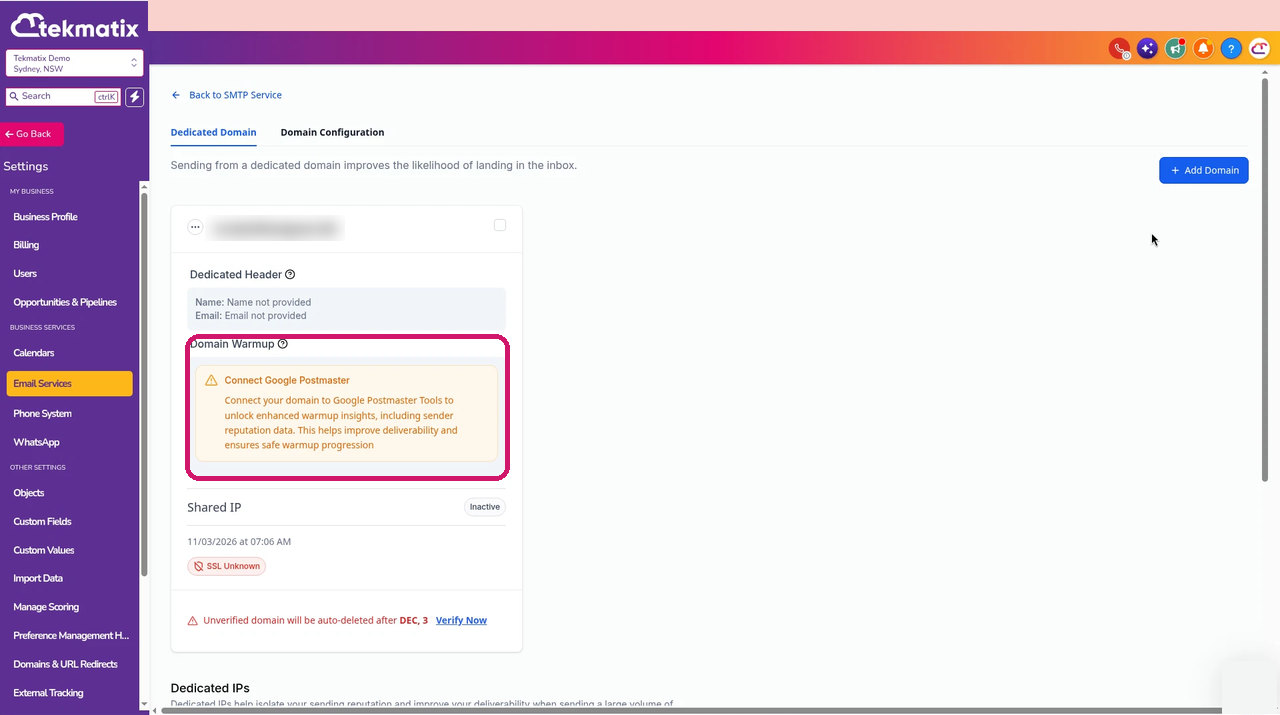
Go to Settings > Email Services > Dedicated Domain and IP. On your domain card, find the Domain Warmup section and click Start warm-up. You may also see an option to connect Google Postmaster Tools, which adds extra reputation insights to your warm-up.
How to Start Warming Up Your Sending Domain in Tekmatix -
Choose a daily goal, for example 10K or 25K a day.
-
Check back in a day or two and click View report on the domain card to see your health score, deliverability and DNS record status.
Prompts you can copy
Set it up for me
Prompt to copy into GrokBot, Claude or ChatGPT with browser control
Taking everything you know about me and access to all of the data and systems you already have, log into my Tekmatix account and check whether my dedicated sending domain is verified and has an SSL certificate. If it is, switch on Email Domain Warm-Up in Settings > Labs, then go to Dedicated Domain and IP and get the warm-up ready with a daily goal that suits my list size and how often I send. Show me the goal you picked and why before you click Start warm-up.
Weekly deliverability check
Prompt to copy into Ask AI, GrokBot, Claude or ChatGPT
Taking everything you know about me and access to all of the data and systems you already have, log into my Tekmatix account, review my email campaign stats from the last 30 days and my domain warm-up report, and tell me in plain English how my deliverability is tracking. List any SPF, DKIM, DMARC or MX records showing red and exactly what needs fixing.
Plan my next big send
Prompt to copy into Ask AI, GrokBot, Claude or ChatGPT
Taking everything you know about me and access to all of the data and systems you already have, log into my Tekmatix account, look at my domain health score and warm-up progress, and tell me whether I'm ready to send my next campaign to my full list. If not, suggest a safe sending plan, such as starting with my most engaged contacts first.
Good to know
- Results take a day or two to show, so 0% or 0 sent straight after you start is normal.
- You can pause or stop warm-up any time from the menu on the domain card. Stopping early slows down reputation building.
- When warm-up is on, the old daily sending limit ramp is removed for that domain.
- If any DNS records show red in your report, fix those first. They lower your health score and deliverability.
- Warm-up emails are a pay-as-you-go consumable, charged only for warm-up emails actually sent, on top of normal email sending. Your daily goal is a ceiling and volume ramps up gradually, so early days cost less. See tekmatix.com/pricing.
Ideas for using it
- Warm up a brand-new sending domain before your first newsletter.
- Rebuild your reputation after a spike in spam complaints or bounces.
- Get ready for a big launch or seasonal campaign weeks ahead of time.
- Check your domain health score every week alongside your campaign stats.
Frequently asked questions
What is email domain warm-up?
Warm-up gradually builds a sending history for your domain by sending natural, threaded conversations between managed warm-up mailboxes, so inbox providers like Gmail, Outlook and Yahoo learn to trust it.
Will my contacts receive warm-up emails?
No. Warm-up emails only go between the managed warm-up mailboxes. Your contacts never receive them.
Where do I turn on warm-up in Tekmatix?
Switch on Email Domain Warm-Up in Settings > Labs, then start it from Settings > Email Services > Dedicated Domain and IP on your domain card.
How long until I see results?
Give it a day or two. Seeing 0% or 0 sent straight after you start is normal.
How much does warm-up cost?
Warm-up emails are a pay-as-you-go consumable, charged only for warm-up emails actually sent. See our pricing page for current rates.
Love Your Tech.

Copyright © 2026 TekMatix. All rights reserved | [email protected]