
TekMatix Blog & Help Articles
Use the search bar below to look for help articles you need.
How to Create Certificates with AI in Tekmatix
Creating professional certificates in Tekmatix just got much faster.
Certificate AI Beta is now available, allowing you to turn a simple description into a complete, editable certificate design using AI.
Instead of starting from a blank canvas, you can tell Tekmatix what kind of certificate you want to create and let AI help build the first version for you.
What Is Certificate AI?
Certificate AI helps you create certificate designs by describing what you need in plain language.
For example, you could ask Tekmatix to create:
A course completion certificate
A training certificate
A coaching program milestone certificate
An event participation certificate
A professional development certificate
A membership achievement certificate
A workshop attendance certificate
The AI then uses your instructions to generate a certificate that you can continue editing inside the Certificate Builder.
What’s New?
Generate Certificates with AI
Simply describe the certificate you want to create.
Certificate AI will use your instructions to generate a complete certificate design, helping you move from idea to finished draft much faster.
Guided Certificate Creation
You do not need to know every design detail before you begin.
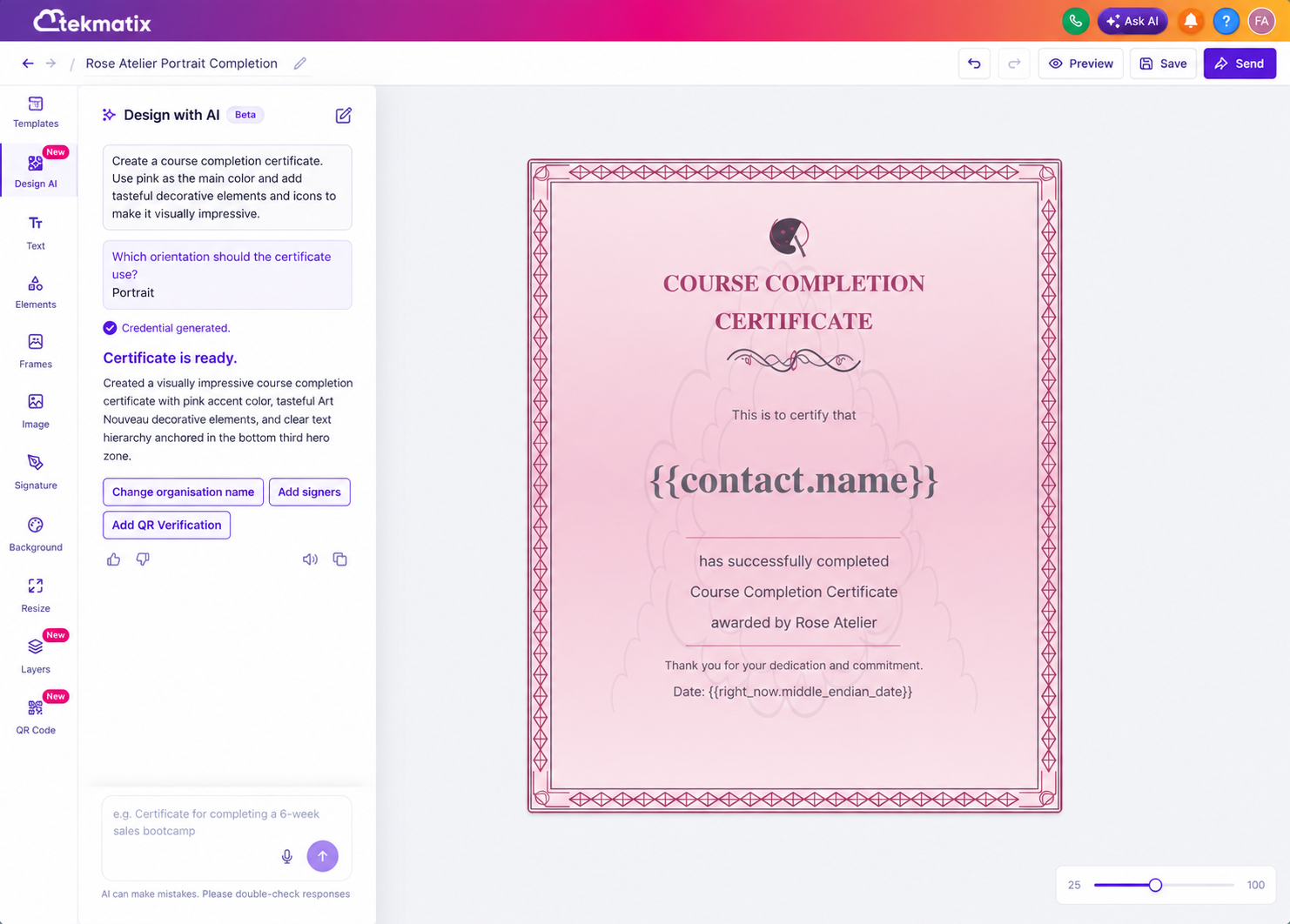
Certificate AI can ask you additional questions, such as whether you want your certificate in portrait or landscape orientation, to better understand the type of certificate you are trying to create.
Create Complete Certificate Designs
The AI can work with Certificate Builder elements including:
Text
Frames
Signatures
QR codes
Certificate details
Decorative elements
Layout components
This means you can generate more than just certificate wording. AI can help assemble the overall certificate structure and design.
Fully Edit Your AI-Generated Certificate
Your AI-generated certificate is not locked into the first design.
Once the certificate has been created, you can continue customising it directly inside the Tekmatix Certificate Builder.
You can adjust the wording, layout, branding, signatures, QR codes and other elements until the certificate matches your business, course or program.
Use Quick Prompts for Certificate Ideas
If you are not sure where to begin, Certificate AI also provides quick prompt ideas to help you get started.
These can be particularly useful when creating certificates for:
Course completions
Learner milestones
Training programs
Events
Workshops
Membership achievements
Coaching programs
Professional development
Choose a starting idea, customise the instructions and allow the AI to create the initial design.
How to Access Certificate AI in Tekmatix
To create a certificate using AI:
Log in to your Tekmatix account.
Go to Memberships.
Select Credentials.
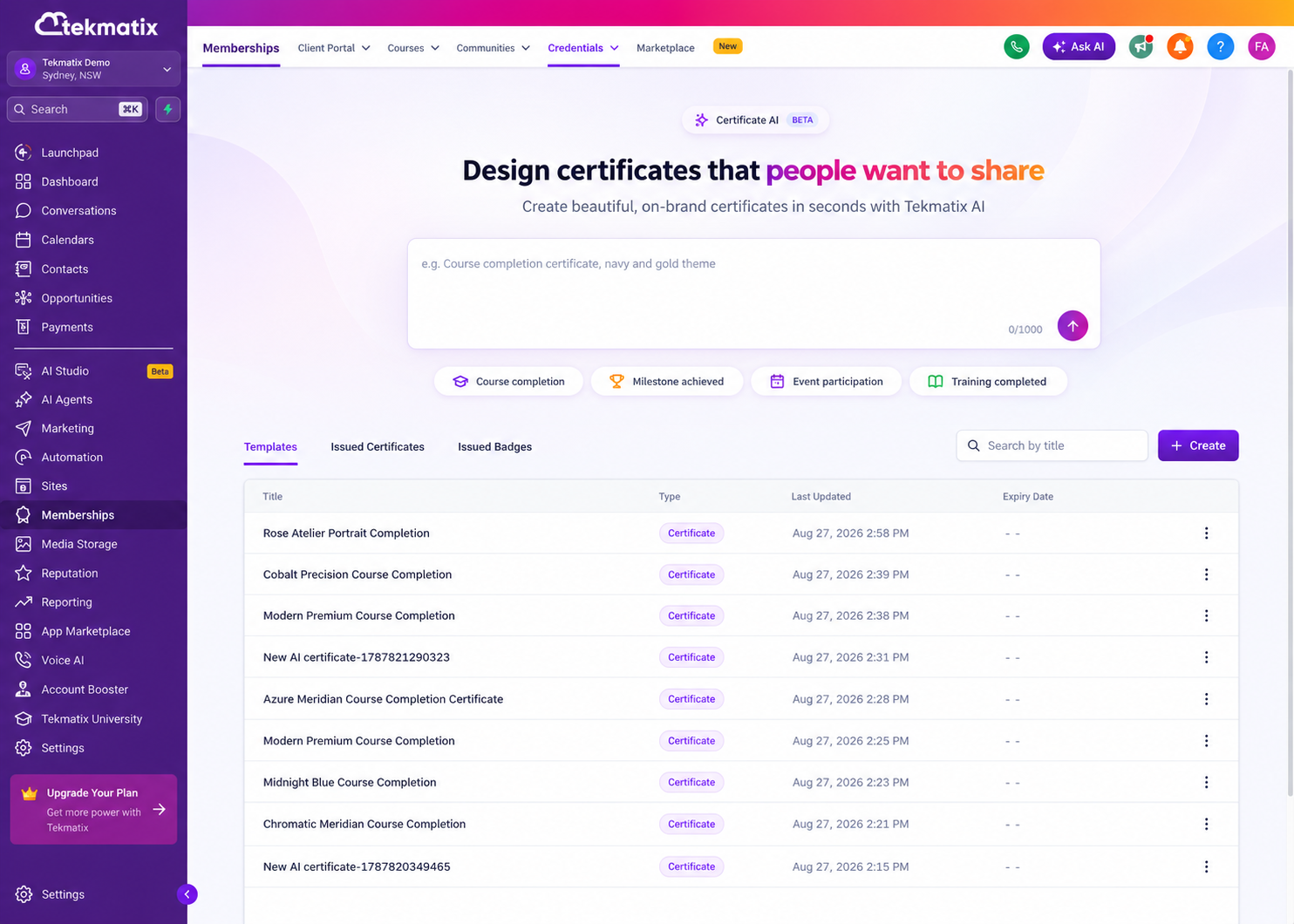
Start creating a certificate.
Describe the certificate you would like Tekmatix AI to generate.
Answer any additional questions the AI asks.
Review the generated certificate.
Continue editing and customising the certificate inside the Certificate Builder.
Why This Matters for Course Creators and Businesses
Certificates can be an important part of the learner and customer experience.
They help recognise progress, celebrate achievements and give participants something tangible they can share after completing a course, training program, workshop or milestone.
With Certificate AI, businesses can now create professional certificate designs without needing to start every certificate manually.
This can save time while also making it easier to create certificates for different programs, events, courses and achievement levels.
Certificate AI Is Currently in Beta
Certificate AI is currently available in Beta inside Tekmatix.
The feature will continue to be developed and improved as the AI certificate creation experience evolves.
If you regularly issue certificates for your courses, memberships, coaching programs, events or training, this new tool can make creating them significantly faster.
Log in to Tekmatix, head to Memberships → Credentials and describe the certificate you want to create.

Copyright © 2026 TekMatix. All rights reserved | [email protected]