
TekMatix Blog & Help Articles
Use the search bar below to look for help articles you need.

How to Count Only Available Working Days in Tekmatix Calendar Date Ranges
Booking availability in Tekmatix just got smarter.
The Date Range setting across Calendars, Services and Rentals can now count only the days your business is actually available.
With the new Count available days only setting, your booking window no longer gets used up by weekends, closed days or other unavailable dates.
That means customers can see the full number of bookable days you intended to offer, based on your actual working schedule.
What’s New?
Count Only Available Days
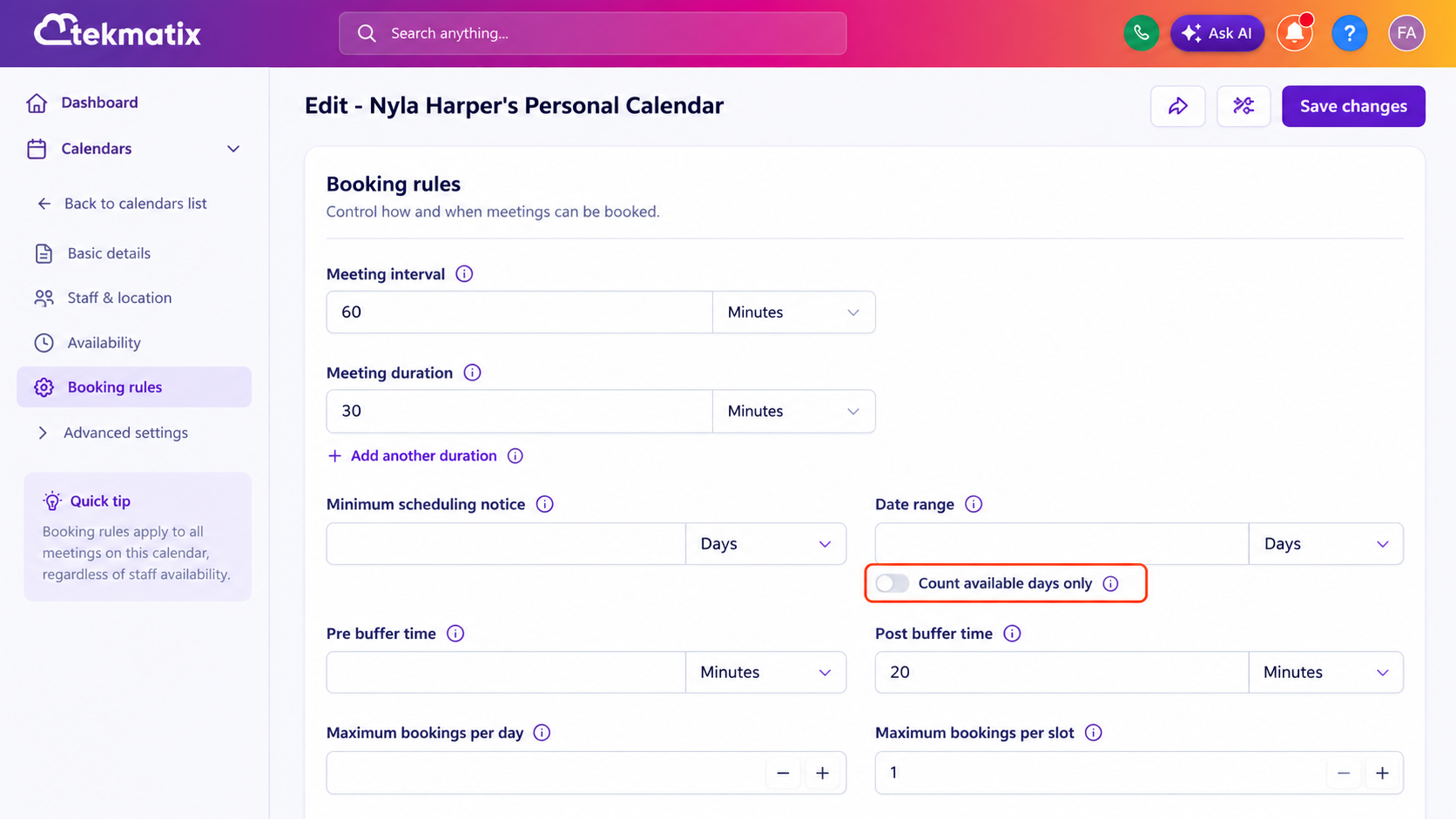
A new Count available days only toggle is now available directly below the Date Range setting.
When enabled, Tekmatix skips unavailable days when calculating how far ahead customers can book.
For example, imagine your business is closed on weekends and your calendar has a two-day booking range.
Previously, if someone visited your booking calendar on a Friday, Saturday and Sunday could be included within that two-day window, potentially leaving the customer with no available booking options.
With Count available days only enabled, Tekmatix skips the weekend and displays Monday and Tuesday instead.
Your booking range is now based on real working days rather than simply counting calendar days.
Works with Minimum Scheduling Notice
The new setting also works alongside your Minimum Scheduling Notice.
When Count available days only is enabled, Tekmatix begins calculating the Date Range from the first available day after the minimum notice period has passed.
For example, if your scheduling notice means a customer cannot book for the next 24 hours, Tekmatix will first apply that notice period and then begin counting the number of available working days within your Date Range.
This helps ensure customers still see the full booking window you intended to provide.
Available Across Multiple Calendar Types
The Count available days only setting works across:
Meeting Calendars
Services
Rentals
Round Robin Calendars
Collective Calendars
For Round Robin and Collective Calendars, a day is considered available when at least one assigned team member has availability on that date.
Date-Specific Availability Is Also Respected
Tekmatix also takes your date-specific availability settings into account.
If you manually add availability for a particular date, that day can count towards the available booking window.
If you block a normally available day using date-specific hours, Tekmatix will skip that date when calculating the Date Range.
This gives businesses much more control over how their booking calendars behave around holidays, special events, roster changes and irregular working schedules.
How to Enable Count Available Days Only
For Meeting Calendars
Go to Calendars.
Open Calendar Settings.
Click Edit on the calendar you want to update.
Locate the Date Range setting.
Turn on Count available days only.
Save your changes.
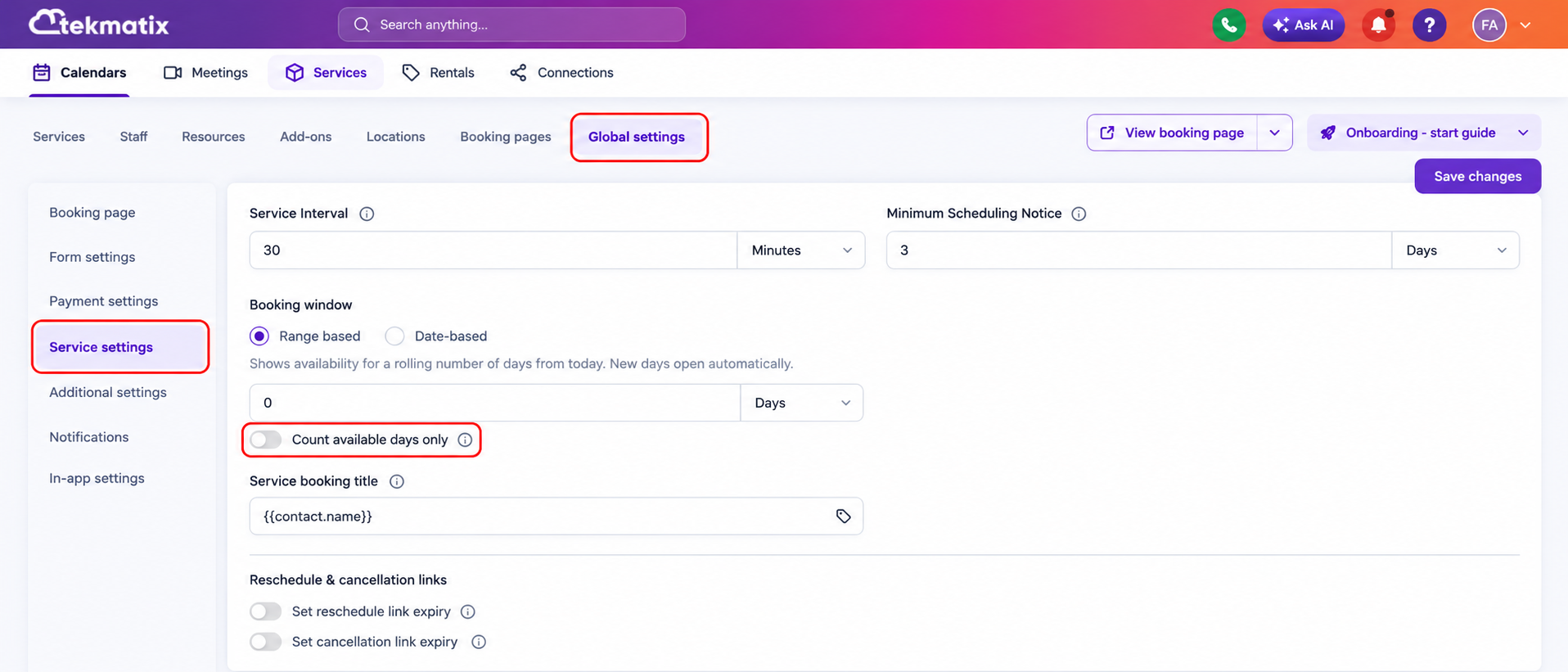
For Services
Go to:
Services → Global Settings → Service Settings
Locate the Date Range setting and enable Count available days only.
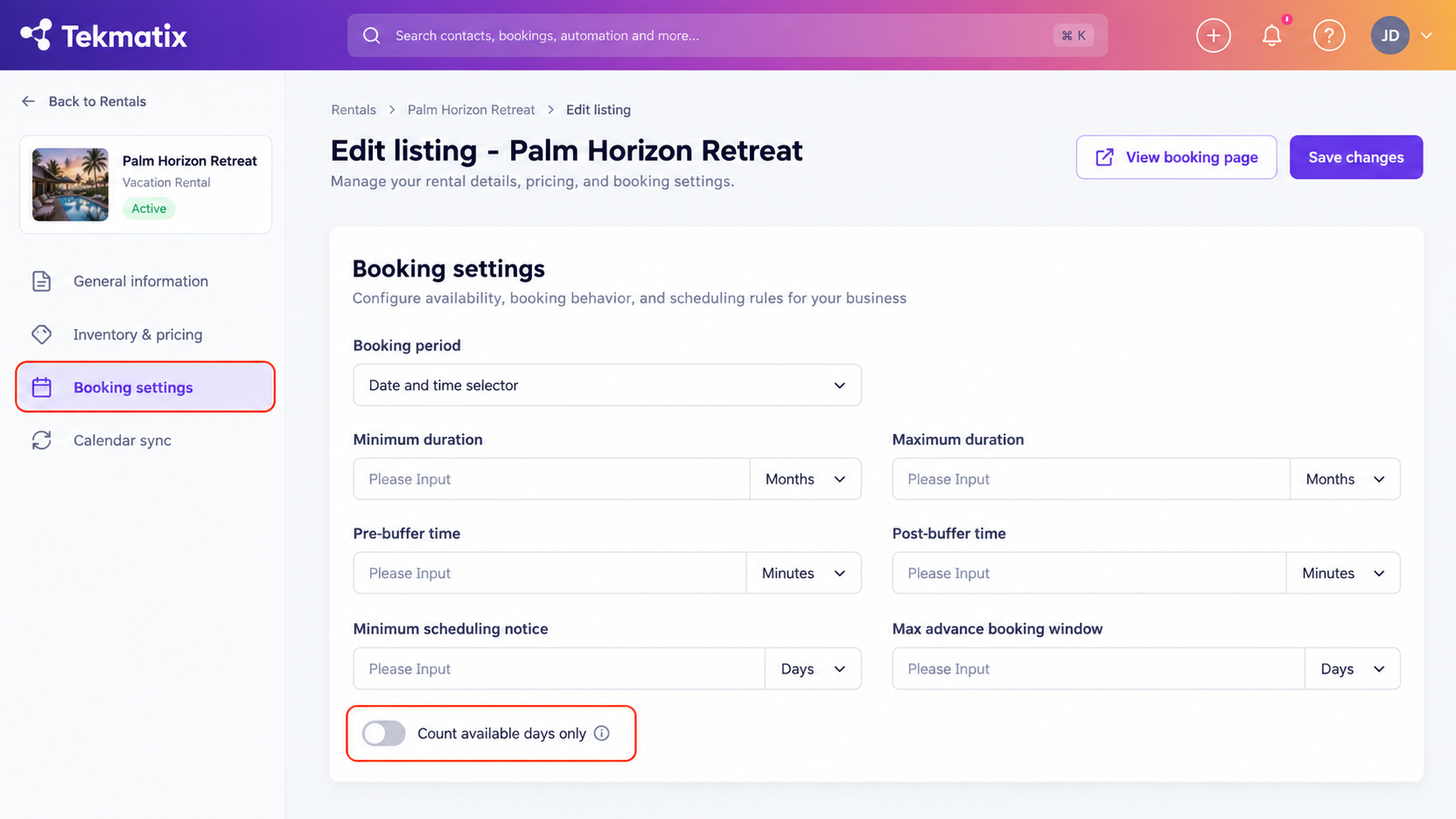
For Rentals
Open the rental listing you want to update and go to:
Booking Settings
Locate the Date Range setting and enable Count available days only.
Why This Matters
This update is particularly useful for businesses that do not operate seven days a week.
For example, your business might only operate:
Monday to Friday
Monday, Wednesday and Friday
Tuesday and Thursday
Selected weekends
Different hours depending on staff availability
Previously, unavailable days could effectively consume part of your booking range.
Now your booking calendar can automatically skip those unavailable dates and continue until it has displayed the correct number of actual working days.
Create a Better Booking Experience for Your Customers
Customers should not have to open your booking calendar and wonder why nothing is available when appointments genuinely exist just a few days later.
By combining Minimum Scheduling Notice, Date Range and Count available days only, you can create a much more predictable booking experience.
This can help:
Reduce empty-looking booking calendars
Make future availability easier to discover
Reduce customer confusion
Reduce unnecessary support enquiries
Better reflect your real operating schedule
Improve bookings for businesses with non-standard working weeks
Whether you run a salon, clinic, consulting business, service company, rental business or appointment-based team, your Tekmatix booking calendars can now more accurately reflect the days you are genuinely open for business.
Another small automation improvement that can make a big difference to the customer booking experience.

Copyright © 2026 TekMatix. All rights reserved | [email protected]