
TekMatix Blog & Help Articles
Use the search bar below to look for help articles you need.
How to Trigger Tekmatix Workflows When Someone Logs Into Your Client Portal
Tekmatix has expanded the User Login workflow trigger so you can now automate actions when someone logs into the new Client Portal experience.
Previously, this trigger was primarily associated with legacy membership logins. Now, successful logins through the new Tekmatix Client Portal can trigger your workflows too.
Even better, Client Portal-related workflow triggers now have their own dedicated category, making them much easier to find and configure.
What’s New With the Client Portal User Login Trigger?
The User Login trigger now recognises successful logins from the new Tekmatix Client Portal experience.
This means you can build automations that start whenever a client, customer or member accesses your Client Portal.
And if you already have workflows using the User Login trigger, there is nothing you need to change.
Your existing workflows will automatically begin recognising eligible logins through the new Client Portal experience.
A New Client Portal Category in Workflows
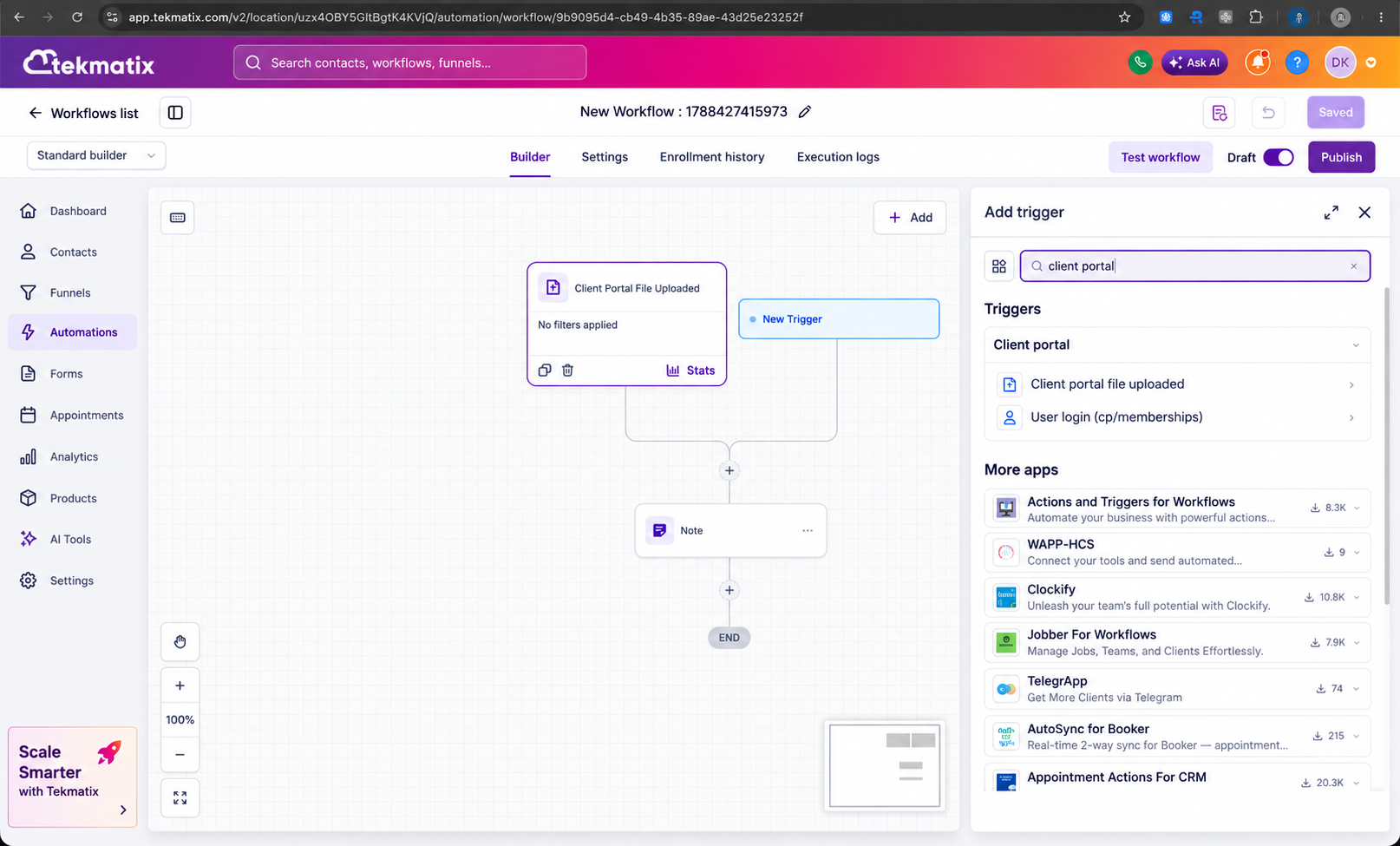
Tekmatix has also introduced a dedicated Client Portal category inside the Workflow trigger picker.
This brings Client Portal-related triggers together in one logical place instead of having them spread across different sections.
The Client Portal category now includes:
User Login, previously located under Courses
Client Portal File Uploaded, previously located under Membership
This makes it much clearer which triggers relate specifically to Client Portal activity.
Clearer User Login Trigger Descriptions
The helper text for the User Login trigger has also been updated.
It now clearly explains that the trigger can respond to both:
Legacy membership logins
Logins through the new Client Portal experience
This removes some of the previous confusion around what the trigger actually monitored.
How to Automate Actions When Someone Logs Into Your Tekmatix Client Portal
To create a workflow that starts when someone logs into the Client Portal:
Open the Tekmatix Workflow Builder.
Create a new workflow or open an existing one.
Click Add Trigger.
Search for User Login.
Select User Login from the Client Portal category.
Configure any additional conditions you require.
Add the workflow actions you want Tekmatix to perform.
Save and publish your workflow.
Your workflow can now run whenever an eligible user successfully logs into your Client Portal.
What Can You Automate After a Client Portal Login?
This opens up plenty of useful automation opportunities.
For example, you could create workflows that:
Send a welcome or onboarding message after a client’s first login
Notify your team when an important client accesses their portal
Update a contact field or tag based on portal activity
Move a client through an onboarding pipeline
Send instructions about what to do next
Trigger follow-up communications
Start another workflow or automation sequence
Track engagement with your membership, program or client resources
For course creators, coaches, consultants and service businesses, this can be especially useful for automating the customer journey after someone starts engaging with your content or services.
Already Using the User Login Trigger?
You do not need to rebuild or reconfigure your existing workflow.
Workflows already using the User Login trigger will continue operating as normal and will automatically recognise supported login events from the new Client Portal experience.
Why This Tekmatix Update Matters
Client Portal activity can be an important signal about customer engagement.
When someone logs in, they could be accessing a course, reviewing resources, checking documents, progressing through onboarding or interacting with your services.
Being able to use that activity as the starting point for a workflow means you can create a more responsive customer experience without manually monitoring who has logged in.
It also makes the Workflow Builder easier to navigate by putting related Client Portal triggers together in one dedicated category.
The result is simpler workflow setup, clearer trigger organisation and more opportunities to automate what happens when your clients engage with your Tekmatix Client Portal.

Copyright © 2026 TekMatix. All rights reserved | [email protected]